Latest Update : 

Salesforce Winter ’26 Release: Updates Before Go-Live

September 25, 2025
1450 Views
Salesforce Winter ’26 Release: Updates Before Go-Live
Summarize this blog post with:

The Salesforce Winter ‘26 Release is officially here, and it’s bringing some of the most exciting new features and updates we’ve seen in a while. As a Salesforce user, you know these three annual releases can feel like a lot to take in. It’s easy to get overwhelmed by all the new tools and improvements.

But don’t worry! We’ve sorted through all the news to bring you a simple guide. This article highlights the biggest and most important changes in the Winter ’26 release. We will focus on the features that will impact your day-to-day work, no matter your role.

Get ready to discover the top features for every Salesforce professional, from admins to developers, and learn how to get your organization ready for success.
Winter ‘26 Release: Key Features by Role

Top Features for Salesforce Admins

Salesforce admins are the heroes of every organization. The Winter ‘26 release gives you some powerful new tools to make your job easier. These features help you manage your org more efficiently and keep things running smoothly.

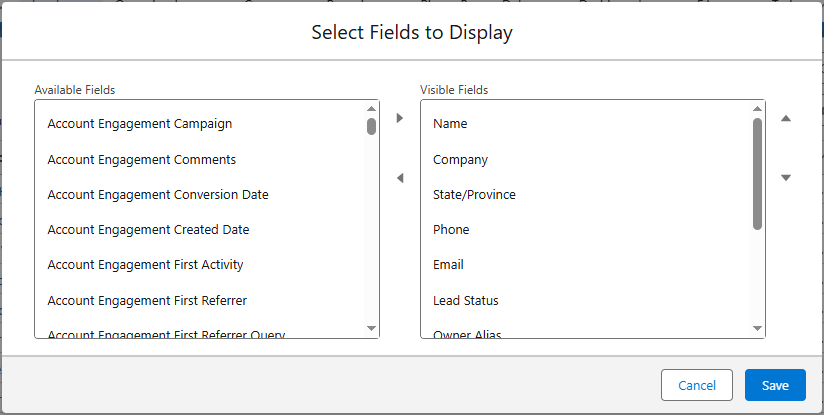
  1. Faster Search in List Views

    Have you ever wished you could quickly find a field when building a list view? In Winter ‘26, you can now use a type-ahead search feature. As you type, the list of available fields will automatically filter. This saves a ton of time and makes finding what you need a lot faster.

    Faster Search in List Views
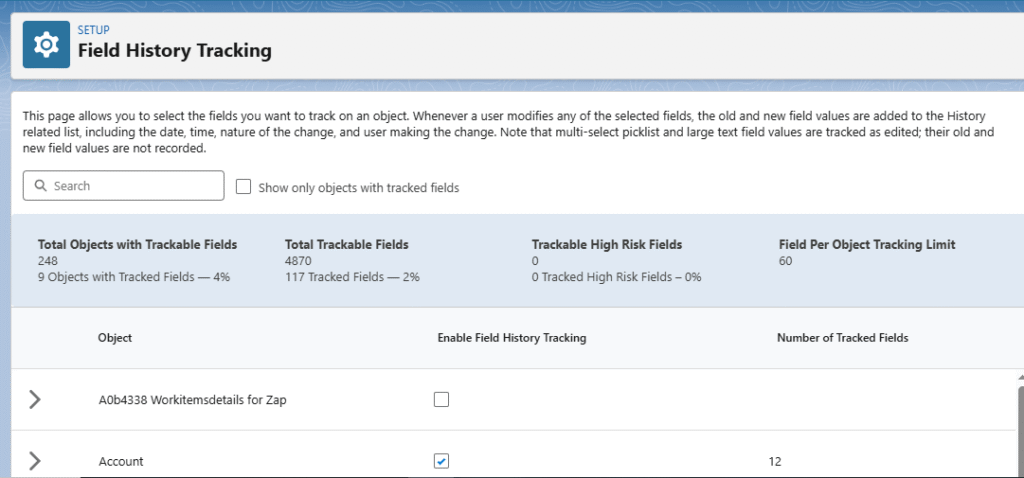
  2. A Central Hub for Field History

    Managing field history tracking used to be a pain. Now, the new Field History Tracking page in the Setup menu serves as a single place to handle everything. You can see all tracked fields in one spot, making it much easier to keep your data organized and ready for reports.

    A Central Hub for Field History
  3. Automatic Permission Set License Removal

    It can be frustrating when you run out of app licenses, especially when you know you should have more available. This often happens when a user is removed from a Permission Set but the license stays attached. With Winter ‘26, when you remove a user from a Permission Set or a Permission Set Group, their license will also be removed automatically. This helps you manage licenses better.

Also Read

Don’t forget to checkout: Salesforce Launches Missionforce: A New AI Defense Unit.

Key Updates for Marketing Pros

Marketing Cloud is getting some major updates in Winter ‘26 to help you create better campaigns and connect with your customers more effectively.

  1. The New Content Builder Agent

    This exciting new AI tool works with you to build and improve marketing content. The Content Builder Agent can help you write better subject lines, text messages, and email content. This means less time on writing and more time on strategy.

  2. Reusable Content Blocks for Consistency

    Branding and consistency are key for any business. Winter ‘26 introduces reusable content blocks. You can create a block once and use it across many different pieces of content. This ensures your brand looks the same everywhere, which builds trust with your audience.

  3. Powerful Landing Page Enhancements

    Landing pages are a vital part of the marketing process, and Winter ‘26 makes them more powerful. You can now set default values for fields, hide certain fields, and use merge fields to fill in known information. These updates make it easier to create customized and effective landing pages.

Important Changes for Developers

Developers play a huge role in building custom solutions on the Salesforce platform. Winter ‘26 brings several updates that make their work more secure and efficient.

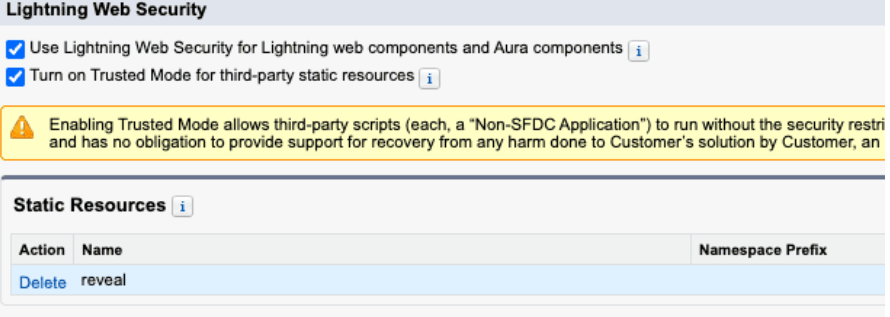
  1. Unlocking LWC Browser API Access with Trusted Mode

    For years, developers have been limited in which third-party JavaScript libraries they could use. The new Trusted Mode in Winter ‘26 allows developers to use these libraries in Lightning Web Components (LWC) without the usual restrictions. This opens up new possibilities for creating custom apps.

    Unlocking LWC Browser API Access with Trusted Mode
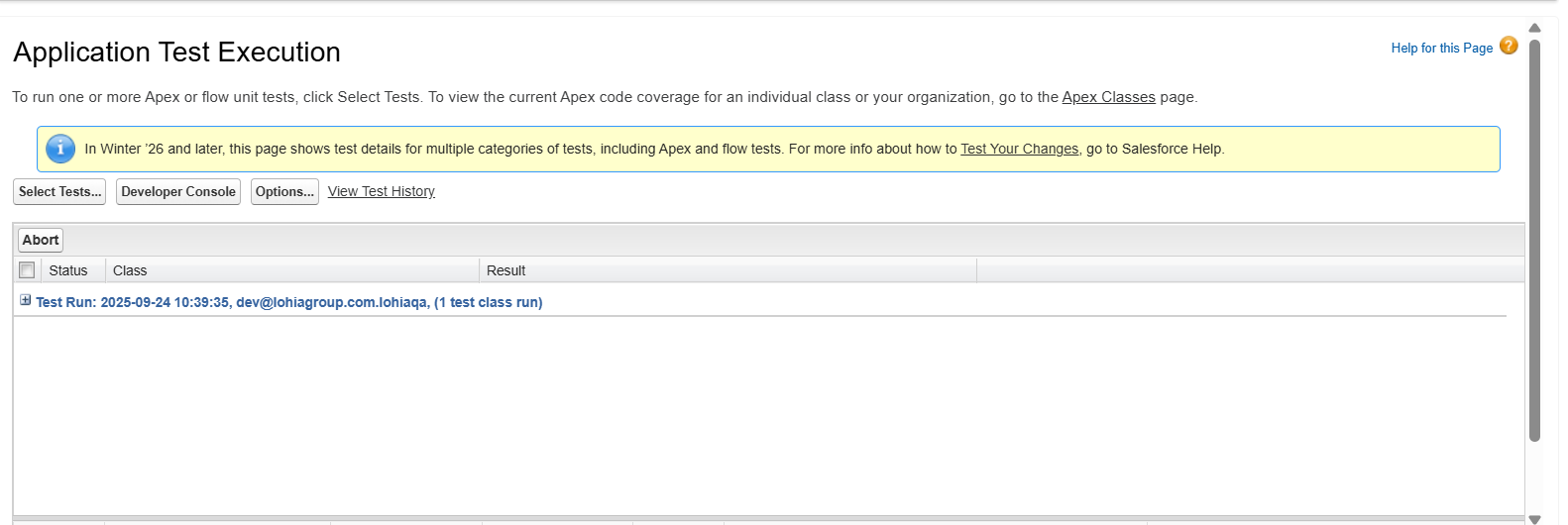
  2. A Single Place for Testing

    Testing is a critical part of development. With the Winter ‘26 release, a new Application Test Execution page has been added to the Setup menu. This single page allows developers to run both Apex and Flow tests from the same spot, which streamlines the testing process.

    A Single Place for Testing
  3. Simplified Project Package References

    Managing package dependencies can be complex. Winter ‘26 introduces the calculateTransitiveDependencies parameter. This feature helps to streamline multi-level package dependencies and makes it easier to work with different packages at once.

Must-Have Flow Features

Flow continues to be a central part of the Salesforce platform. The Winter ‘26 release introduces new features that make building and debugging flows a lot better.

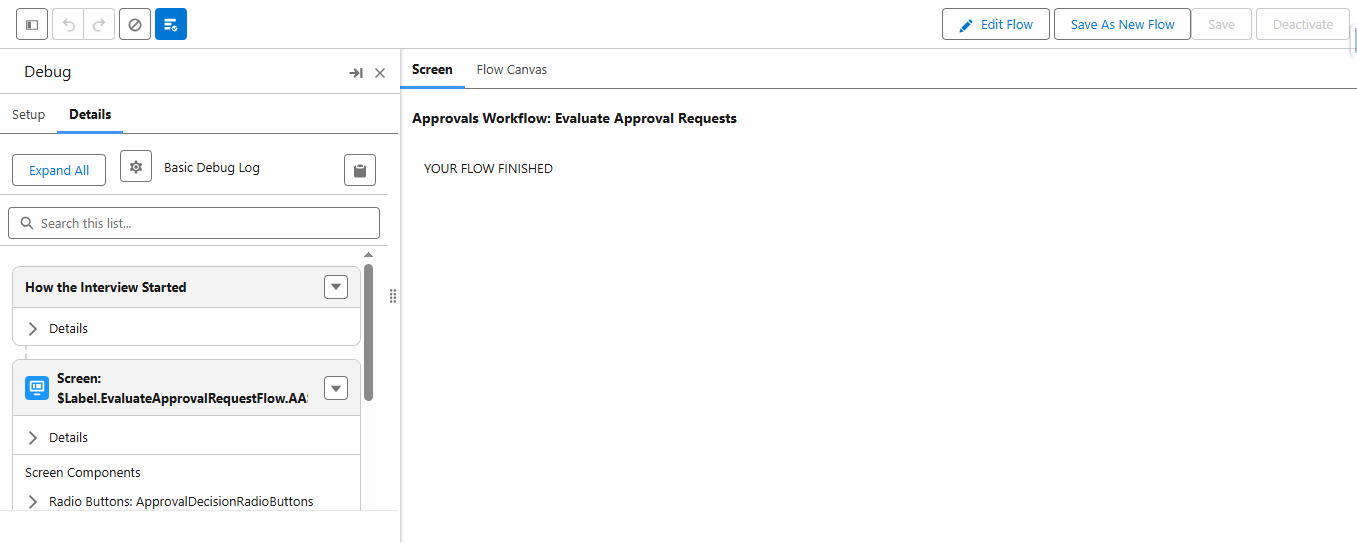
  1. Debugging for Screen Flows

    The new Flow Debug experience has been extended to Screen Flows. This update provides new tabs and a new user interface that makes it easier to understand how your Screen Flows are working. Debugging flows is now much more straightforward.

    Improved Debugging for Screen Flows
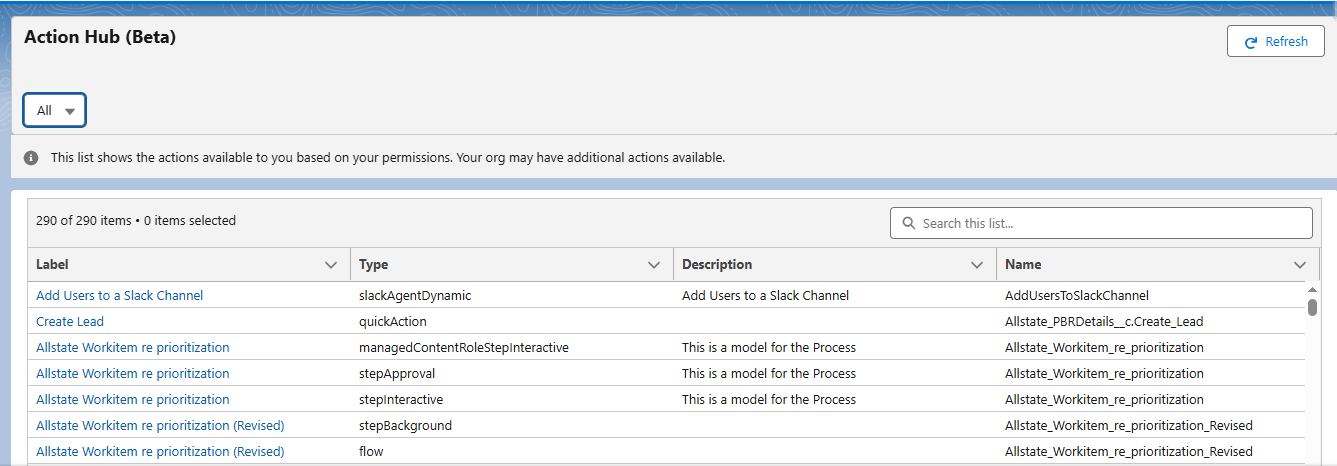
  2. The New Action Hub

    Finding all your invocable actions is now easier than ever with the new Action Hub. Located in the Automation App, this hub shows you all your actions and where they are used. It’s a great tool for keeping your automations organized.

    The New Action Hub
  3. Better Email Sending in Flows

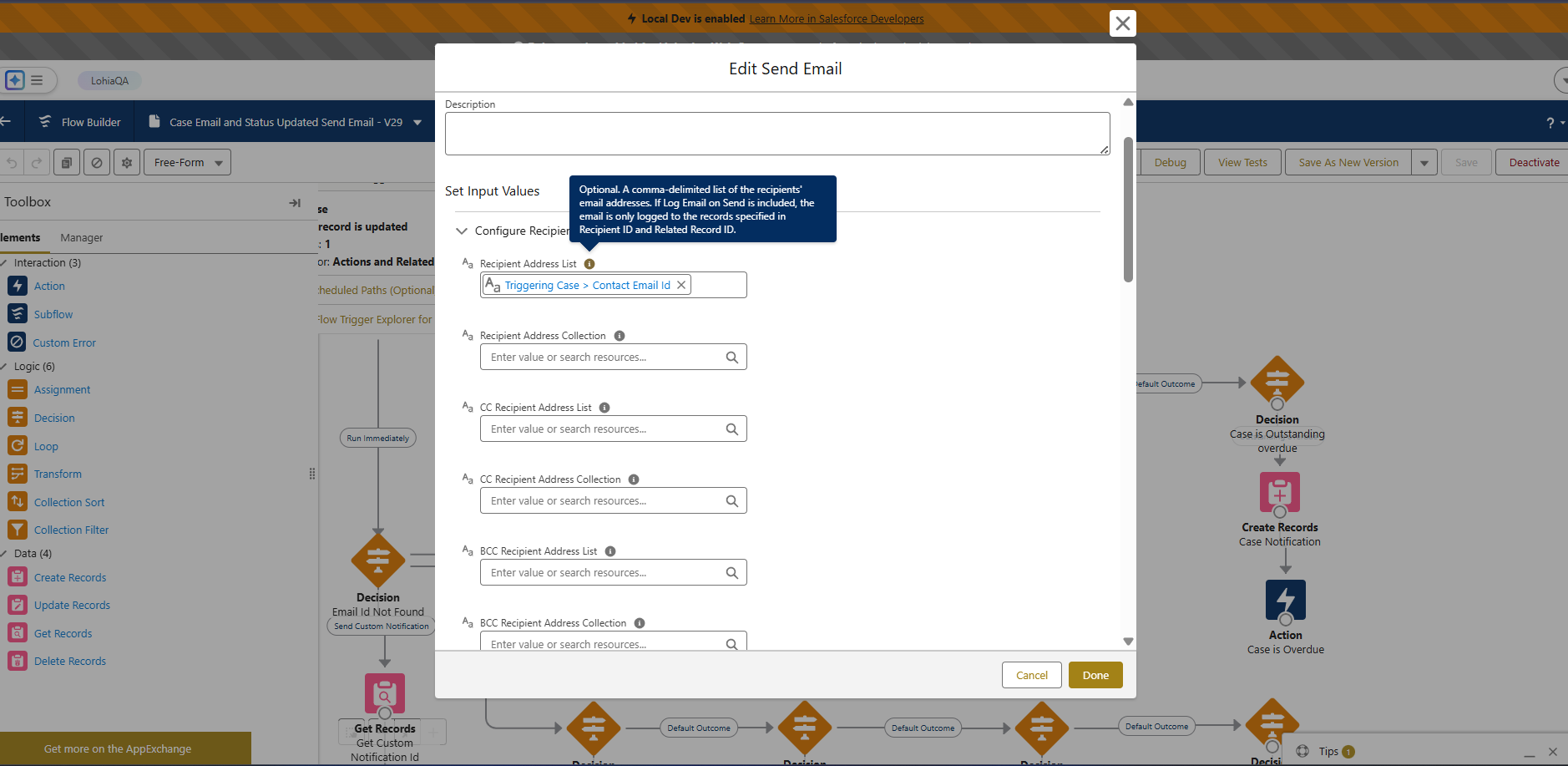
    Sending emails from a Flow is more flexible in Winter ‘26. The updated Send Email Flow Action allows you to combine email addresses from different sources, such as a single record or a collection of records. This gives you more control over your email automations.

    Better Email Sending in Flows

Enhancements for Service Teams

Service teams will find new ways to improve customer satisfaction and manage cases more efficiently with the Winter ‘26 release.

  1. Better Insights into Case Team Work

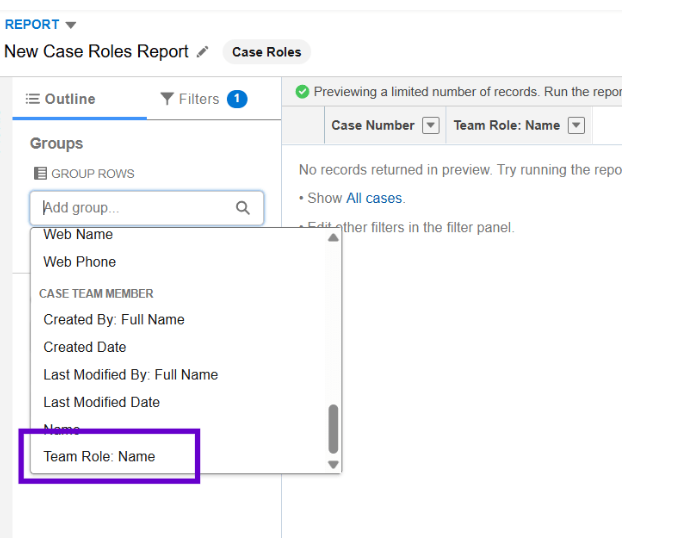
    Reporting on case team contributions is now easier. You can enable role-based reporting, which lets you see the specific roles of team members in your reports. This helps you understand who is doing what and how cases are progressing.

    Better Insights into Case Team Work
  2. Smarter SLA Management

    Managing service level agreements (SLAs) is much more flexible. With Winter ‘26, you can prioritize cases based on how much time is left to meet a milestone. You can also pause individual milestones and prioritize work by the start target date.

    Smarter SLA Management
  3. Improved Surveys for Customer Feedback

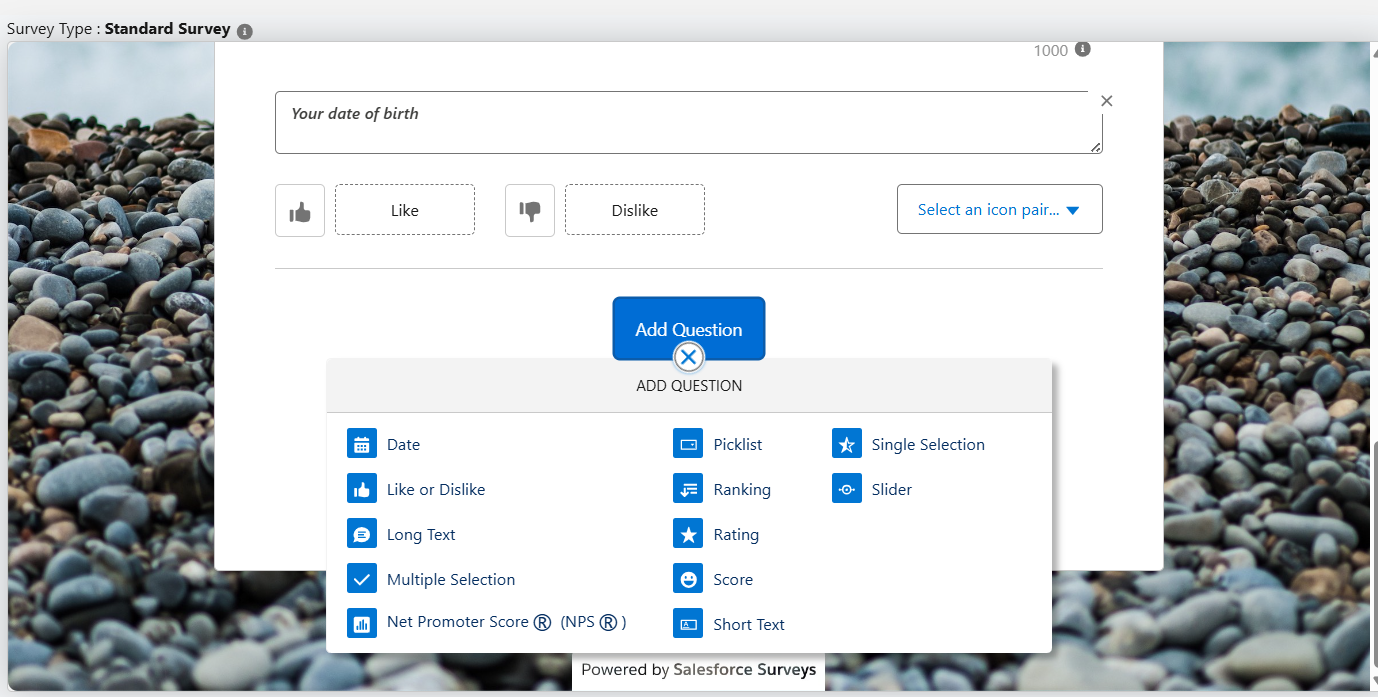
    The survey experience is getting a lot better. In Winter ‘26, you can customize how partially completed surveys are handled. You can also limit the number of selections for multi-choice questions and translate Knowledge Feedback forms.

    Improved Surveys for Customer Feedback

Exciting Updates for Sales Professionals

Sales teams will be able to work smarter and close deals faster with the new features in the Winter ‘26 release.

  1. AI-Powered Account Research

    Generative AI is here to help your sales team. This new feature provides quick insights into customers and accounts. It helps your team learn more about their customers in a fraction of the time, so they can focus on selling.

  2. More Flexible List Views

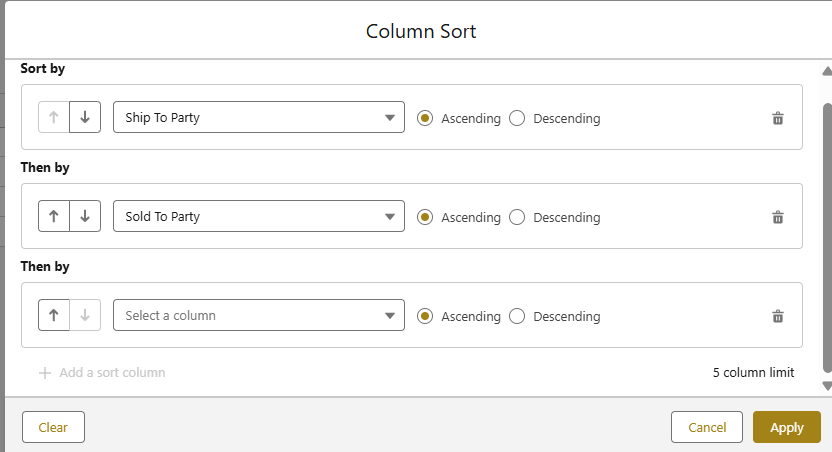
    List views are getting a major update. The multi-column sorting that was available in a previous release is now generally available. This lets users sort their list views by more than one column, making it easier to organize and analyze data.

    More Flexible List Views

Critical Updates You Need to Know

Every Salesforce release includes changes that are enforced. Here are the three most important updates from Winter ‘26 that you need to be aware of to prevent any issues.

  1. Email Verification for Older Users

    To improve security, Salesforce will enforce a rule that only users with a verified email address can send emails from the platform. This change only affects users who were created before November 1, 2016. Make sure to check that all older users have verified their email addresses before the change goes live.

  2. Restricting User Access to Flows

    Previously, some users could run flows without specific permissions. Now, only users with the correct permission to run flows will be able to do so. This change helps to make your organization more secure and gives you more control over who can run automations.

  3. End of Legacy Host Name Redirection

    Salesforce is ending support for older, non-enhanced host names for all production and demo orgs. This change is enabled automatically. It’s a good idea to check your organization’s settings to ensure everything is using the latest host names.

Getting Your Org Ready for Winter ‘26

Now that you know about the biggest features and changes, it’s time to get your organization ready. Here are a few simple steps to make sure your transition is smooth:

  • Check the Release Notes: Always read the full release notes to find features specific to your business.
  • Test in a Sandbox: Don’t wait until the new features are live in your main org. Test all your key processes in a sandbox to ensure everything works correctly.
  • Communicate with Users: Let your users know what’s coming and how the new features will help them.

Final Thoughts

The Winter ‘26 release brings a lot of great features for every type of Salesforce user. From powerful new AI tools to simple quality-of-life improvements, these updates will help your team work smarter. Take the time to explore these changes in a sandbox to see how they can improve your daily tasks.

  • Want to know more about a specific feature?
  • Need help planning your release testing?
  • Let us know in the comments below! We’d love to help you get the most out of the Winter ’26 release.

How useful was this post?

Click on a star to rate it!

Average rating 0 / 5. Vote count: 0

No votes so far! Be the first to rate this post.

Written by

Mohit Bansal

Salesforce Technical Architect | Lead | Salesforce Lightning & Integrations Expert | Pardot | 5X Salesforce Certified | App Publisher | Blogger

Get the latest tips, news, updates, advice, inspiration, and more….

Contributor of the month
contributor
Garima Chaturvedi

Marketing lead | CDP lead | SFMC | Martech | Automation | Cert. SF Data cloud consultant

...
Categories
...
Boost Your Brand's Visibility

Want to promote your products/services in front of more customers?

...

Leave a Reply

Your email address will not be published. Required fields are marked *