Bulk Object Field Creator (BOFC) Review — The Ultimate Salesforce Productivity Booster

March 03, 2026
226 Views
Bulk Object Field Creator (BOFC) Review — The Ultimate Salesforce Productivity Booster
Summarize this blog post with:

If you’re a Salesforce Administrator or Developer, you know that metadata management, creating fields, objects, and managing configurations, can be extremely tedious and time-consuming. The native Salesforce UI makes it possible, but doing hundreds of tasks one by one can literally eat up days of work.

Enter Bulk Object Field Creator (BOFC), a native Force.com app built to simplify and automate these mundane tasks with a point and click interface without writing a single line of code. But is it as good as everyone says? Let’s get into this detailed review.

What is BOFC?

BOFC (Bulk Object Field Creator) is a Salesforce AppExchange app that lets users perform bulk metadata operations with ease. Rather than manually clicking through Salesforce Setup dozens or hundreds of times to create fields or objects, BOFC lets you do it in minutes, and that’s just the start.

It’s designed for:

  • Salesforce Admins
  • Developers
  • Consultants working across orgs
  • Anyone responsible for Salesforce configuration at scale

Quick Setup Experience with Bulk Object Field Creator (BOFC)

Have you ever postponed a Salesforce configuration project because creating hundreds of fields or updating permissions felt overwhelming?
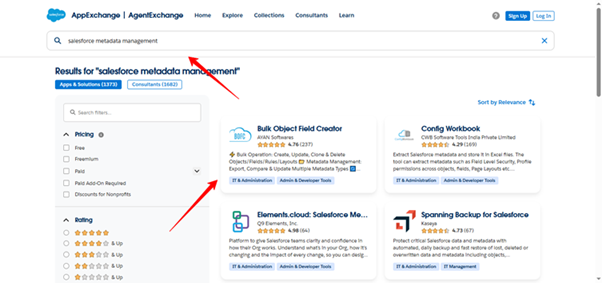
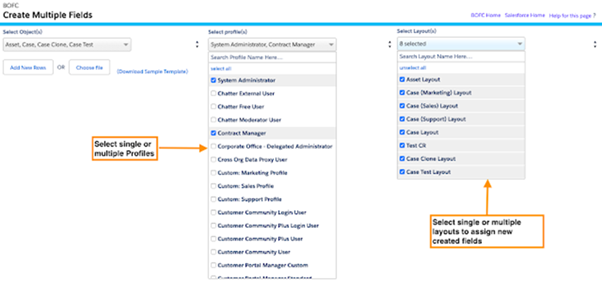
BOFC Picture1

Bulk Object Field Creator (BOFC) doesn’t require weeks of planning or complicated deployment procedures to get started. In less than half an hour, the majority of Salesforce administrators can finish installation and initial setup.

The installation and activation procedure is also explained in detail in the official BOFC documentation.

Let’s walk through the setup.

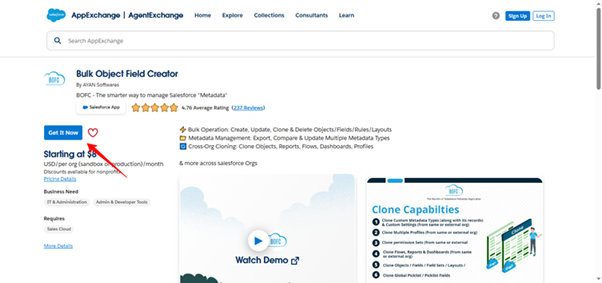
Step 1. Install from AppExchange

Download BOFC directly from the Salesforce AppExchange.
BOFC Picture2
During installation:
  • Choose Install for Admins Only
  • Review third-party access permissions
  • Confirm installation
This follows Salesforce best practices by limiting access until you explicitly assign permissions

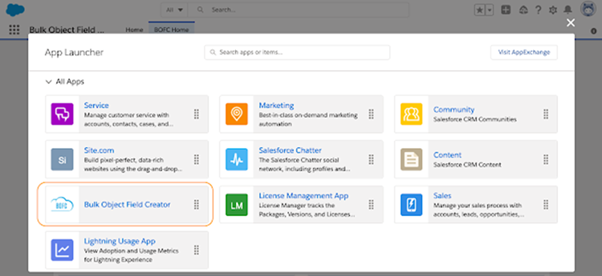
Step 2. Open BOFC from the App Launcher

BOFC Picture3
After installation:
  • Navigate to the App Launcher
  • Search for BOFC
  • Open the application
The BOFC home screen displays a structured list of available modules such as:
  • Bulk Field Creation
  • Clone Custom Metadata Types
  • Export Field Permissions
  • Clone Field Sets
  • Compare Objects
  • Import Picklists

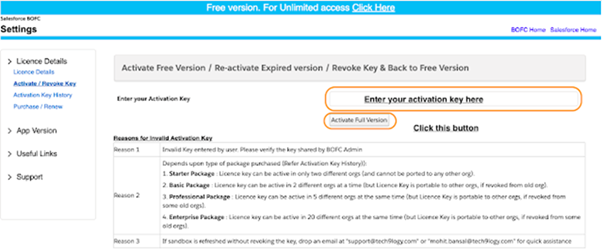
Step 3. Activate the Full Version (If Applicable)

BOFC Picture4
If you are using the trial version:
  • Navigate to the Activation tab inside BOFC
  • Enter your activation key (provided after license purchase)
  • Click Activate
Once activated, all bulk limits are removed.

Step 4. Execute Your First Bulk Operation

Now BOFC is ready to use.
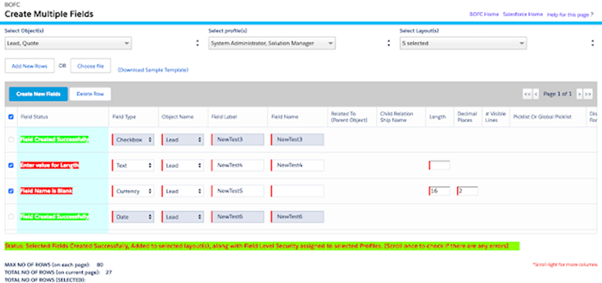
BOFC Picture5
Example: Bulk Field Creation
  • Select object
  • Define fields via structured input
  • Review configuration
  • Execute
Within minutes, dozens or hundreds of fields can be created consistently.

Step 5 . Validate Changes

BOFC Picture6
After execution:
  • Confirm fields are created
  • Verify field-level security
  • Check page layouts (if applicable)
  • Review object structure
BOFC operations reflect immediately in Salesforce metadata.

Key Features

Here’s what makes BOFC stand out from standard Salesforce Configuration tools:

1. Bulk Metadata Operations

  • Create, update, delete, and clone objects and fields in bulk.
  • Supports both Standard and Custom Objects.
  • Import definitions from other orgs or spreadsheets.

2. Bulk Export & Analysis

You can export lots of metadata, objects, profiles, page layouts, field permissions, workflows, process builders, in a single go. This is incredibly useful for audits or documentation.

3. Compare Across Orgs

If you’re cleaning up or migrating between environments (Sandbox → Production, or org–to–org), BOFC lets you compare objects, fields, and code side-by-side.

4. Advanced Reporting

View API limits, object and field usage, and metadata insights to help plan your changes more confidently.

What Users Really Like

Time savings is the most consistent feedback from real users: “BOFC saves me hours and hours that I used to spend clicking in the Salesforce Setup.” Verified Reviewer on G2

Highlights from user reviews also include:

  • The app feels intuitive and works smoothly with Salesforce.
  • Support and onboarding assistance are helpful and responsive.
  • It’s useful not just for field creation, but also for mass deletion, permissions management, and exporting metadata.
A few community users also mention BOFC as a helpful alternative for bulk field creation tools that otherwise don’t handle Salesforce complexities.

Free Vs Paid Versions

BOFC offers a Free trial version with limitations:

  • The free version allows creation of up to 30 fields at once.
  • Bulk deletion is limited to 10 fields.

These limitations disappear After you upgrade to the paid version, and you also get full access to the app’s features.

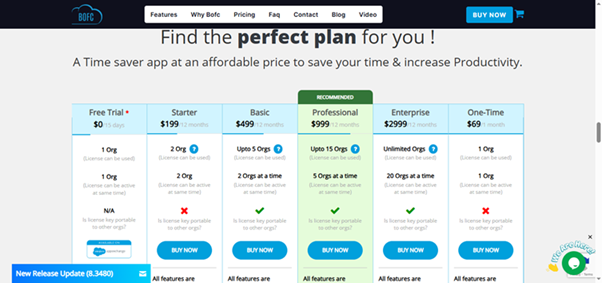
Depending on how many organisations you need to activate, pricing tiers (relying on user-reported data on G2) provide plans ranging from Initial to Professional.

BOFC Picture7

Any Downsides?

No tool is perfect, and the broader Salesforce community has had mixed topic discussions around BOFC, mostly centered on how it’s marketed online rather than the tool itself.

From a usage perspective:

  • Some admins working on extremely complex projects might require additional documentation or training.
  • Like any capable automation tool, improper setup can lead to unintended bulk changes if not used carefully.

But in fairness, most user reviews say that the learning curve is reasonable compared with the hours it saves.

BOFC vs Native Salesforce Setup

Below is a quick comparison between Native Salesforce setup capabilities and BOFC:
Capability Native Salesforce BOFC
Bulk Field Creation
Bulk Permission Update
Metadata Export Limited Extensive
Cross-Org Compare
Picklist Import Manual Automated
Salesforce is powerful, but BOFC enhances administrative efficiency.

Final Verdict

BOFC is amazing for Salesforce developers and administrators who deal with big organisations, complicated metadata tasks, or frequent migrations. It allows teams’ time for strategic priorities by eliminating tedious clicks and manual work.

👍 Pros

  • Massive time and effort savings
  • Bulk operations for metadata tasks
  • Supports export, compare, clone, and more
  • Reasonable pricing for full versions
  • Helpful support

👎 Cons

  • Free version has notable limits
  • Need to be used carefully to prevent unwanted mass modifications.
Overall Rating: ⭐ 4.5/5 (based on feature set, reviews, and real-world utility)
Try BOFC Now
If you routinely create dozens or hundreds of fields, perform multi-org metadata migrations, or manage complex configurations, you can try BOFC with a free trial direct from the Salesforce AppExchange and decide if it fits your workflow.

How useful was this post?

Click on a star to rate it!

Average rating 0 / 5. Vote count: 0

No votes so far! Be the first to rate this post.

Written by

Dev Anand

A dynamic engineer, innovative thinker, initiative taker and multi technology professional with exceptional logical, analytical and management skills possess a decade experience in Software Development and Salesforce CRM Solutioning. Enrich experience in converting business needs to Salesforce Experience. Worked on multiple RFPs and POCs. 50+ Integrations between Salesforce and other Platforms. Experience in LWC, Aura, Apex, JS, HTML, PHP, WordPress, Magento and many others.

Get the latest tips, news, updates, advice, inspiration, and more….

Interested to Talk?

    Boost Your Brand's Visibility

    Want to promote your products/services in front of more customers?

    Categories
    ...
    Boost Your Brand's Visibility

    Want to promote your products/services in front of more customers?

    ...