Salesforce Spring ’26 Release: Top 7 Features Explained

December 30, 2025
1356 Views
Salesforce Spring ’26 Release: Top 7 Features Explained
Summarize this blog post with:

With 2025 ending, Salesforce is already looking ahead to what comes next with the Salesforce Spring ’26 release. Service Cloud, rebranded as Agentforce Service, offers a carefully curated set of usability improvements, automation enhancements and platform refinements, designed to enable service teams to provide speedier, more dependable and uniform support.

Instead of disruptive changes, the focus of Spring ’26 is on streamlining daily workflows for service, enhancing visibility around case activity, and minimising the agent and admin manual overhead. For service teams, here’s a detailed look at the most impactful updates to be aware of as you prepare for the coming year.
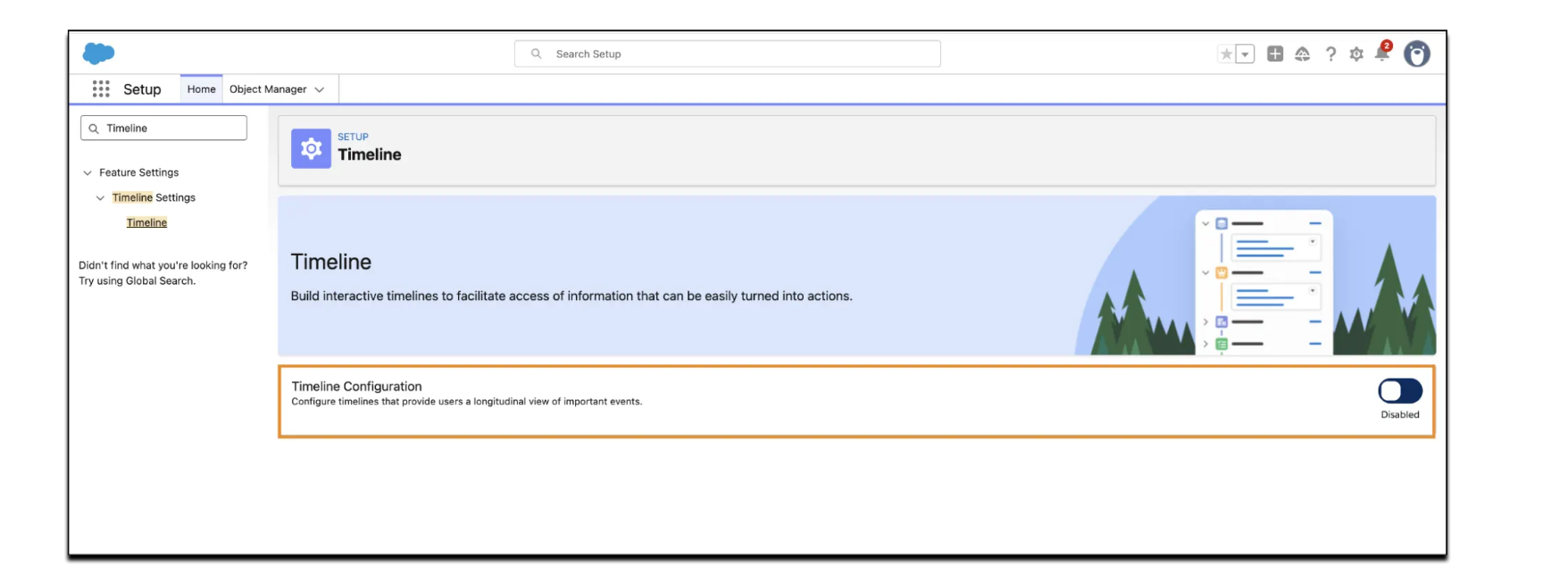
1. Case Timeline in Salesforce for Complete Case Visibility

The new Case Timeline brings a more straightforward experience for agents to see what occurred on a case without having to jump between multiple related lists, feeds, or records. Now you can have all the important events in a single timeline view, which gives you a better context understanding before action.

It is particularly useful for complex and long-lived cases, in which multiple interactions, updates, or changes of ownership were performed over time. Agents can more easily see key milestones and prior activities, empowering them to provide more confident and efficient responses.

Service Cloud Top 7Salesforce Spring 26 Features 1

Case Timeline improves agent productivity by,

  • Presenting key case events in a clear, time-based sequence
  • Highlighting milestones and major updates for quick context
  • Reducing time spent searching through related records

This feature is available to organisations with Industry Service Excellence enabled.

2. Quick Text in Case Comments for Faster Agent Responses

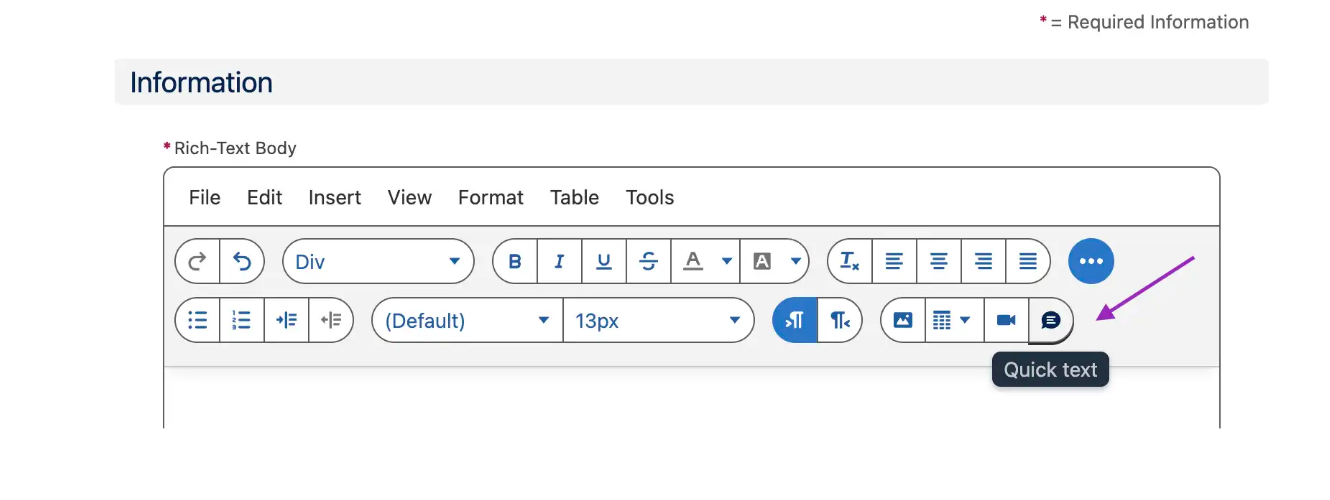
Spring ’26 extends Quick Text functionality to Case Comments, making it easier for agents to insert predefined responses directly into their comments. These text snippets can include dynamic merge fields, allowing information such as contact names or case details to be pulled in automatically.

This update reduces repetitive typing while maintaining consistency across both internal notes and customer-facing communication. For administrators, centrally managed Quick Text entries help standardise messaging and improve documentation quality across service teams.

Service Cloud Top 7Salesforce Spring 26 Features 2

To use this feature, Rich Text for Case Comments must be enabled in Support Settings, along with Quick Text in Quick Text Settings.

3. Rule-Based Milestone Pauses for Accurate SLA Tracking

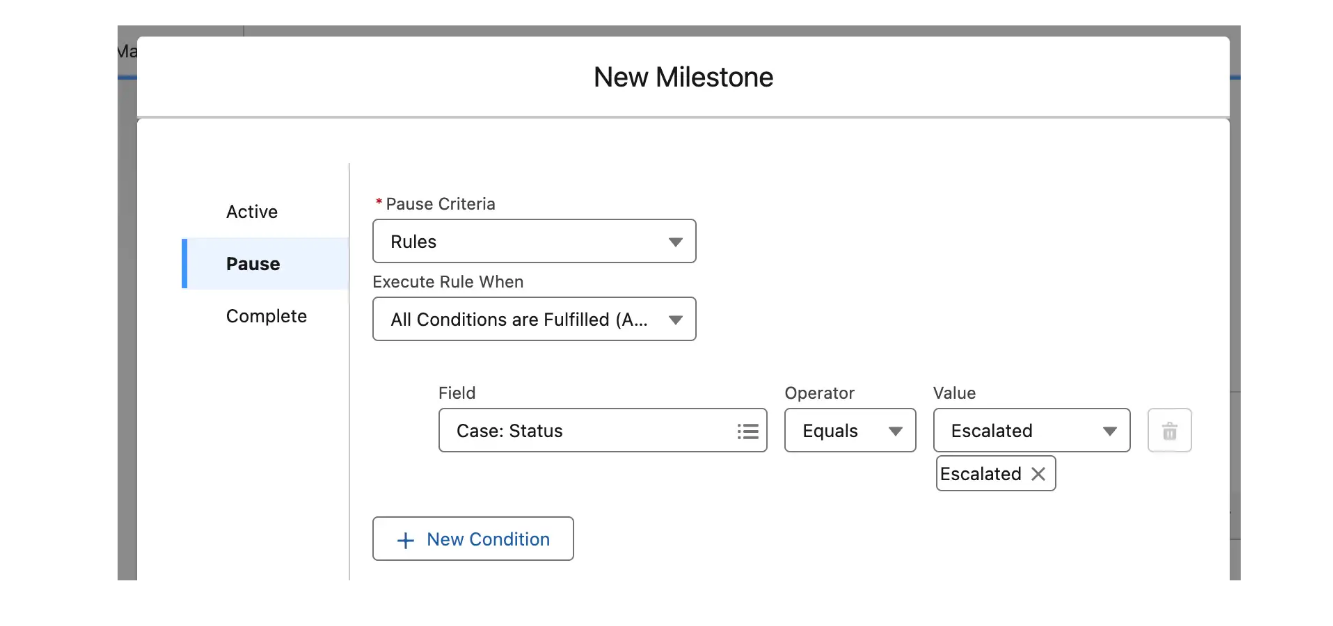
Manual SLA tracking of milestones may be inconsistent, particularly when cases are blocked temporarily by customer delays or escalations. In Spring ’26, rule-based milestone pauses let admins automate when milestones should pause and resume.

Admins can define conditions that pause milestones automatically, such as,

  • When a case status changes to Waiting for Customer
  • When a case is escalated or transferred
  • When predefined pause criteria are met
Service Cloud Top 7Salesforce Spring 26 Features 3

Configuration is available under SLA Policies, with Simplified SLA Setup enabled.

4. Bidirectional Milestone Visibility Across Salesforce Records

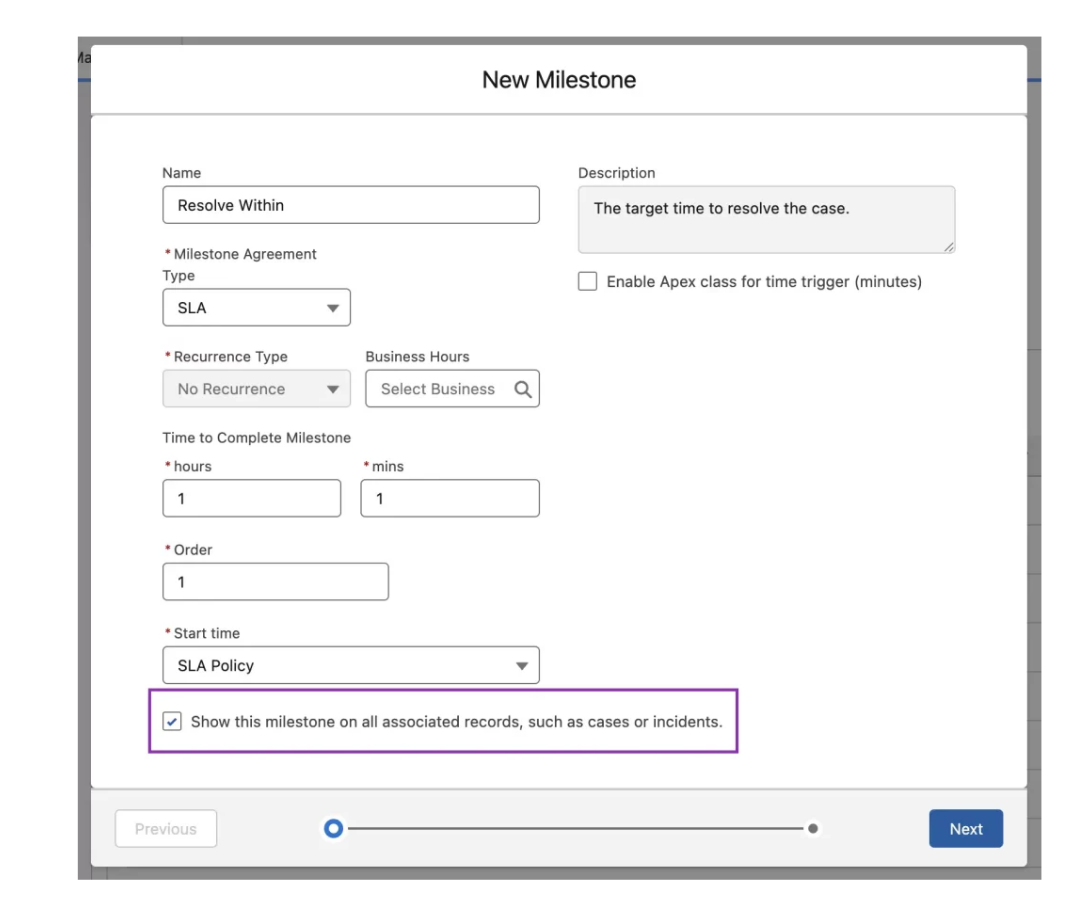
Previously, milestone tracking was limited to individual cases, making it difficult for teams working on related records to stay aligned. Spring ’26 introduces bidirectional milestone visibility, allowing milestones to be viewed across parent, child, and related records.

This provides agents, managers, and support teams with real-time visibility into SLA and OLA timelines , no matter where the work is being performed. This is especially useful in multi-group or cross-department situations to keep commitments and deadlines visible and in sync.

Service Cloud Top 7Salesforce Spring 26 Features 4

5. Service Setup Assistant Retirement for New Orgs

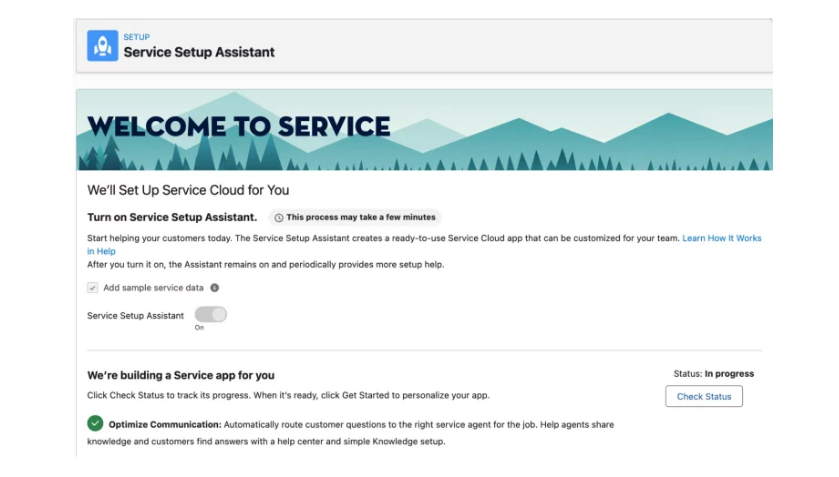
For new orgs created in Spring ’26 or later, Service Setup and Service Setup Assistant are retired. Existing orgs will continue to have access, so there is no immediate impact for teams already using these tools.

Salesforce now directs new orgs toward Salesforce Go, which provides guided onboarding and setup support through a more modern and centralised experience. This transition reflects Salesforce’s broader move toward streamlined configuration tools.

Service Cloud Top 7Salesforce Spring 26 Features 5

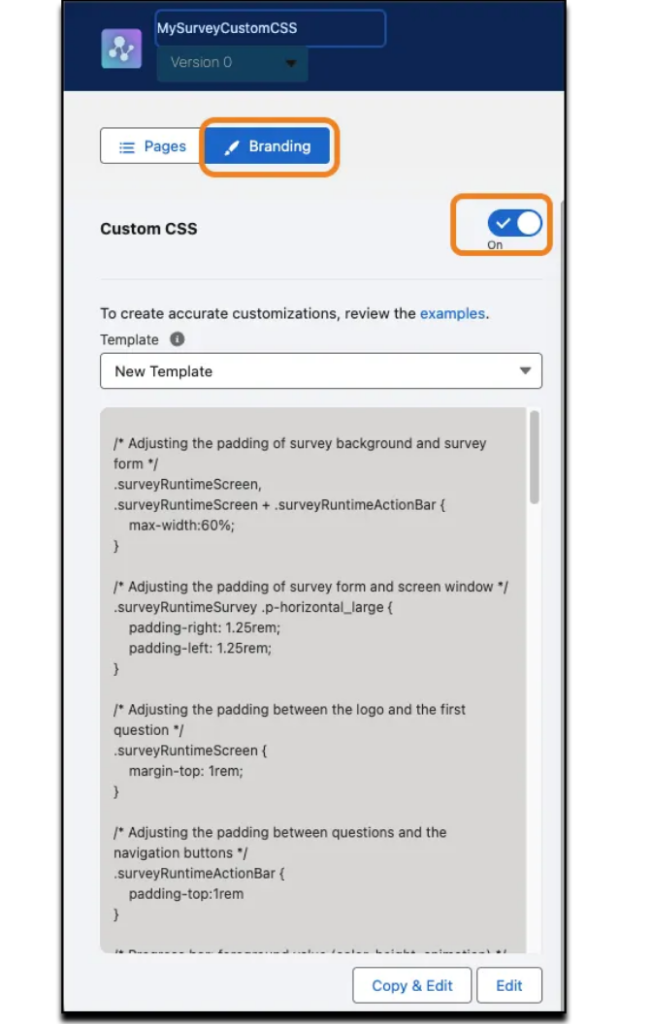
6. More Flexible and Branded Survey Experiences

Salesforce Surveys receive several upgrades in Spring ’26, particularly for organisations using Feedback Management Starter or Growth. Partial survey responses can now be saved for up to 999 days, giving respondents significantly more time to complete surveys.

Partial responses from guest users are also saved automatically, reducing lost feedback. In addition, Custom CSS support means your surveys can be fully branded, and fonts, colours, layouts and spacing can be customised to your brand guidelines.

Service Cloud Top 7Salesforce Spring 26 Features 6

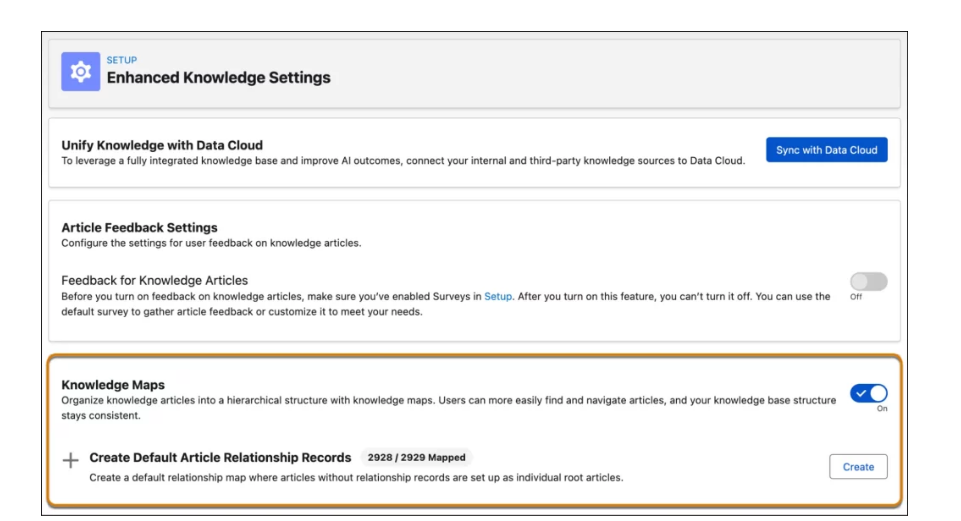
7. Streamline Knowledge with Maps

Knowledge Maps are now generally available, allowing teams to organise knowledge articles into a clear hierarchical structure. This improves navigation for both agents and customers by grouping related content logically.

Service Cloud Top 7Salesforce Spring 26 Features 7

When enabled, Knowledge Maps create Article Relationship records, strengthening connections between articles and improving discoverability across the knowledge base.

Summary

The Spring ’26 Agentforce Service release focuses on refining the service experience through better visibility, smarter automation, and reduced manual effort. Enhancements like Case Timeline, automated milestone pauses, improved milestone visibility, smarter voice routing, enhanced surveys, and Knowledge Maps help service teams resolve cases faster and more consistently.

These updates empower agents with clearer context and give admins better tools to manage service operations effectively. As organisations plan for the year ahead, Spring ’26 offers practical improvements that support scalable, high-quality customer service.

How useful was this post?

Click on a star to rate it!

Average rating 3 / 5. Vote count: 2

No votes so far! Be the first to rate this post.

Written by

Mohit Bansal

Salesforce Technical Architect | Lead | Salesforce Lightning & Integrations Expert | Pardot | 5X Salesforce Certified | App Publisher | Blogger

Get the latest tips, news, updates, advice, inspiration, and more….

Contributor of the month
contributor
Antonina Kharchenko

Technical Writer, Salesforce Admin at SFApps.info

...
Categories
...
Boost Your Brand's Visibility

Want to promote your products/services in front of more customers?

...

Leave a Reply

Your email address will not be published. Required fields are marked *