Enhance Salesforce Security with SendGrid OTP Verification

May 19, 2026
209 Views
Enhance Salesforce Security with SendGrid OTP Verification
Summarize this blog post with:

In today’s digital applications, verifying user identity is critical, especially for public-facing systems like Salesforce site, Experience Cloud or payment portals.

While SMS-based OTP is widely used, Email-based OTP verification using Twilio SendGrid is a reliable and cost-effective alternative. This blog will explain to you how to implement secure Email OTP verification in Salesforce using Apex and SendGrid API.
Why Email OTP Instead of SMS

  • No dependency on mobile network
  • Cost-effective at scale
  • Works globally without country restrictions
  • Ideal for portals and form-based authentication

Benefits of Email OTP

  • Reliable delivery
  • Scalable
  • Easy integration
  • Improves security

Architecture Overview

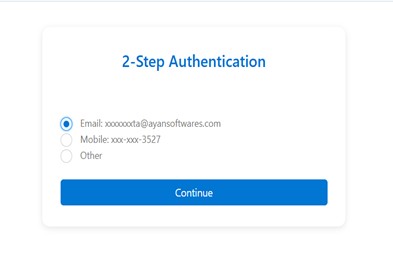
  1. User enters details
  2. System validates user
  3. OTP is generated in Apex
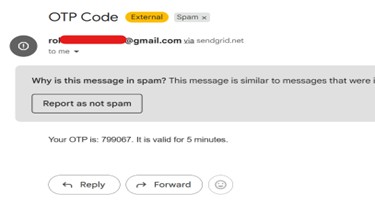
  4. OTP sent via SendGrid Email API
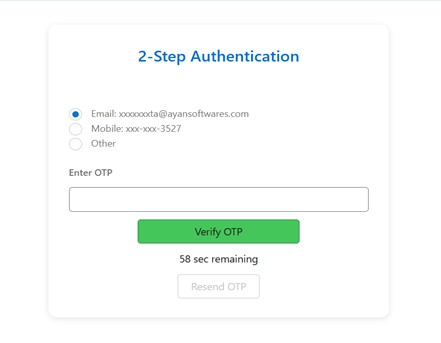
  5. User enters OTP
  6. System verifies OTP with expiry & attempts

What Challenges to face without OTP Verification?


Integer otp = Math.mod(Math.abs(Crypto.getRandomInteger()), 1000000);
generatedOTP = String.valueOf(otp).leftPad(6, '0');
otpExpiryTime = System.now().addMinutes(5);

OTP Verification

  • Match OTP
  • Check expiry
  • Limit attempts
  • Mark verified

SendGrid Setup

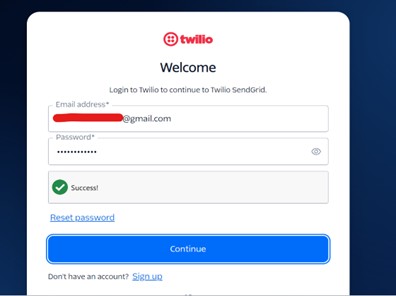
Step 1: Create SendGrid Account
  1. Go to 👉 https://signup.sendgrid.com
  2. Sign up using your email
  3. Verify your email address
  4. Complete basic profile setup

Picture1 2

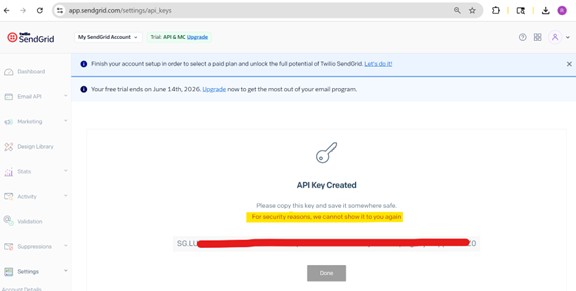
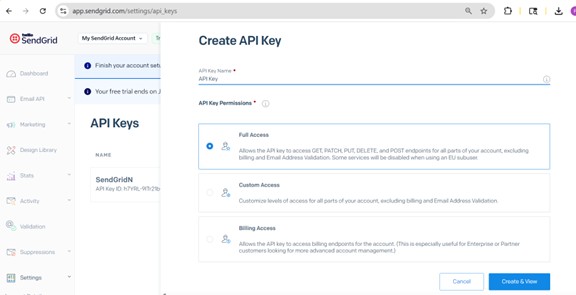
Step 2: Generate API Key (Most Important Step)
  1. Go to Settings → API Keys
  2. Click Create API Key
  3. Choose:
    • Full Access (for testing)
    • OR Restricted Access → Mail Send (Recommended for production)
  4. Click Create & View
  5. Copy the API Key and save it securely
Important Notes:
  • You will NOT see the API key again
  • Store it in:
    • Salesforce Custom Setting / Custom Metadata
  • Never hardcode in Apex

Picture2 2
Picture3 2

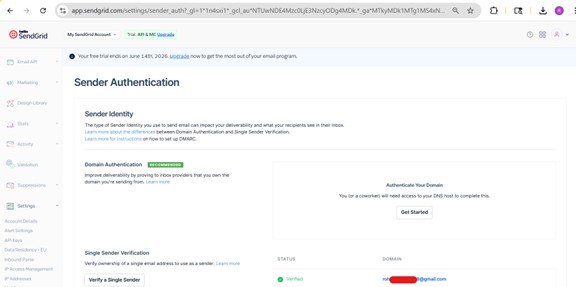
Step 3: Verify Sender Email (Mandatory)

SendGrid does NOT allow sending emails without verification.

Option A: Single Sender Verification (Easy for Testing)

  1. Go to Settings → Sender Authentication
  2. Click Verify a Single Sender
  3. Fill details:
    • From Name
    • Email Address
    • Company Address
  4. Click Create
  5. Check your email inbox → click Verify

After this, you can send emails from this address

Picture4 2

Option B: Domain Authentication (Best for Production)
  1. Go to Settings → Sender Authentication
  2. Choose Authenticate Your Domain
  3. Add your domain (e.g., yourcompany.com)
  4. Add DNS records provided by SendGrid
  5. Verify domain
Benefits:
  • Better email deliverability
  • Emails won’t go to spam
  • More professional setup
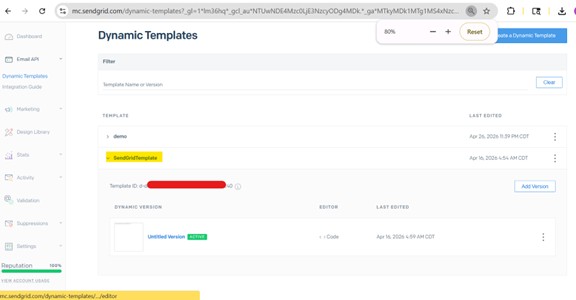
Step 4: (Optional) Create Email Template
Instead of hardcoding email content in Apex, you can use templates.
    1. Go to Email API → Dynamic Templates
  1. Click Create Template
  2. Add a version
  3. Design email like:
    • Your OTP is: {{otp}}
    • This OTP is valid for 5 minutes.
  4. Save and copy Template ID

Picture5 2

How to Use Template in Apex


'dynamic_template_data' => new Map<String, Object>{
    'otp' => otp
},
'template_id' => templateId
This replaces {{otp}} dynamically in email

Salesforce Configuration

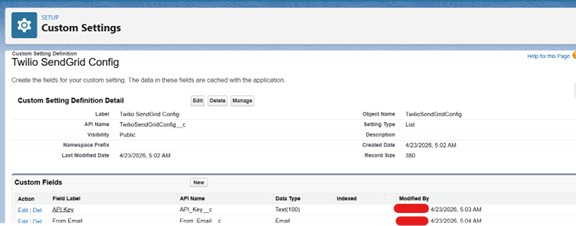
Create Custom Setting: TwilioSendGridConfig__c Fields:
  • API_Key__c
  • From_Email__c

This avoids hardcoding credentials.

Picture6 2

Apex Code – Send OTP via Email


public Boolean sendEmail(String toEmail, String otp){
    TwilioSendGridConfig__c config = 
        TwilioSendGridConfig__c.getValues('SendGridN');

    if(config == null || String.isBlank(config.API_Key__c)){
        return false;
    }

    HttpRequest req = new HttpRequest();
    req.setEndpoint('https://api.sendgrid.com/v3/mail/send');
    req.setMethod('POST');

    req.setHeader('Authorization', 'Bearer ' + config.API_Key__c);
    req.setHeader('Content-Type', 'application/json');

    String body = JSON.serialize(new Map<String, Object>{
        'personalizations' => new List

Picture7 2
Picture8 2
Picture9 2

Conclusion

If you are working with Salesforce and looking for a solid way to verify users, email OTP through SendGrid is honestly a great choice. It is affordable, it works well, and it makes sure that only real, verified users can get in or submit anything, which naturally cuts down on unauthorized access and fake entries.

On top of that, when you add things like OTP expiry, limited attempts, and proper logging, the whole setup feels a lot more secure and dependable in day-to-day use.

How useful was this post?

Click on a star to rate it!

Average rating 5 / 5. Vote count: 3

No votes so far! Be the first to rate this post.

Written by

Rohit Mehta

A passionate Salesforce Developer and 3x Salesforce Certified professional specializing in building scalable CRM solutions. Proficient in Apex, Lightning Web Components (LWC), Triggers, Flows, and integrations, with a strong focus on delivering efficient, user-friendly applications. Experienced in translating business requirements into robust technical solutions while optimizing system performance. Skilled in end-to-end development, from design and implementation to deployment across Salesforce platforms.

Get the latest tips, news, updates, advice, inspiration, and more….

Contributor of the month
contributor
Rohit Mehta

3x Certified Salesforce Developer || Apex || LWC

...
Categories
...
Boost Your Brand's Visibility

Want to promote your products/services in front of more customers?

...

Leave a Reply

Your email address will not be published. Required fields are marked *