As AI-powered coding agents become part of everyday development workflows, the real shift is not just writing code faster but learning how to guide these agents effectively. At the core of this shift are two foundational concepts: Rules and Skills.
Latest Update : Data 360 MCP: Your Agent Needs Better Context, Not More Data

As AI-powered coding agents become part of everyday development workflows, the real shift is not just writing code faster but learning how to guide these agents effectively. At the core of this shift are two foundational concepts: Rules and Skills.
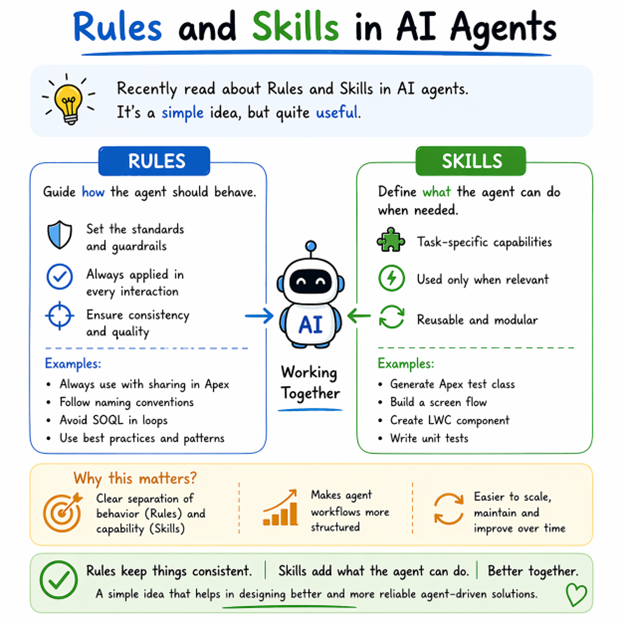
Rules act as guardrails for your coding agent. They define how the agent should behave across all tasks.
Think of Rules as your coding standards baked into AI. For example:
These are not task specific. They are always applied (as long as enabled), making them ideal for enforcing consistency across your codebase.
However, Rules come with a trade-off. Since they are static and always loaded into context, they can grow large over time. As more rules are added, they increase context size, which can reduce efficiency and even confuse the agent.
Rules are global guardrails that shape how the agent writes code every time.
Rule Name: Apex Best Practices
Whenever you ask the agent:
“Create an Apex class to fetch Accounts”
The agent will:
Skills represent a more advanced and scalable approach. They are dynamic, task-specific capabilities that the agent can use when needed.
Instead of telling the agent “Always behave this way,” Skills tell the agent:
“When you see this kind of task, use this approach.”
For example:
Skills are triggered based on their name and description, and only then does the agent load the relevant instructions. This means they are efficient, modular, and scalable.
Another key advantage is that Skills can include:
This allows them to act more like mini playbooks for specific development tasks.
Skills are task-specific capabilities that the agent uses only when needed.
name: create-apex-test-class
description: Generate a complete Apex test class with best practices, including test setup, data creation, and assertions.
steps:
When you write a prompt:
“Write a test class for AccountService”
The agent:
The difference between Rules and Skills is not just technical, it changes how you design your AI workflow.
In practice, Rules can quickly become bloated, while Skills encourage breaking problems into smaller, reusable units.
Use Rules when:
Use Skills when:
| Aspect | Rules | Skills |
|---|---|---|
| Purpose | Enforce standards | Execute specific tasks |
| Nature | Static | Dynamic |
| Context Loading | Fully loaded every time | Loaded on demand |
| Trigger | Always active (if enabled) | Selected based on description |
| Granularity | Broad (global rules) | Fine-grained (task-level) |
| Scalability | Poor (grows large quickly) | High (modular & reusable) |
| Efficiency | Low (context bloat risk) | High (progressive loading) |
| Determinism | Slightly more predictable | Less predictable (depends on matching) |
| Maintenance | Hard as file grows | Easier (split into small units) |
| Best Use Case | Coding standards, naming, architecture patterns | Specific workflows (Apex, Flow, Test class, etc.) |
What’s becoming clear is that development is moving toward engineering the agent, not just the code.
Instead of writing everything line by line, you
Don’t forget to check out: Designing Agent-to-Agent (A2A) Architecture in Salesforce
This is the simplest way to think about it when working with AI agents in real projects.


Want to promote your products/services in front of more customers?

40 Views

87 Views
140 Views
232 Views

185 Views

246 Views









