Why Do We Need Round Robin?
- Workload becomes uneven
- Manual assignment slows down operations
- Some users are overloaded while others are idle
- No visibility or fairness
- Equal workload distribution
- Faster assignment and response
- Fully automated process
- Scalable for large teams
Before implementing a Round Robin assignment, one critical question must be addressed:
This choice will have immediate consequences on how scalable, maintainable, and reliable your solution is.
Recommended Approach: Use a Custom Setting
A Custom Setting (preferably List type) is an ideal choice to store and track the last assigned user.
Why Custom Setting?
- Persistent State: Keeps track of the last assigned user across transactions.
- Dynamic Configuration: Admins can easily update users and assignment order without code changes.
- Performance Efficient: Faster than querying standard/custom objects.
- Supports Multiple Round Robin Groups: You can manage different assignment groups using fields like Group Name or Functionality.
How It Works?
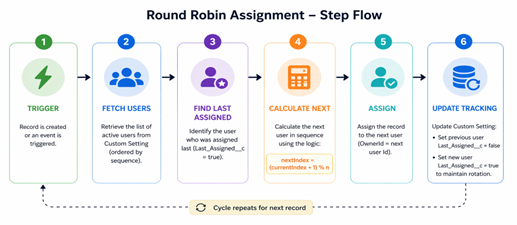
1. Store users with an Order field (defines assignment sequence)
2. Track the Last Assigned User
3. On each assignment:
- Identify the last assigned user
- Select the next user in sequence
- Assign the record
- Update the Custom Setting with the last assigned user
Why Use Custom Setting (And NOT Custom Metadata)?
Custom Setting (Used in this Implementation)
We use List Custom Setting because:
- Supports DML operations in Apex
- Allows updating Last_Assigned__c dynamically
- Maintains state across transactions
Why Not Custom Metadata?
| Limitation |
Impact |
| No DML allowed in Apex |
Cannot update the last assigned user |
| Static configuration |
No runtime updates |
| Deployment required for changes |
Not flexible |
Conclusion
Round Robin requires state tracking, so Custom Setting is mandatory.
Step-by-Step Round Robin Implementation
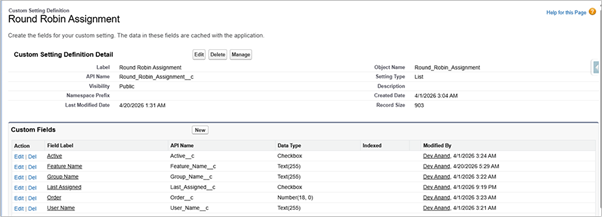
Step 1: Create Custom Setting
- Type: List Custom Setting
- Name: Round_Robin_Assignment__c
Step 2: Create Required Fields
| Field Name |
Type |
Purpose |
| User_Name__c |
Text |
Stores Username |
| Order__c |
Number |
Defines sequence |
| Last_Assigned__c |
Checkbox |
Tracks the last assigned user |
| Active__c |
Checkbox |
Enables/disables the user |
| Feature_Name__c |
Text |
Supports multiple groups |
Step 3: Insert Configuration Data
Example:
| User |
Order |
Last Assigned |
Active |
| user1 |
1 |
✔️ |
✔️ |
| user2 |
2 |
❌ |
✔️ |
| user3 |
3 |
❌ |
✔️ |
Step 4: Fetch Data Using SOQL
We use SOQL instead of getAll().
List theRoundRobinSetting = [SELECT Id, User_Name__c, Last_Assigned__c FROM Round_Robin_Assignment__c WHERE Feature_Name__c = 'Feature Name' AND Active__c = true Order By Order__c ASC];
Why SOQL?
- Ensures correct ordering
- Filters only active users
- Supports multiple assignment groups
- Provides real-time data
Step 5: Prepare User Mapping
- Collect usernames
- Query User object
- Map Username → UserId
This ensures a valid assignment.
Code
//Collect Round Robin UserNames
if (!theRoundRobinSetting.isEmpty()) {
   Set theUserNameSet = new Set();
   for (Round_Robin_Assignment__c theRRA : theRoundRobinSetting) {
         theUserNameSet.add(theRRA.User_Name__c);
         }

// Store UserName and Their Ids
Map<String, Id> theUserMap = new Map<String, Id>();
for (User theUser : [SELECT Id, Name, UserName FROM User WHERE UserName IN :theUserNameSet AND IsActive = true]) {
    theUserMap.put(theUser.UserName, theUser.Id);
}
Step 6: Validate Current Owner
Assign User only if needed:
- The owner is a part of the rotation
Step 7: Identify Last Assigned User
Find the record where:
Last_Assigned__c = true
Store its index.
Code
Integer currentIndex = -1;
// Check Latest Assigned User
for (Integer i = 0; i < theRoundRobinSetting.size(); i++) {
      if (theRoundRobinSetting[i].Last_Assigned__c == true) {
          currentIndex = i;
          break;
         }
 }
Step 8: Calculate Next User
Integer nextIndex = Math.Mod((currentIndex + 1), theRoundRobinSetting.size());
Result:
- Moves to the next user
- Automatically loops back
Step 9: Assign Record
- Assign the next user to record
theAcc.OwnerId = nextUserId;
Step 10: Update Custom Setting (Most Important Step)
This step is critical because it maintains the rotation state.Round Robin works on one key idea:
“Who was assigned last?”If you don’t update the Custom Setting:
- System will not know the last assigned user
- Same user may get assigned again
- Rotation will break (not fair anymore)
What this step does:
- Previous user → Last_Assigned = false
- New user → Last_Assigned = true
- Perform DML update
List updates = new List();
// Mark Last Assigned User false
if (currentIndex != -1) {
   theRoundRobinSetting[currentIndex].Last_Assigned__c = false;
   updates.add(theRoundRobinSetting[currentIndex]);
}

// Mark Current Assigned User true
nextUserSetting.Last_Assigned__c = true;
updates.add(nextUserSetting);
if(!updates.IsEmpty()) update updates;
Conclusion
Round Robin Assignment is a simple yet powerful automation pattern in Salesforce.
By combining:
- Custom Settings (for state tracking)
- SOQL (for ordered, real-time data)
- Apex logic (for execution)
You can create a solid, scalable and equitable assignation system.
Real-world examples
Partner / Region-Based Assignment
Different regions have their own teams and separate round robin.
Example:
- US Leads → assigned between User A & B
- EU Leads → assigned between User C & D
Each team only gets their own region’s records, and distribution stays fair within that team.