Salesforce’s new agent-driven Setup experience brings an AI assistant directly into your admin workflow. Powered by the Atlas Reasoning Engine, it lets you describe what you need in plain English and get it done with fewer clicks, less navigation, and more time for the work that actually matters.
Summarize this blog post with:
What Is Setup with Agentforce?
Setup with Agentforce is a conversational AI assistant built into every page of
Salesforce Setup. Instead of hunting through menus, you can simply ask it questions or give it commands and it handles the rest (with your approval, of course).
Once Setup with Agentforce is enabled, it will be available at the home page of setup.
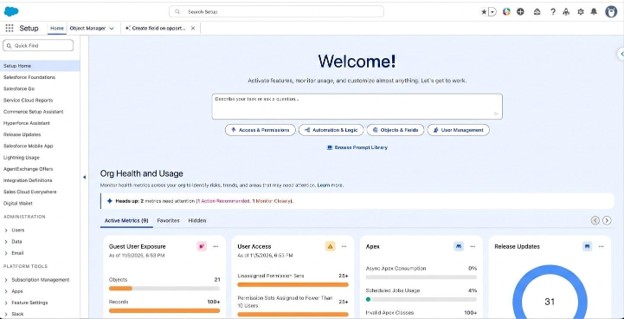
Or it will be available at bottom every setup page:
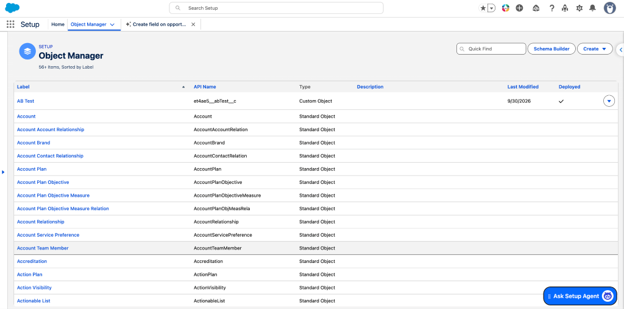
It can help you with a surprisingly wide range of tasks. Here’s a closer look at the key capability areas the Setup agent covers:
- User Access Management : Troubleshoot user access issues, review the permissions and access that users have, and understand how access is configured.
- User Management : Create users and manage their details, access assignments, and passwords.
- Data Model Management : Create Salesforce standard and custom objects, fields, and relationships.
- Flows : Create, list, and summarize flows using natural language commands.
- Setup Information : Get information sourced from Salesforce documentation directly in the flow of work, with links to relevant Setup pages or Salesforce Go features.
- Reports and Dashboards : Create custom report types, reports, and dashboards.
- Formulas : Get help with Salesforce formulas. Explain, validate, and fix formulas directly within Setup pages.
- Org Health & Usage : Get information about your org’s health and usage metrics.
- Events : Get usage metrics for platform event usage.
- Identity : Configure Salesforce identity services like creating an external client app or migrating a connected app.
That’s just the highlights, the full list of supported tasks continues to grow as the feature receives automatic updates.
Getting Started
Before you can use Setup with Agentforce, you’ll need to enable it in your org and make sure users have the right permissions assigned. From there, you can jump in from any Setup page and start exploring.
Go to setup, in quick find search for ‘Setup with Agentforce’
- Complete all the pre-requisites
- Turn on Einstein
- Turn on Agentforce Platform
- select Salesforce Default as the model provider
- Turn on Data Cloud
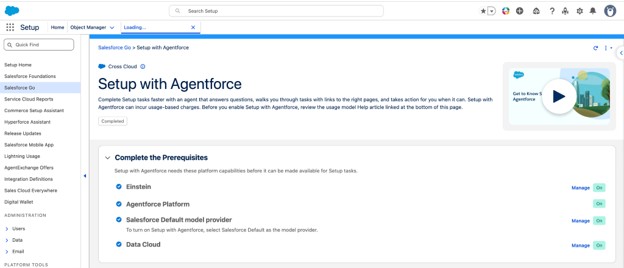
- Then enable Setup with Agentforce
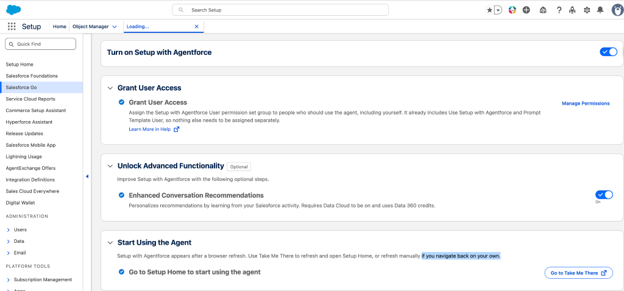
- Refresh the browser and go to the Permission Set Groups. Click here for additional details
- Click Setup with Agentforce User.
The Setup with Agentforce User permission set group is a bundle of the Prompt Template User and Use Setup with Agentforce user permissions. - Click Manage AssignmentsAdd Assignments.
- Select your users, including yourself if you plan to use Setup with Agentforce, click Next, and then click Assign.
- Users can turn on ‘Enhanced Conversation Recommendations’ to get personalized recommendations by learning from your Salesforce activity. Note: This requires Data Cloud to be on and uses Data 360 credits and this is optional step.
- Now Setup with Agentforce is available for use. Use Take Me There to refresh and open Setup Home. Do manual refresh if you navigate back on your own.
How Does It Work?
The Setup agent lives in the Agentforce panel, available from any page in Setup. You can carry on a conversation with it while still browsing Setup normally, it doesn’t interrupt your workflow, it enhances it.
Sample prompts to create field on account object:
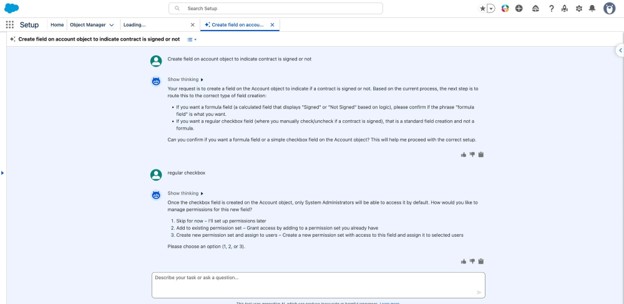
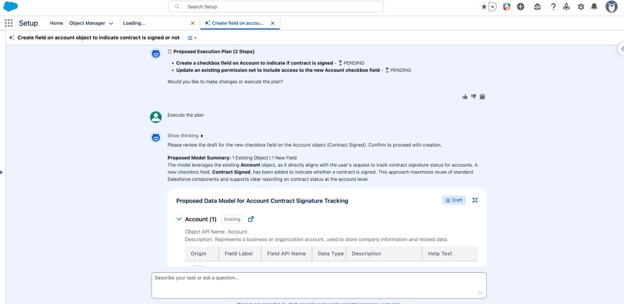
For more complex tasks, the experience can expand into a full-sized agentic view: new console tabs open, and a canvas surfaces rich content like record details, list views, and metadata previews.
The redesigned Setup Home page also gets an AI boost, a prompt bar lets you jump straight into a task, and conversation recommendations help you get started quickly based on common admin actions.
Sample prompt to create Flow which will fetch list of accounts where this Contract signed flag is set to true.
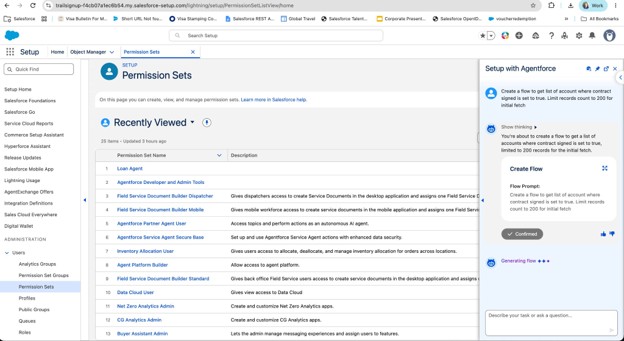
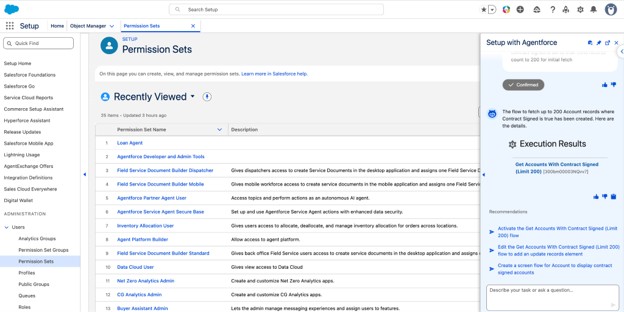
One important thing to know: the agent never makes changes without your go-ahead. It will suggest what it plans to do, and you confirm with a simple “Yes,” “Confirm,” or “Proceed.” Your permissions stay intact, and you stay in control.
Note: ‘Confirmed’ action from above screenshot, shows the flow was created after confirmation was provided by user
Why Should You Use It?
The honest answer is: it saves time. But the reasons vary depending on where you are in your Salesforce journey.
For experienced admins, the Setup agent cuts down on the repetitive, multi-step tasks that eat up your day. Instead of navigating five pages to create and assign a permission set, you describe what you need and confirm the result. It also makes org maintenance faster by quickly pulling up license counts, permission assignments, or config details without writing a single SOQL query.
For newer admins, it lowers the learning curve considerably. Step-by-step guidance for common tasks, plus the ability to ask questions about Salesforce features and get answers grounded in official documentation, makes it a surprisingly capable onboarding companion.
Either way, the goal is the same: less time on routine admin work, more time on the strategic stuff.
Conclusion
Setup with Agentforce isn’t just a quality-of-life improvement. It’s a meaningful shift in how admin work gets done. Give it a try and see how much faster your next setup task goes.
Useful links
Salesforce has published a set of helpful resources to get you up and running:
- Get Started with Setup with Agentforce: Quick-start guide with example prompts to try
- Configure Setup with Agentforce: Step-by-step enablement instructions
- Grant Permissions to Use Setup with Agentforce: Access requirements and how to configure them
- Explore What Setup with Agentforce Can Do: Full list of supported tasks and features
- Considerations for Setup with Agentforce: Limitations and things to keep in mind Already using the Agent for Setup from March 2025? Salesforce recommends switching to Setup with Agentforce, it supports significantly more tasks and gets updated automatically. You can find the original documentation here.
Also Read
Don’t forget to check out: Salesforce Winter ’27: 15 Flow Features That Actually Matter