Ultimate Guide to Advanced Approvals in Salesforce CPQ

May 21, 2026
68 Views
Ultimate Guide to Advanced Approvals in Salesforce CPQ
Summarize this blog post with:

What is Salesforce CPQ Advanced Approvals (SBAA)?

Salesforce CPQ advances approvals, handles quoting and pricing, but pricing alone is not enough. Businesses need control over who can approve what discount level, what contract length, or what product combinations are, before a quote reaches the customer. That governance layer is exactly what SBAA, Salesforce Billing Advanced Approvals, provides.

SBAA is a Salesforce-built managed package that sits on top of CPQ and delivers a dedicated, rules-driven approval engine to the business. It replaces ad-hoc email chains, manual manager reviews, and brittle native approval processes with a structured system that automatically routes every quote through the right set of approvers, based on real pricing data, not on guesswork.

It ships with its own set of Salesforce objects that work natively with CPQ’s pricing data, giving you deep integration between how a price with that exact percent of discount is built and how it gets approval.

Core SBAA Objects

SBAA introduces the following dedicated objects into your Salesforce org:
  • SBAA__ApprovalRule__c — The master record defining when approvals are triggered, who approves, and in what order.
  • SBAA__ApprovalCondition__c — Child records on each rule that evaluate field values or variables. All conditions must pass for the rule to fire.
  • SBAA__Approver__c — Defines the approver identity: a specific user, a group, a queue, or a dynamically resolved hierarchy member.
  • SBAA__ApprovalVariable__c — Stores calculated aggregate values (e.g., maximum discount %) for use inside conditions.
  • SBAA__ApprovalRequest__c — Created automatically when a rule fires. Tracks status (Pending, Approved, Rejected, Recalled) per approval step.
Difference between Advanced Salesforce Approvals and Standard Salesforce Approvals

What is Standard Salesforce Approval?

Standard Salesforce Approval is the built-in approval process that allows all the records to be submitted for approval with the basic criteria and simple step-by-step routing. It is best to be used for simple approval workflows but still has limitations when processes become complex.

What is Advanced Approvals (SBAA)?

Advanced Approvals (also known as Salesforce CPQ Advanced Approvals) is a more powerful and flexible approval engine, which is designed for handling complex, multi-level, and dynamic approval scenarios, especially in CPQ (pricing and discount approvals).

Feature Standard Approvals Advanced Approvals (SBAA)
Multi-step chains ✗ Limited ✓ Unlimited steps
Condition-based routing ✗ Basic criteria only ✓ Complex formula conditions
Parallel approvals ✗ Sequential only ✓ Full parallel + sequential
Dynamic approvers ✗ Static assignment ✓ Formula-based, hierarchy
Quote-level integration ✗ Generic ✓ Native CPQ pricing context
Audit trail ✗ Basic ✓ Complete, queryable records

What is Salesforce CPQ Advanced Approvals (SBAA)?

An approval process is an automated process that routes records to designated approvers based on defined criteria. It controls the lifecycle of a record from submission to the final approval or rejection.

Key Components:

  • Entry Criteria
  • Approval Steps
  • Approvers
  • Actions (Initial, Approval, Rejection, Final)

Prerequisites Before Implementation

Before creating an advanced approval process in Salesforce, ensure:

  • Proper object structure (Standard or Custom Object)
  • Required fields are created
  • User roles and hierarchy are defined
  • Email templates are configured
  • Approval requirements are clearly documented

Who Uses Advanced Approvals?

SBAA touches every role involved in the quote-to-cash process. Every person interacts with the system differently from the sender who submits, to the executive who approves, to the administrator who builds the rules. Understanding all these roles is essential for designing and approval workflows that work for real people, not just on paper.

User Personas

Key Benefits of Advanced Approvals in Salesforce

  • Dynamic approval routing based on pricing and discount.
  • Multi-level approval chains with Manager → Director → Financer
  • Supports sequential and parallel approvals
  • Condition-based triggering of approvals
  • Reusable approval rules for multiple scenarios
  • Automated actions (field updates, emails, Flow, Apex)
  • Flexible approval chains and levels configuration
  • Real-time approval tracking and history
  • Integration with Salesforce Flow and Apex
  • Supports multiple evaluation events like create, edit and submit
  • Strong governance and control over all approvals
  • Scalable for complex enterprise, who use cases (CPQ, pricing approvals)
  • Improves user experience with clear approval visibility
  • Allows dynamic approver assignment (User, Manager, Lookup)

Step-by-Step Implementation

Step 1: Prepare Your Object
  • Go to Setup → Object Manager
  • Select your object (e.g., SBQQ__Quote__c)
  • Ensure required fields exist:
    • Amount
    • Discount
    • Approval Status
    • Any custom approval fields
Step 2: Create Approval Rule
  • Go to App Launcher → Advanced Approvals
  • Open Approval Rules
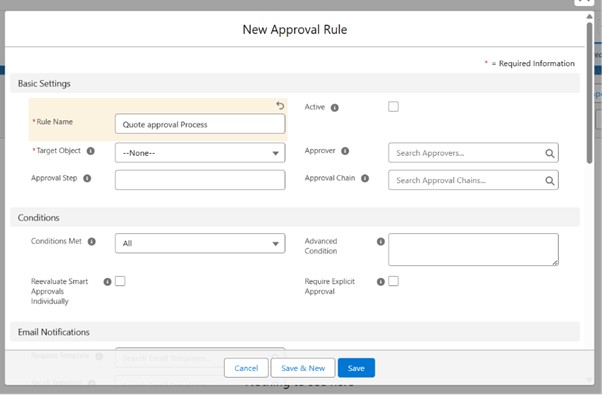
  • Click New Approval Rule

Picture1 3

Step 3: Define Entry Criteria
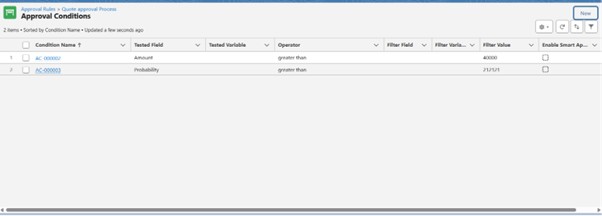
  1. Set conditions such as:
    • Discount > 20%
    • OR Amount > ₹5,00,000

Picture2 3

Step 4: Configure Approval Chain
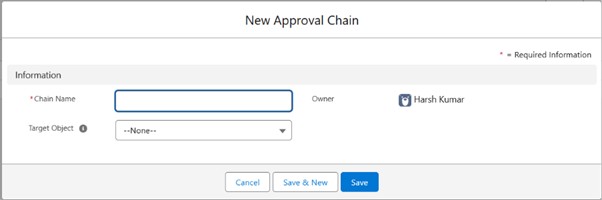
  • Add an Approval Chain
  • Store it in:
    • User
    • Manager
    • Lookup Field
  • Set approval sequence (sequential or parallel)

Picture3 3

Step 5: Define Approval Levels
  • Go to Settings → Sender Authentication
  • Click Verify a Single Sender
  • Go to Settings → Sender Authentication
  • Click Verify a Single Sender
Step 6: Configure Approval Actions
  • Update fields (e.g., Approval Status = Approved)
  • Trigger:
    • Email Alerts
Step 7: Configure Rejection Actions
  • Update status → Rejected
  • Notify the submitter
  • Allow re-submission if required
Step 8: Final Approval Actions
  • Lock or unlock the record
  • Mark record as Approved
  • Trigger post-approval automation:
    • Flow
    • Apex
    • Email notifications
Step 9: Activate Approval Rule
  • Enable the Active checkbox
Also Read

Conclusion

Advanced Approvals offer a flexible and efficient manner to manage complex approval processes in Salesforce, specially for CPQ situations involving pricing, discounts, and organization level decision-making. Not like standard approval procedures, advanced approvals support features like multi-level approval chains, dynamic approver assignment, parallel approvals, and condition- based routing.

It also offers various features such as, automated action, real-time approval tracking, re-approval whilst records are updated, and seamless integration with the Salesforce flow and Apex. These features help businesses reduce manual work, improve accuracy, maintain compliance, and speed up the overall approval process.

Because of this, Advanced Approvals have become an important part of modern Salesforce and CPQ implementations where structured and advanced approval management is required.

How useful was this post?

Click on a star to rate it!

Average rating 0 / 5. Vote count: 0

No votes so far! Be the first to rate this post.

Written by

Dev Anand

A dynamic engineer, innovative thinker, initiative taker and multi technology professional with exceptional logical, analytical and management skills possess a decade experience in Software Development and Salesforce CRM Solutioning. Enrich experience in converting business needs to Salesforce Experience. Worked on multiple RFPs and POCs. 50+ Integrations between Salesforce and other Platforms. Experience in LWC, Aura, Apex, JS, HTML, PHP, WordPress, Magento and many others.

Get the latest tips, news, updates, advice, inspiration, and more….

Contributor of the month
contributor
Antonina Kharchenko

Technical Writer, Salesforce Admin at SFApps.info

...
Categories
...
Boost Your Brand's Visibility

Want to promote your products/services in front of more customers?

...

Leave a Reply

Your email address will not be published. Required fields are marked *