Connecting Claude with Salesforce Hosted MCP Servers: A Headless Approach to CRM

June 22, 2026
10 Views
Connecting Claude with Salesforce Hosted MCP Servers: A Headless Approach to CRM
Summarize this blog post with:

Salesforce integrations have traditionally been designed around applications, APIs, middleware, and user interfaces. An external system sends a request, Salesforce processes it, and the result appears in a portal, mobile app, integration layer, or Lightning page.

Generative AI introduces a different kind of consumer: an AI assistant that understands a user’s intent, determines which Salesforce capability to use, retrieves the necessary context, and completes an action.

Connecting Claude with Salesforce Hosted MCP Servers demonstrates this shift. Instead of building a custom integration for every conversational use case, organizations can expose approved Salesforce data and actions to Claude through the Model Context Protocol, or MCP.

This approach also fits naturally into the broader Salesforce Headless 360 vision, where Salesforce capabilities can be accessed through APIs, MCP tools, command-line interfaces, agents, and experiences that do not require users to work directly inside the standard Salesforce interface.
What Is the Model Context Protocol?

The Model Context Protocol is an open standard for connecting AI applications to external tools and data sources.A traditional API provides endpoints that developers call using predefined request structures. MCP adds a standardized discovery and interaction layer that helps an AI client understand:

  • Which tools are available
  • What each tool does
  • What inputs are required
  • Which resources can be accessed
  • Which actions need approval
  • How the results should be returned

Claude can therefore use MCP tools to interact with Salesforce without requiring every Salesforce operation to be manually embedded in a prompt or implemented as a separate custom integration.

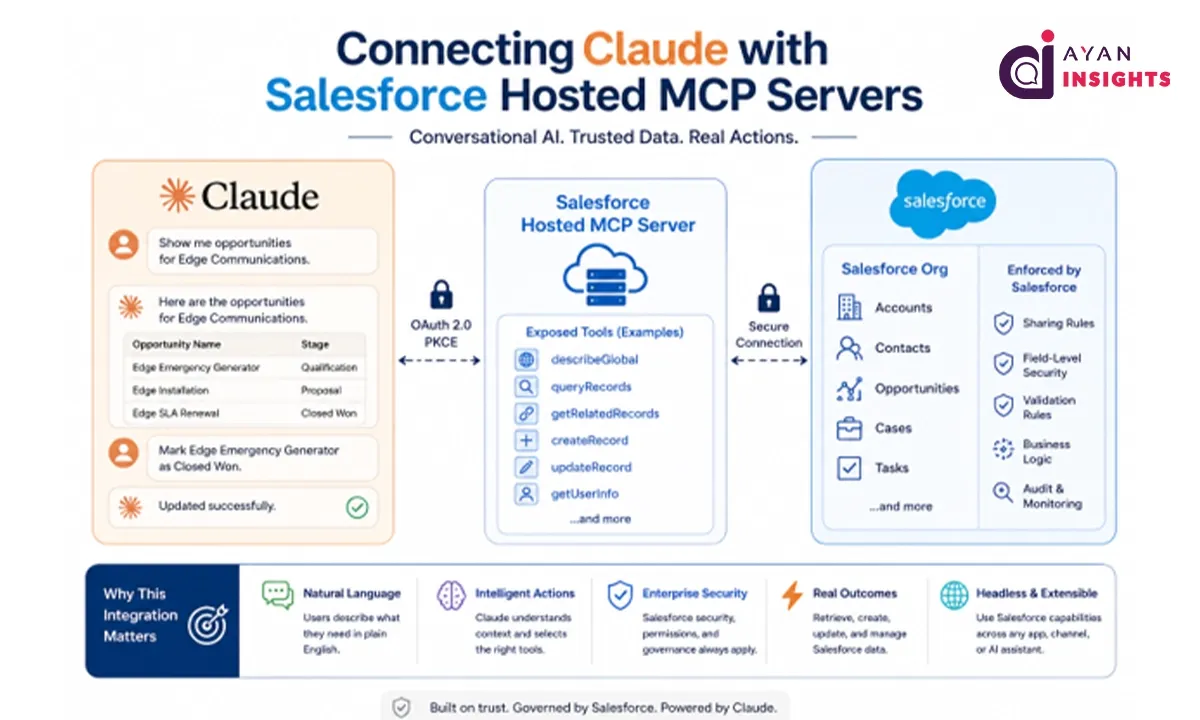
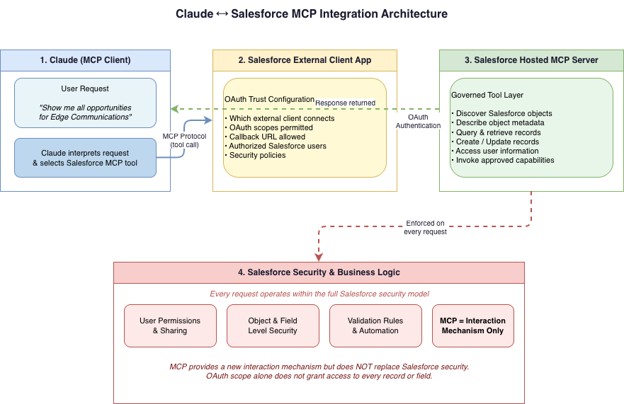
Salesforce Hosted MCP Servers provide this tool layer from within the Salesforce platform. An authorized MCP-compatible client can discover and invoke approved Salesforce capabilities while Salesforce continues to enforce authentication, permissions, and platform governance.

Why Connect Claude with Salesforce?

Claude is highly effective at understanding natural language, maintaining conversational context, reasoning across information, and selecting tools based on user intent.

Salesforce provides trusted customer data, business processes, automation, security, and transaction management.

Connecting them creates a useful division of responsibilities:

Claude handles:
  • Natural-language understanding
  • Intent interpretation
  • Conversational context
  • Reasoning and tool selection
  • User-friendly response generation

The result is not simply a chatbot that talks about Salesforce. It is a conversational interface capable of securely working with Salesforce.

Understanding the Architecture

Picture2 5

Configuration Overview

The exact setup can change as Salesforce and Claude evolve, but the integration generally follows these stages.

Step 1: Create an External Client App

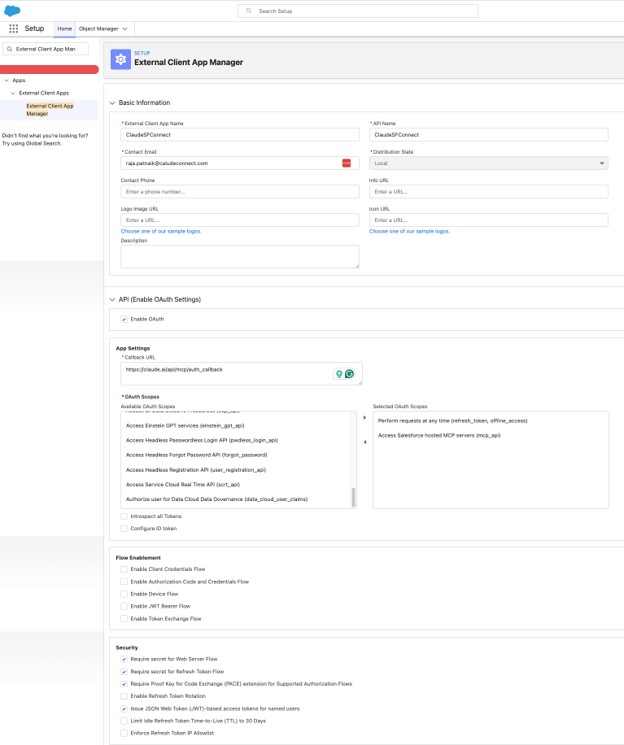
To allow Claude to securely connect with Salesforce-hosted MCP servers, create an External Client App and configure its OAuth settings.
1. Open External Client App Manager
In Salesforce Setup:
  1. Search for External Client App Manager.
  2. Open Apps → External Client Apps → External Client App Manager.
  3. Create a new External Client App.
2. Enter the basic application information
Provide the required application details:
  1. External Client App Name: ClaudeSFConnect
  2. API Name: ClaudeSFConnect
  3. Contact Email: Enter the email address of the application owner or administrator.
3. Enable OAuth

Expand the API (Enable OAuth Settings) section and select Enable OAuth.

Enter the following callback URL:

https://claude.ai/api/mcp/auth_callback

The callback URL redirects the OAuth response back to Claude after the user successfully authenticates with Salesforce.

4. Select the required OAuth scopes

Add the following OAuth scopes:

  1. Perform requests at any time
    refresh_token, offline_access
  2. • Access Salesforce hosted MCP servers
    mcp_api

The refresh-token scope allows Claude to maintain access without requiring the user to authenticate for every request. The MCP API scope grants access specifically to Salesforce-hosted MCP servers.

Only include the scopes required for the integration. Avoid granting broader permissions unless the use case specifically needs them.
Picture3 5

Step 2: Activate the required Salesforce Hosted MCP Server

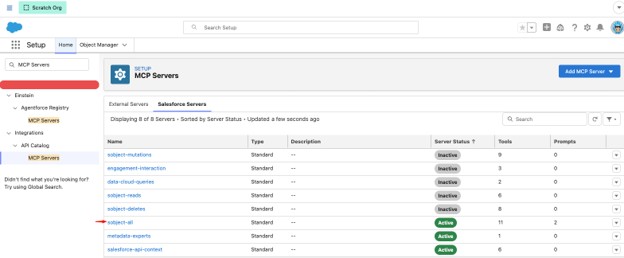
In Salesforce Setup, search for MCP servers.

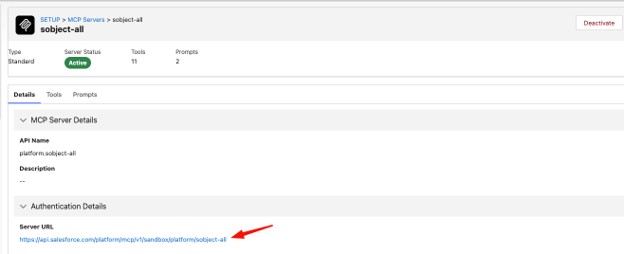
Select the required server and activate it. For example, the sobject-all server provides comprehensive access to Salesforce data. It supports all standard and custom objects in the org, with tools for creating, retrieving, updating, deleting, querying, searching, and navigating object relationships.

Activating the server is essential. Creating the OAuth client alone does not make MCP tools available.
Picture4 5

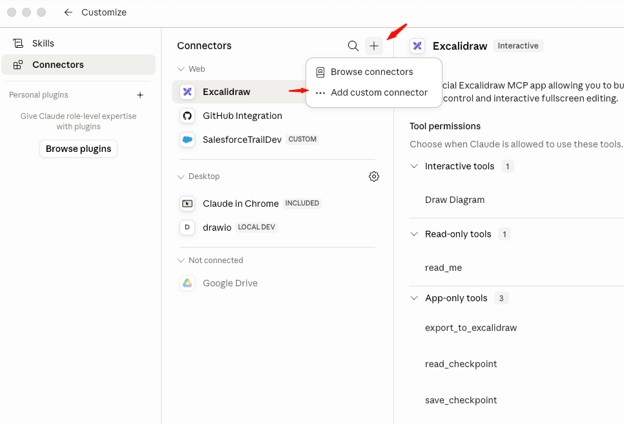
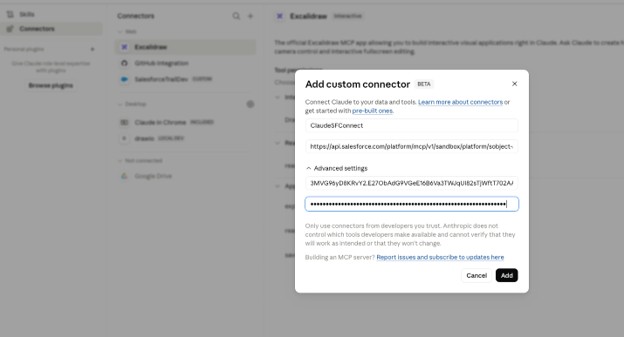
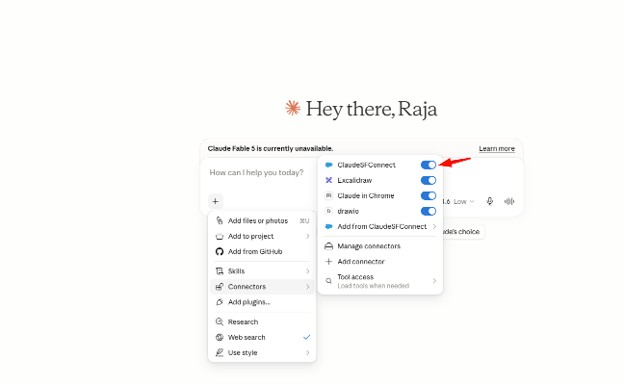
Step 3: Add Salesforce as a custom Claude connector

In Claude, open the connector settings and add a custom connector.

Provide:

  • A descriptive connector name
  • The Salesforce Hosted MCP Server URL
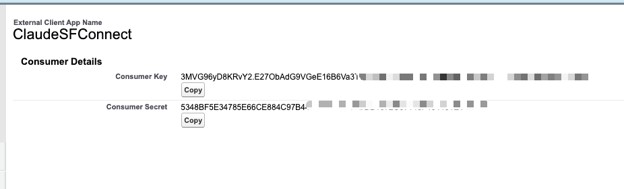
  • The External Client App consumer key
  • The consumer secret, when required

Picture5 5
Picture6 5
Picture7 5
Picture8 5

Use different connector names for each environment, such as:

  • Salesforce Development
  • Salesforce UAT
  • Salesforce Production

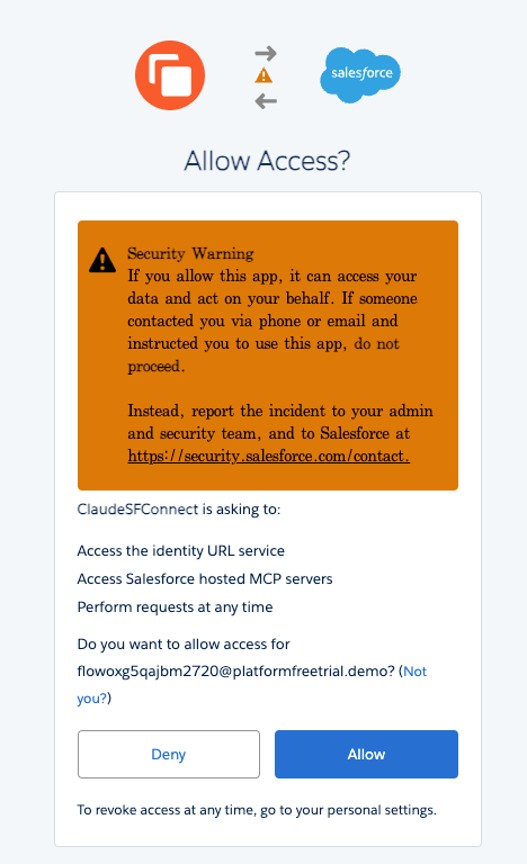
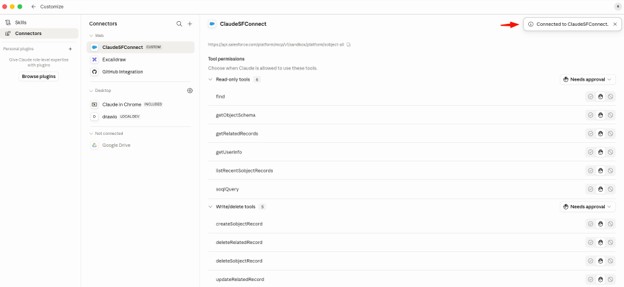
This reduces the risk of accidentally running a production operation while testing.After saving the connector, complete the Salesforce OAuth login and authorization flow.

Picture9 5

Picture10 3

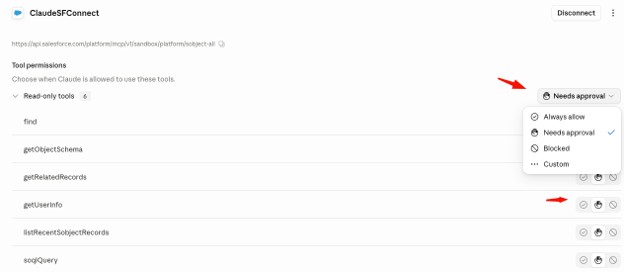
Step 4: Configure tool approval behavior

Claude can apply different approval policies to the tools exposed through the connector.

Depending on the client configuration, a tool can be:

  • Automatically allowed
  • Allowed only after user approval
  • Blocked

Picture11 2

Picture12 2


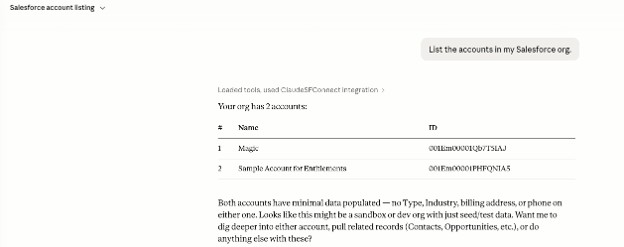
Prompt – List the accounts in my Salesforce org.Picture13 1

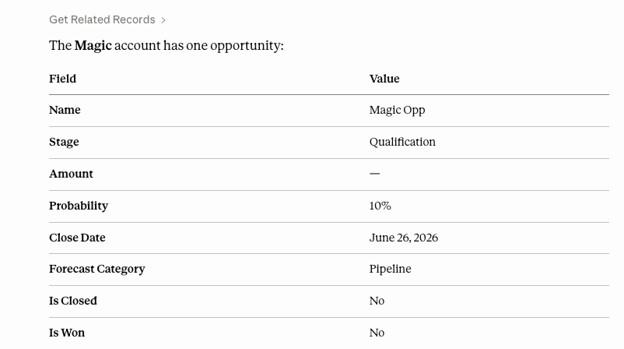
Prompt – Show me the opportunities associated with Magic Account.Picture14 1

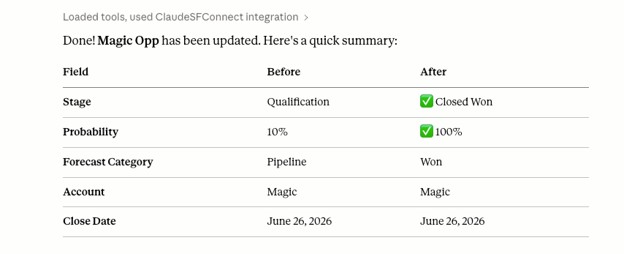
Prompt – Mark the Magic Opp opportunity as Closed Won and a Summary.Picture15 2

Adding the Headless Context

The Claude integration becomes more strategically important when viewed through the Salesforce Headless 360 model.

Headless does not simply mean removing the user interface. It means separating Salesforce capabilities from any single presentation layer.

In a headless architecture:

  • Salesforce remains the trusted system of record and business platform.
  • Data and processes are exposed through governed interfaces.
  • The consuming experience can be Claude, a custom web application, a mobile app, Slack, Microsoft Teams, a voice assistant, a commerce storefront, or another AI agent.
  • Users can access Salesforce capabilities without opening Salesforce directly.
Claude becomes one possible “head” connected to the Salesforce platform.
Also Read

Final Thoughts

Connecting Claude with Salesforce Hosted MCP Servers creates a practical bridge between conversational AI and trusted CRM operations. Instead of building separate custom integrations for every use case, organizations can expose approved Salesforce tools and data through a standardized MCP interface.

Claude can understand a user’s intent, maintain conversational context, and select the appropriate Salesforce capability, while Salesforce continues to enforce authentication, permissions, sharing rules, validation, and business automation.

The real value of this integration is not limited to retrieving records through natural-language prompts. It also enables Claude to help users navigate related data, create records, update information, and complete business tasks without requiring them to work directly inside the Salesforce interface.

For production adoption, organizations should begin with a focused use case, provide only the required MCP tools, apply least-privilege access, and require user approval for sensitive or high-impact actions. With the right governance in place, Salesforce Hosted MCP Servers can turn Claude into a secure and useful conversational interface for Salesforce.

Resources

How useful was this post?

Click on a star to rate it!

Average rating 0 / 5. Vote count: 0

No votes so far! Be the first to rate this post.

Written by

Raja Patnaik

With over a decade of experience in Salesforce, I specialize in crafting smart solutions for industries like real estate, healthcare, banking, and payments. As director of Technology Architecture at RafterOne, I help businesses grow and streamline operations by building powerful B2B Commerce solutions on Salesforce. I’m passionate about turning ideas into reality—from gathering business needs to designing, developing, and launching solutions that create real value. I’ve had the opportunity to lead projects integrating tax, shipping, and payment systems into e-commerce platforms, improving workflows and customer experiences. A highlight of my work has been automating CPQ and billing processes using the Lightning B2B Store. I'm also honored to serve on the Salesforce B2B Commerce Partner Advisory Board, contributing to the evolution of future products. I love learning and staying ahead of the curve, focusing on solving complex problems and driving meaningful results for businesses.

Get the latest tips, news, updates, advice, inspiration, and more….

Contributor of the month
contributor
Rohit Mehta

3x Certified Salesforce Developer || Apex || LWC

...
Categories
...
Boost Your Brand's Visibility

Want to promote your products/services in front of more customers?

...

Leave a Reply

Your email address will not be published. Required fields are marked *