Building a Custom Salesforce MCP Server with Apex, Flow, and APIs

August 03, 2026
15 Views
Building a Custom Salesforce MCP Server with Apex, Flow, and APIs
Summarize this blog post with:

Over the years, many of us have built Salesforce capabilities using Apex, Flow, REST services, and platform APIs. Those capabilities were usually consumed by Lightning applications, integration platforms, or external systems.

And then the AI agents introduce another way of using the same business logic.

Instead of building a separate integration for every AI client, Salesforce Hosted MCP Servers can expose selected platform capabilities as tools that an MCP-compatible client can discover and invoke.

In this article, I will walk through how a custom Salesforce MCP server can bring together Apex, Flow, and query-based tools through one governed endpoint.

These are only a few examples. The real value comes from deciding which Salesforce operations should be safely exposed to an agent and how those operations should be governed.

What Is a Salesforce Custom MCP Server?

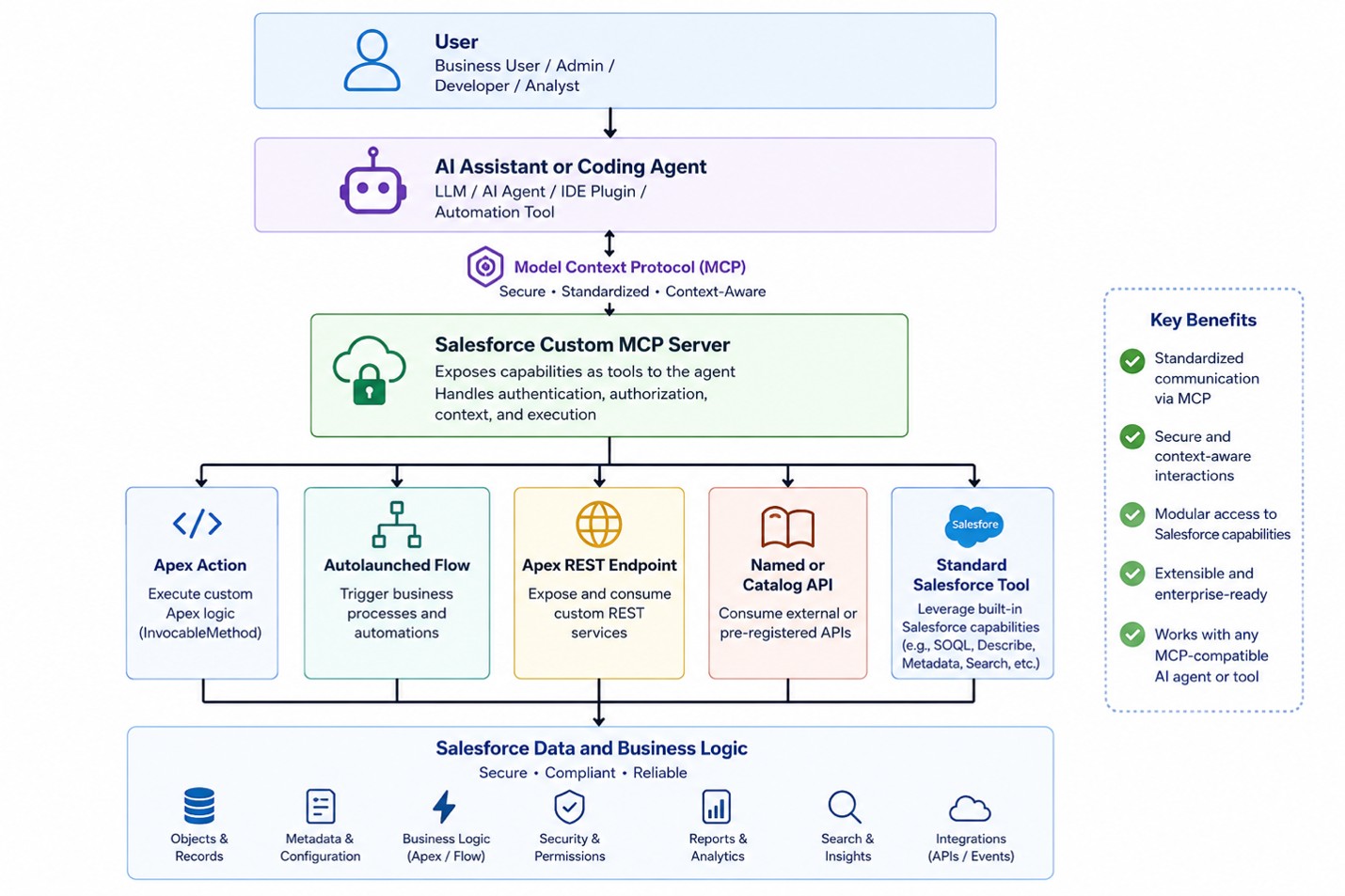
A custom MCP server is a Salesforce-managed endpoint containing a curated collection of tools for a particular persona or workflow.

Instead of giving an AI assistant access to every possible Salesforce capability, an administrator selects only the tools needed for a specific purpose.

Think of the Salesforce org as a large workshop. Apex classes, Flows, queries, and APIs are the available equipment. A custom MCP server creates a smaller tool kit containing only the equipment required for a specific job.

Picture2

Architecture diagram showing the flow from the user and AI agent through MCP to Salesforce tools, data, and business logic.

Why Build a Custom Server Instead of Exposing Everything?

This is now an essential section because the official documentation explicitly addresses tool limits.

Salesforce notes that AI clients can struggle to select the correct operation when a server exposes more than a few dozen tools. Custom servers should therefore be focused around a persona or workflow rather than becoming a catalogue of everything available in the org.

A customer-service assistant probably needs case, contact, entitlement, and order-related tools. It does not need metadata deployment, marketing analytics, or user-administration tools.

A focused server improves tool selection, simplifies permissions, reduces risk, and makes testing easier.

Here are some of the examples of a personal-based custom servers

Custom server Example capabilities
Customer Onboarding Server Create accounts and contacts, verify required information, generate onboarding tasks, assign owners, and track onboarding status
Salesforce Administrator Server Review user access, analyze permission assignments, inspect configuration, create approved fields, and summarize org setup
Partner Operations Server Register partner leads, review deal registrations, check partner eligibility, create follow-up tasks, and retrieve program information
Field Service Coordinator Server Review work orders, find available technicians, check parts availability, update appointments, and summarize service history

Let’s take a deeper look at the Customer Support MCP Server through one practical example and explore the technologies each tool can support.

Customer Support MCP Server

This server will contain four tools:

Tool name Backing technology Purpose
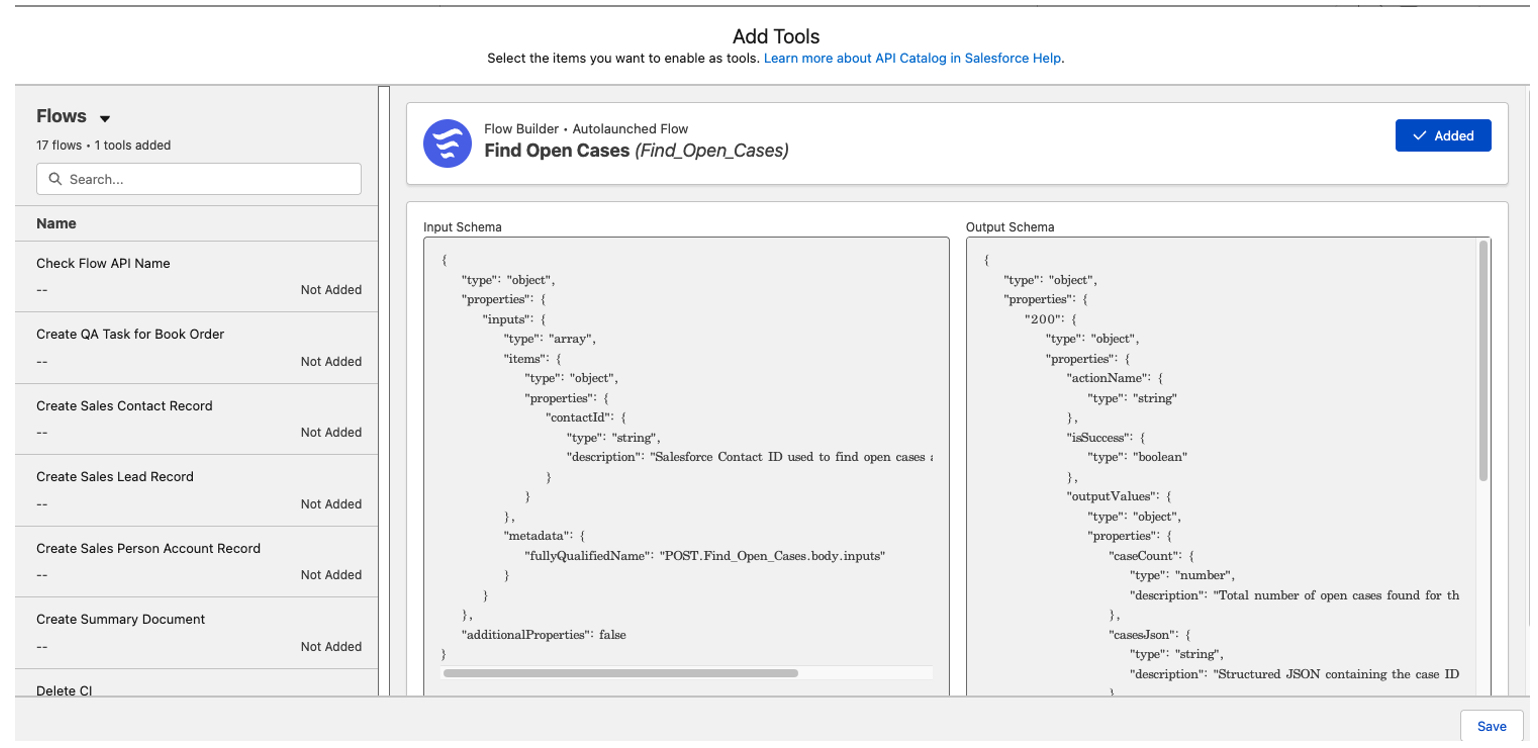
find_customer_cases Autolaunched Flow Retrieve open cases for a contact
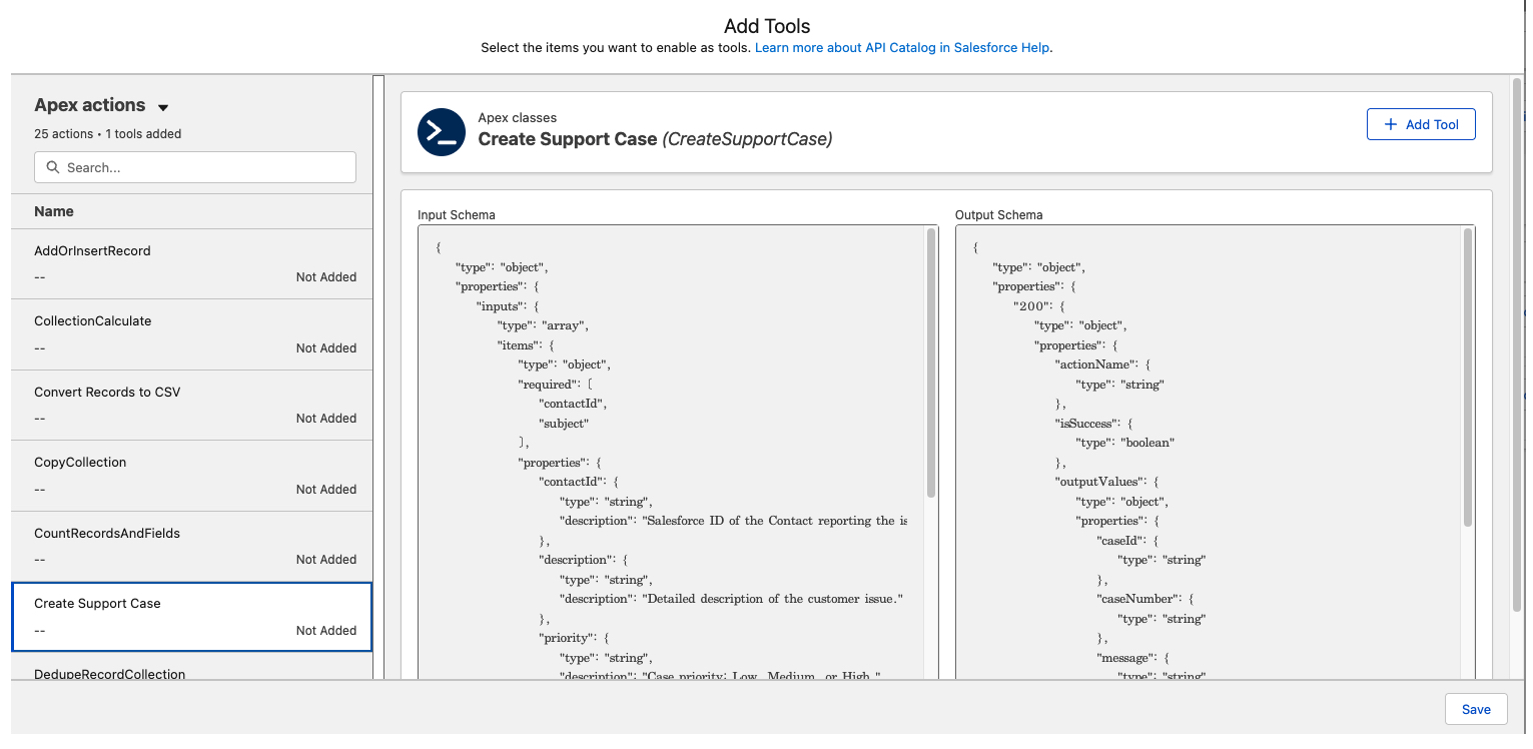
create_support_case Apex Invocable Action Validate inputs and create a case
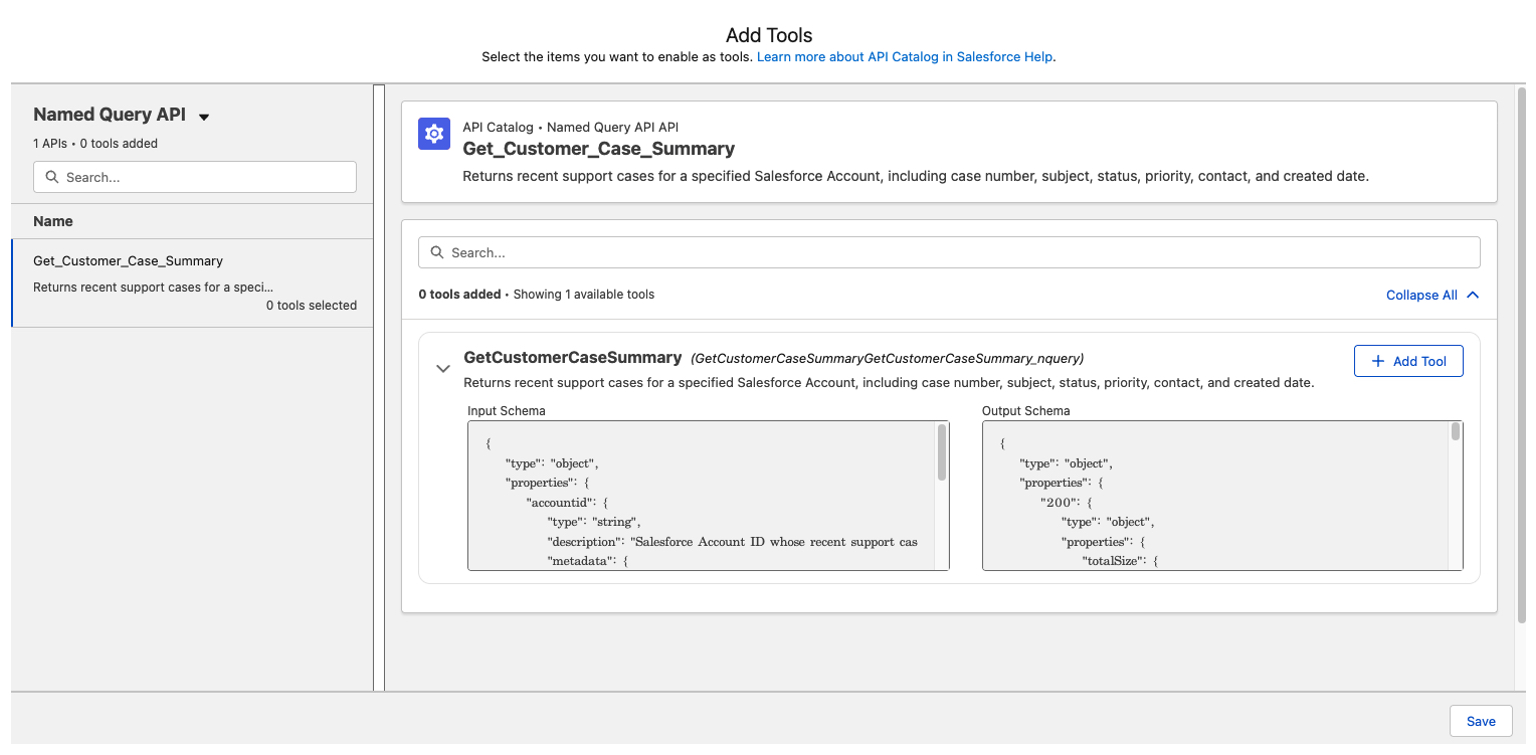
get_account_summary Named Query or API Catalog endpoint Return controlled account information
escalate_support_case Apex Action or Flow Apply escalation rules and update the case

A support representative can ask an AI assistant to find a customer’s open issues, create a case, summarize the account, or escalate an urgent problem. The assistant uses the appropriate Salesforce MCP tool rather than attempting to directly manipulate Salesforce data.
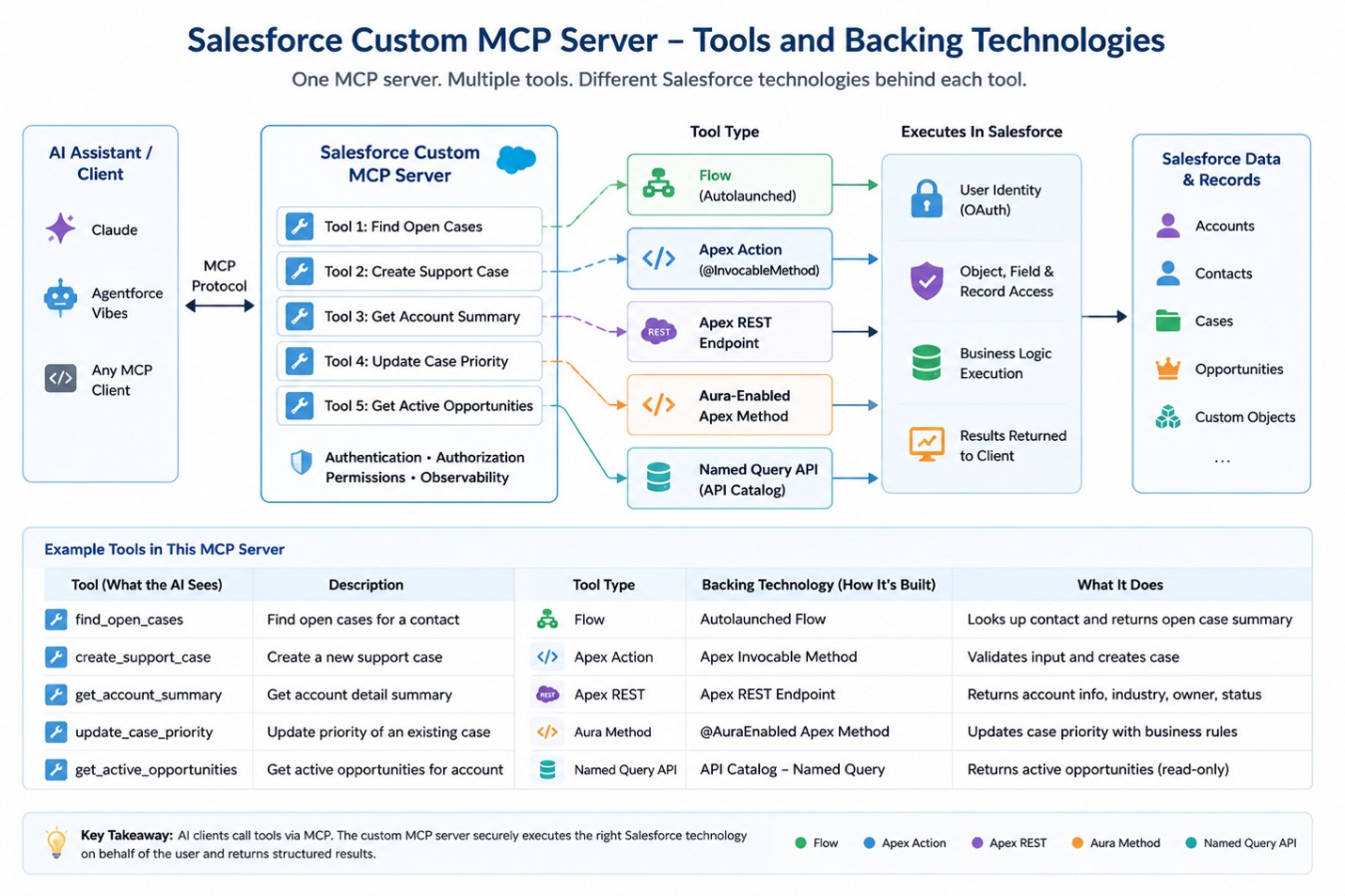
Picture3

Here is a visual representation of the tools and backend technologies that can be used for this use case.

PS – Only auto launched Flows can currently be exposed through this mechanism. The Flow must define its input and output variables. Screen Flows and scheduled Flows are not supported as custom MCP tools. Please review the latest Salesforce documentation on this topic, including key considerations, limitations, implementation details, and recommended best practices.

Tool Names and Descriptions Matter

The salesforce documentation emphasizes that the tool name and description are as important as the underlying implementation because the AI client uses this information to decide which tool to select.

Element Weak Example Better Example
Tool Name caseAction create_support_case
Tool Description Creates case Creates a Salesforce support case for an existing Contact. Use this tool only after the user confirms the subject and issue description. Do not use it to update or close an existing case.

Assemble the Custom Server

Custom servers can also combine tools from different standard Salesforce servers and organization-specific capabilities under one URL.

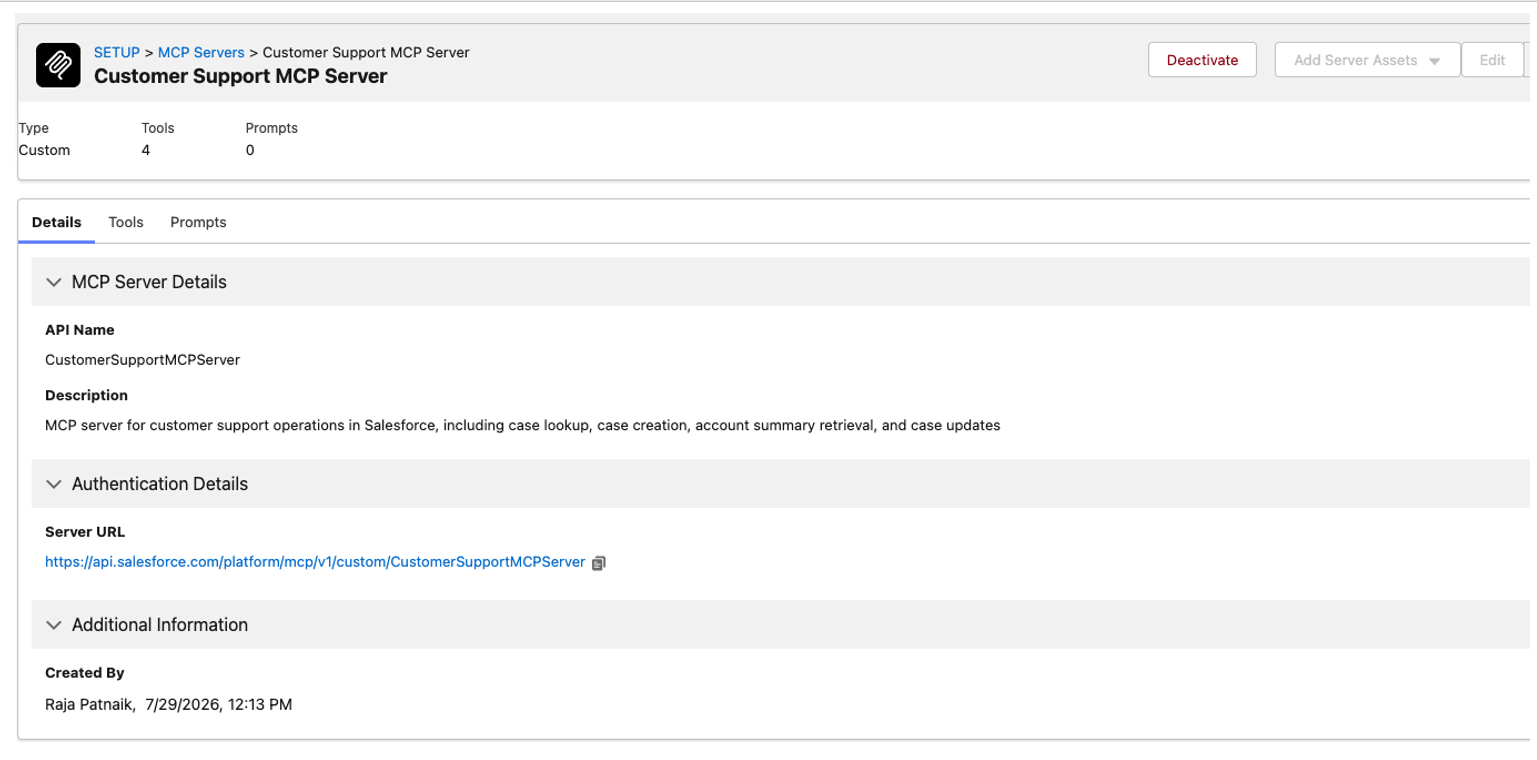
In this example, a single endpoint provides access to four specific tools instead of exposing a large set of information that may not be relevant to the task.

https://api.salesforce.com/platform/mcp/v1/custom/CustomerSupportMCPServer

Salesforce also states that custom server configurations can be moved between environments using Metadata API, which should be included in a deployment and lifecycle-management section.

Below are screenshots showing how to create a Salesforce Custom MCP Server and add specific tools to it.
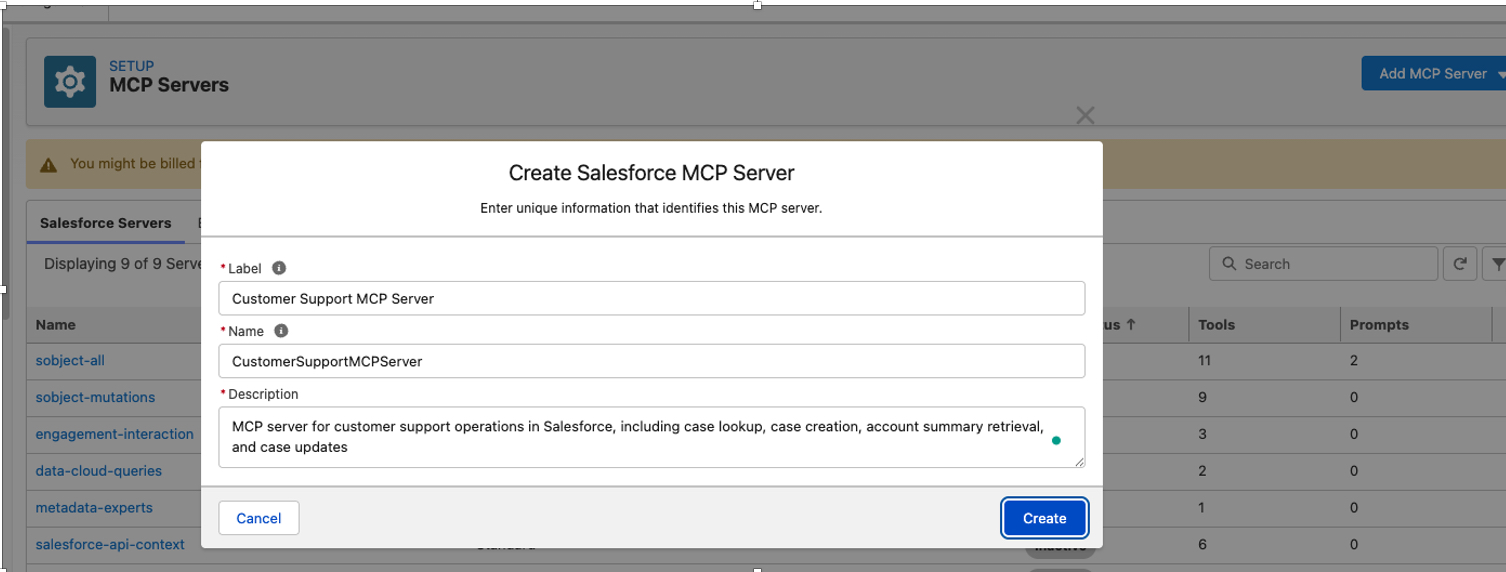
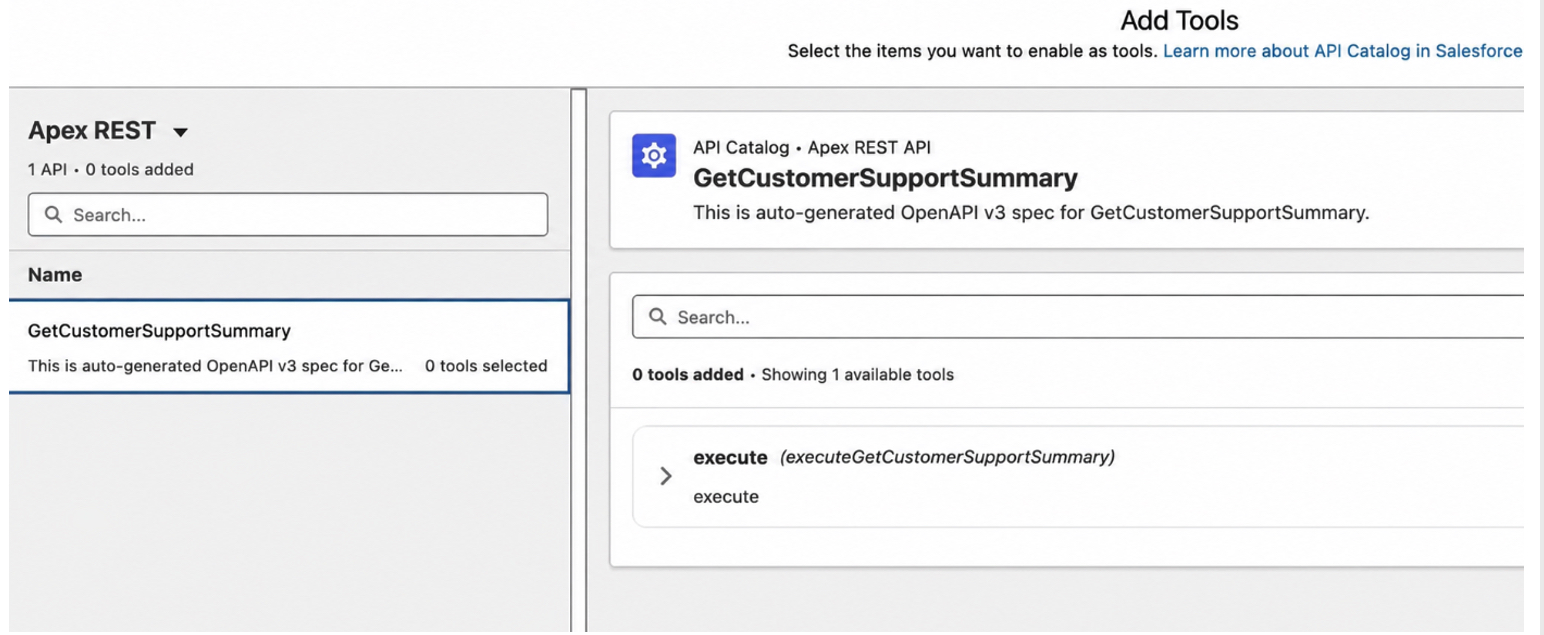
Picture4


Picture5


Picture6


Picture7


Picture8


Picture9

Connect the MCP Client

An MCP-compatible AI client can now securely connect to the Salesforce-hosted MCP server using an external client application, OAuth authentication, and the server URL.

Add MCP Custom Server URL in Visual Studio

Within the same Salesforce-connected Visual Studio Code instance, we can connect to the newly created Custom Remote MCP Server and access all the tools and capabilities it exposes.
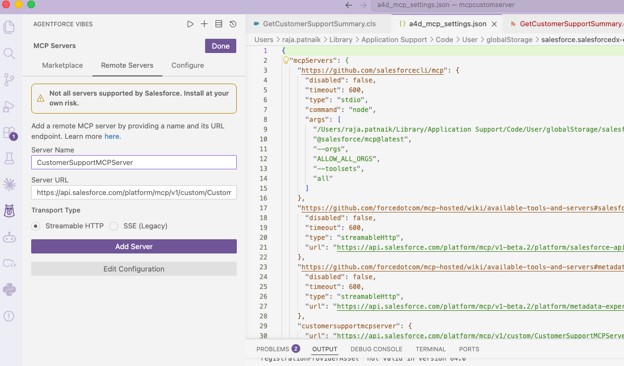
Picture10

Once it’s successfully added. You can view all the tools.
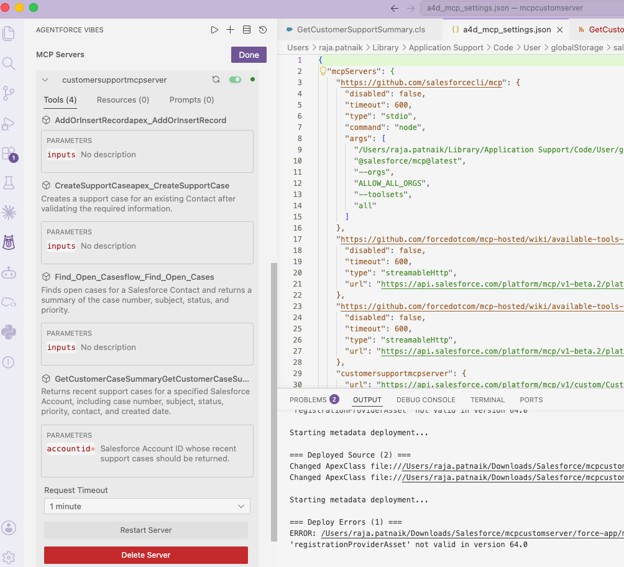
Picture11

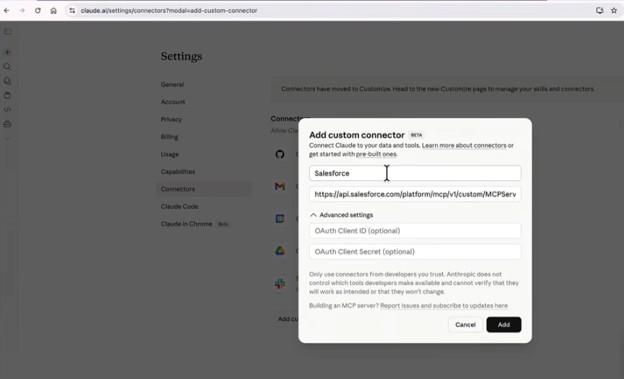
Similarly, the Custom MCP Server can be integrated with Claude using an External Client App, OAuth Client ID, and Client Secret. Refer to my blog for detailed setup instructions:

https://ayaninsights.com/guestblogs/connecting-claude-with-salesforce/
Picture12

Security, Governance, and Per-User Access in Salesforce Hosted MCP Servers

Salesforce Hosted MCP Servers provide platform-managed authentication, authorization, and observability. Salesforce warns against creating an unnecessary proxy around Salesforce REST APIs because doing so can bypass platform controls, reduce telemetry, and introduce additional maintenance.

Per-user access

Each MCP request operates with the permissions of the user who authorized the connection. This includes object access, field-level security, and sharing rules.

Conclusion

Building a custom MCP server inside Salesforce gives AI agents a structured and secure way to use existing Salesforce capabilities. Instead of rebuilding business logic outside the platform, we can expose selected Apex methods, autolaunched Flows, Apex REST services, Aura-enabled methods, and Named Queries as focused MCP tools.

The real value is not simply making more actions available to an AI agent. It is choosing the right tools, defining clear inputs and outputs, applying the correct permissions, and keeping sensitive or high-impact operations governed.

A small persona-based server, such as a Customer Support MCP Server, is a practical place to start because it keeps the use case focused and easier to test.

MCP does not replace Apex, Flow, or APIs. It provides a new way for AI clients to discover and invoke those capabilities while Salesforce continues to manage identity, access, business logic, and data. As agent-based experiences continue to grow, this pattern can help organizations reuse their existing Salesforce investments in a more controlled and scalable way.

References
Also Read

How useful was this post?

Click on a star to rate it!

Average rating 0 / 5. Vote count: 0

No votes so far! Be the first to rate this post.

Written by

Raja Patnaik

I am a Salesforce technology leader with more than 19 years of experience designing and delivering enterprise solutions across Commerce Cloud, Experience Cloud, Revenue Cloud, Data Cloud, Agentforce, and the core Salesforce platform. In my current role as Vice President of the Salesforce COE Technology Group at Acxiom, I lead architecture strategy, governance, technical standards, and innovation across complex transformation programs. As a hands-on technical professional, I enjoy solving difficult architecture challenges, guiding delivery teams, and translating business goals into scalable, secure, and maintainable solutions. I partner closely with business leaders, clients, architects, and engineering teams to drive platform modernization, AI adoption, and measurable business outcomes. I am passionate about building strong architecture practices, mentoring technical talent, and advancing Salesforce capabilities through thought leadership, research, and continuous learning. My focus is always on combining deep technical expertise with practical execution to create solutions that deliver lasting value for global enterprises.

Get the latest tips, news, updates, advice, inspiration, and more….

Contributor of the month
contributor
Akash P T

Salesforce Developer with 1.8+ years of experience in Apex, LWC, Flows, REST API integrations and Agentforce. Passionate about automation, scalable CRM solutions, and sharing Salesforce knowledge with the community.

...
Categories
...
Boost Your Brand's Visibility

Want to promote your products/services in front of more customers?

...

Leave a Reply

Your email address will not be published. Required fields are marked *