The Real Workflow Problems Salesforce Developers Face Every Day

August 07, 2026
8 Views
The Real Workflow Problems Salesforce Developers Face Every Day
Summarize this blog post with:

A Salesforce developer wakes up thinking about VS Code, spends the afternoon wrestling with VS Code over something else entirely, and goes to bed not entirely sure if that last change was actually pulled or pushed. Somewhere in between, an org update actually happens.

Every Salesforce developer has a version of the same morning.

You open your laptop, pull up VS Code, wait for the Salesforce Extension Pack to load, run an org authentication command, wait for the metadata to sync, and only then — ten or fifteen minutes in — do you actually start writing code. If you’re debugging something urgent in a sandbox, you might skip all that and open the Developer Console instead, where you’re greeted by a UI that hasn’t meaningfully changed in years.

This is normal. It’s also, when you step back and look at it, a lot of overhead for what should be a simple task: writing and managing code inside an org.

This article looks at the specific friction points Salesforce developers deal with on a daily basis, and how a newer approach — an IDE built natively inside the platform — changes the equation.

Challenge 1: Every Tool Depends on Something Outside Salesforce

Look at the standard developer toolkit today, and a pattern emerges: nothing is truly native.

  • VS Code needs a local installation, the Salesforce CLI, the Salesforce Extension Pack, org authentication, a metadata pull, and a push back to the org every time a change is made.
  • The Developer Console is native to Salesforce, but it’s dated — slow to load, limited in what it can do, and widely considered a tool the platform has outgrown rather than invested in.
  • Browser-based editors often rely on a Chrome extension installed from an external marketplace, something that has to be installed, kept updated, and trusted outside Salesforce’s own security boundary.

Each of these tools asks the developer to pay a small tax before a single line of code gets written: install something, authenticate something, wait for something to sync.

What changes with a native IDE: A tool built directly inside the Salesforce org, authenticated by the existing Salesforce session, removes that tax entirely. There’s nothing to install locally, nothing to authenticate separately, and nothing to maintain outside the platform. Opening the tool inside the org is the entire setup process.

Challenge 2: Your Codebase Is Scattered Across the Org

Apex Classes live in one Setup menu. Triggers are tucked under Object Manager, one object at a time. Lightning Web Components and Aura Components are in a different place entirely. Visualforce Pages and Components are somewhere else again. Static Resources have their own separate list.

For a developer trying to get a full picture of an org’s custom codebase, this means constant navigation between disconnected screens — with no single view of everything that exists.

What changes with a unified interface: Bringing LWC, Aura Components, Apex Classes, Triggers, Visualforce Pages, Visualforce Components, and Static Resources into one interface means a developer can see and manage the entire custom codebase from a single place — searchable, organized, and without jumping between Setup pages.

Challenge 3: Context-Switching Between the Org and an External Editor

Even with a well-configured local setup, working in an editor like VS Code means constantly switching context: pull metadata from the org, make changes locally, push them back, and hope nothing was missed in the sync. If two developers are working in the same sandbox, this sync process becomes a source of conflicts and confusion.

What changes with in-org editing: When an IDE runs natively inside Salesforce, there’s no metadata sync cycle to manage. Changes are saved directly to the org in real time, so what’s visible in the editor is always the live state of the org — not a local copy that may or may not match.

Challenge 4: Security Concerns With External Tooling

Every external tool in a developer’s workflow — a local IDE, a CLI, a browser extension — is a point where an org’s code and credentials leave Salesforce’s own security boundary, even briefly. For teams with strict data governance requirements, this is a legitimate concern, not a hypothetical one.

What changes with a fully native approach: A tool that runs entirely within the org, under the org’s existing session and security model, means code never has to leave Salesforce. There’s no third-party server involved and no external data transfer — the org’s intellectual property stays inside the platform it was built on.

Challenge 5: The Barrier to Entry for New Salesforce Developers

CLI-based tooling is powerful, but it’s not approachable. A developer new to Salesforce — or an admin looking to pick up light development work — often has to learn command-line authentication and metadata deployment concepts before they can make a single edit.

What changes with a guided, in-platform interface: A native IDE with a straightforward, visual interface lowers that barrier. Developers can explore and manage code without first mastering CLI tooling, making it more approachable for solo consultants, admins who also write code, and developers early in their Salesforce careers.

What This Looks Like in Practice: Introducing Dev Studio

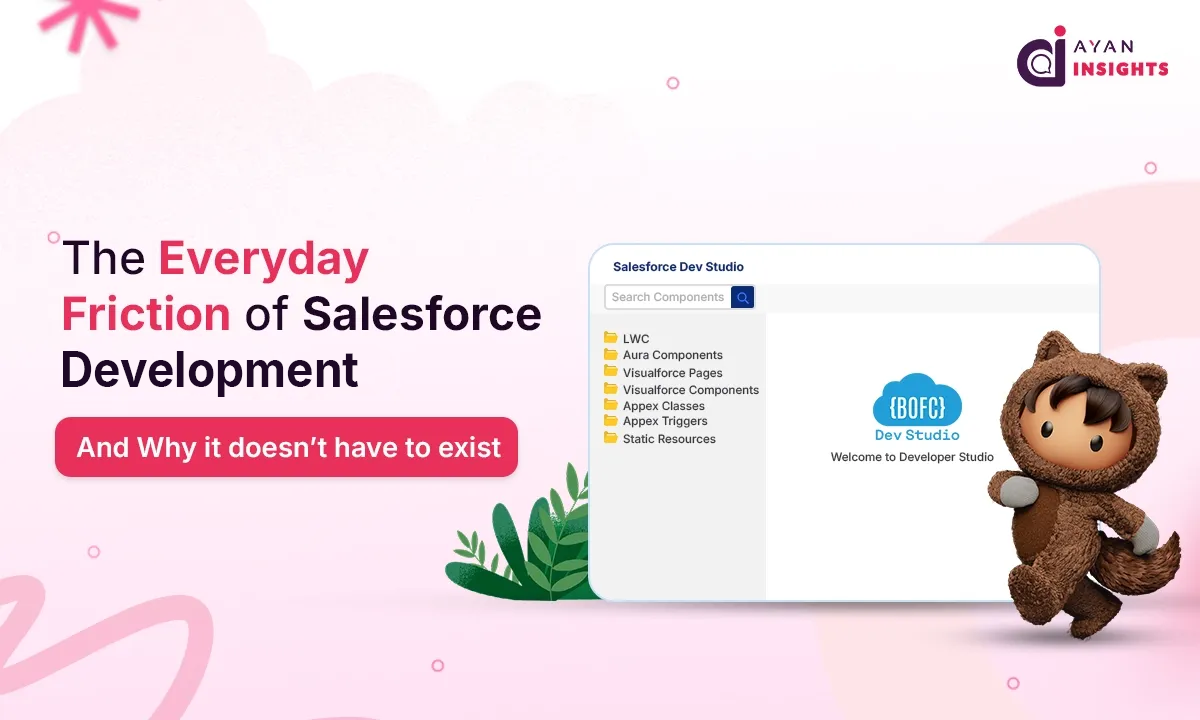
BOFC  already known in the Salesforce ecosystem as a metadata management tool for bulk creating, updating, cloning, comparing, and deleting metadata — has extended that same philosophy to code, with a feature called Dev Studio.

Dev Studio is a fully native IDE that lives inside the Salesforce org itself. It isn’t a browser extension, a marketplace plugin, or a bridge to an external editor — it requires no VS Code installation, no CLI authentication, and no local dependencies of any kind.

Once inside Dev Studio, a developer’s entire custom codebase is available in one place:

  • Lightning Web Components (LWC) — create, edit (HTML, JavaScript, CSS, metadata XML), and delete components
  • Lightning Aura Components — manage controller, helper, style, and markup files
  • Apex Classes — browse, create, edit, and delete classes
  • Apex Triggers — write, modify, and delete triggers across objects
  • Visualforce Pages — create, edit, and delete pages
  • Visualforce Components — create, edit, and delete components
  • Static Resources — download, view, create, edit, and delete resources

Because it runs inside the org and uses the existing Salesforce session for authentication, every change is written directly to the org in real time — there’s no separate sync step, and no code leaves the Salesforce security boundary.

This also solves a limitation developers run into with browser-based alternatives like the Lightning Studio Chrome extension, which restricts access to one Salesforce org’s codebase at a time. With Dev Studio, access, edits, and code management happen per org, separately — so working across multiple orgs doesn’t mean juggling a single extension’s session or switching contexts just to see a different org’s code.

Who This Kind of Tooling Helps Most

An in-org, dependency-free IDE tends to matter most for a specific set of situations:

  • Solo developers and consultants managing several orgs, who need to get in and make changes quickly without re-authenticating tooling each time
  • Development teams looking for a lightweight option for quick edits, code reviews, or urgent fixes that don’t warrant a full local setup
  • Admins who also write code, who’d rather manage metadata and code from the same place instead of switching tools
  • Sandbox and UAT managers who need to create or validate components quickly in non-production environments
  • Developers newer to Salesforce, who benefit from a more approachable interface while they’re still getting comfortable with the platform

The Bigger Picture

None of this is to say external tools like VS Code or the Salesforce CLI are going away — for large-scale development, version control, and CI/CD pipelines, they remain essential. But for the everyday friction of quick edits, urgent fixes, and working across multiple orgs, a native, dependency-free option addresses a real gap in how Salesforce development currently works.

As more of the Salesforce ecosystem moves toward reducing setup overhead and keeping data inside the platform’s own security boundary, in-org tooling like this is likely to become less of a novelty and more of an expectation.

Dev Studio is available inside BOFC, currently included at no additional cost across all plans.

Also Read

Don’t forget to check out: Bulk Object Field Creator (BOFC) Review

How useful was this post?

Click on a star to rate it!

Average rating 0 / 5. Vote count: 0

No votes so far! Be the first to rate this post.

Written by

Mohit Bansal

Salesforce Technical Architect | Lead | Salesforce Lightning & Integrations Expert | Pardot | 5X Salesforce Certified | App Publisher | Blogger

Get the latest tips, news, updates, advice, inspiration, and more….

Contributor of the month
contributor
Akash P T

Salesforce Developer with 1.8+ years of experience in Apex, LWC, Flows, REST API integrations and Agentforce. Passionate about automation, scalable CRM solutions, and sharing Salesforce knowledge with the community.

...
Categories
...
Boost Your Brand's Visibility

Want to promote your products/services in front of more customers?

...

Leave a Reply

Your email address will not be published. Required fields are marked *