Customize agent response using Lightning Types
With the increasing use of agents in day-to-day operations, it becomes clear that users should not be limited to text interactions. Let’s explore how standard and custom Lighting types can be used to customize and build the user friendly agent conversations in Lightning Experience, enhance their interactivity, and add an initial layer of validation.
Standard Lightning Types
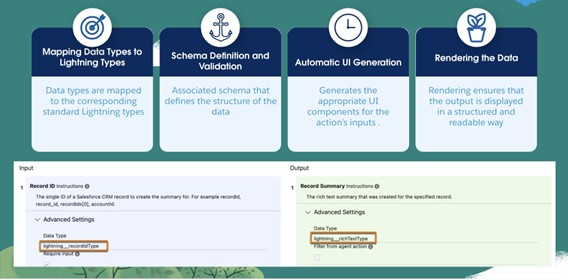
Salesforce supports predefined Lightning Types to validate, define, and display data for an Agent whenever an action is triggered. Standard Lightning types come with ready-to-use input and output components that require minimal configuration, covering most common use cases and delivering a seamless experience within agent actions. Below is an overview of how Lightning types are applied in this context.
Custom Lightning Types
Although standard Lightning types are good, for complex agent response we need a user friendly UI. Custom Lightning types can help us to build such advanced UI. These are JSON-based data models that define how complex data is structured, validated, and presented in the user interface. They can be used across Salesforce tools like Agentforce, Experience Builder, Prompt Builder, and Flows.
This feature enables you to build a fully tailored, branded experience in two key ways. First, you can define the data structure either by referencing an Apex class or by creating a custom JSON schema. Second, you can customize the user interface by developing a LightningTypeBundle, where editor.json controls the input experience and renderer.json defines the output display, both powered by your own Lightning Web Components (LWC).
Lighting type artifacts
Lightning Type consists of following building blocks.
- Schema defines the data structure and the rules for its validation, such as maximum length, type, and format.
- Editor defines the input UI component that you use to enter or edit data.
- Renderer defines the output UI component that displays data.
LightningTypeBundle Structure
LightningTypeBundle components are stored in the lightningTypes folder. The bundle includes these resources.
- The lightningTypes directory includes a subfolder for every custom Lightning type, named using the {typeName} format.
- Within each custom type folder, a schema.json file defines the data model used for validating the custom Lightning type.
- The bundle can include optional channel-specific folders to replace the default UI for particular Salesforce applications. Supported channels include:
- lightningDesktopGenAi: Used for Agentforce Employee agents within Lightning Experience.
- enhancedWebChat: Used for Agentforce Service agents through Enhanced Chat v2.
- experienceBuilder: Used within Experience Builder.
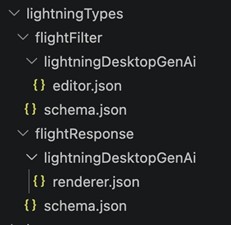
- Within each {channelName} folder, you can define either:
- An editor.json file to specify the custom UI for the editor.
- A renderer.json file to specify the custom UI for the renderer.
Build Custom Lightning Type with Top-Level Renderer Overrides
Example Apex Class for Retrieving Flight Information. Use these Apex classes together to create a custom agent action that finds flights. The main FlightAgent class contains the invocable method, and the other classes define the complex data structures for the request and response.
When you create your custom agent action, select the method Find Flights.
The Apex class FlightAgent accepts the flight search criteria, including the origin city, destination city, and date of travel, and then returns a list of available flights.
Note – For this example, flight availability data is already included in the FlightAgent Apex class. However, in a real-time scenario, flight information is fetched from an external service, and the Apex class processes that data to generate the final response.
Create Agent Action by Using Apex Class
For information about how to create a custom action by using Apex class, see
Create a Custom Agent Action. Inputs and outputs for the agent action are defined by using standard Lightning types and Apex classes.
Input:
dateOfTravel, destinationCity, and originCity use standard Lightning types such as
lightning__dateType and lightning__textType.
Output:
- The output
aFlight for the agent action is a complex type that references an Apex class. The available flight information is retrieved by using @apexClassType/c__AvailableFlight in the agent action output, where:
apexClassType is the bundle name.AvailableFlight is the Apex class.
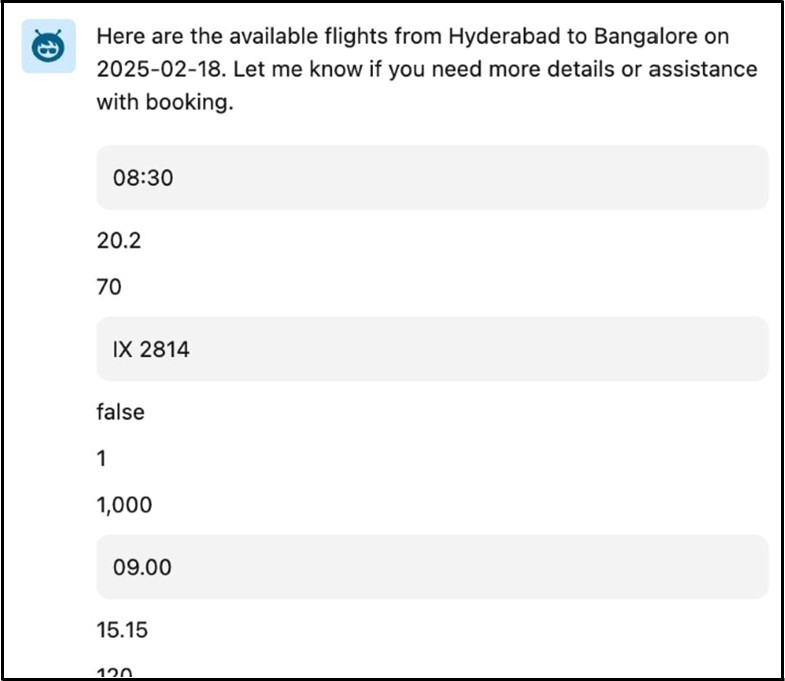
Agent action execution output with standard lightning types
When you execute this agent action, it prompts you to provide input and then generates the output. The agent’s action UI returns the available flight details. Here’s the image that shows how the custom agent action’s output appears in an agent conversation.
Build advanced output components with Lightning Web Components
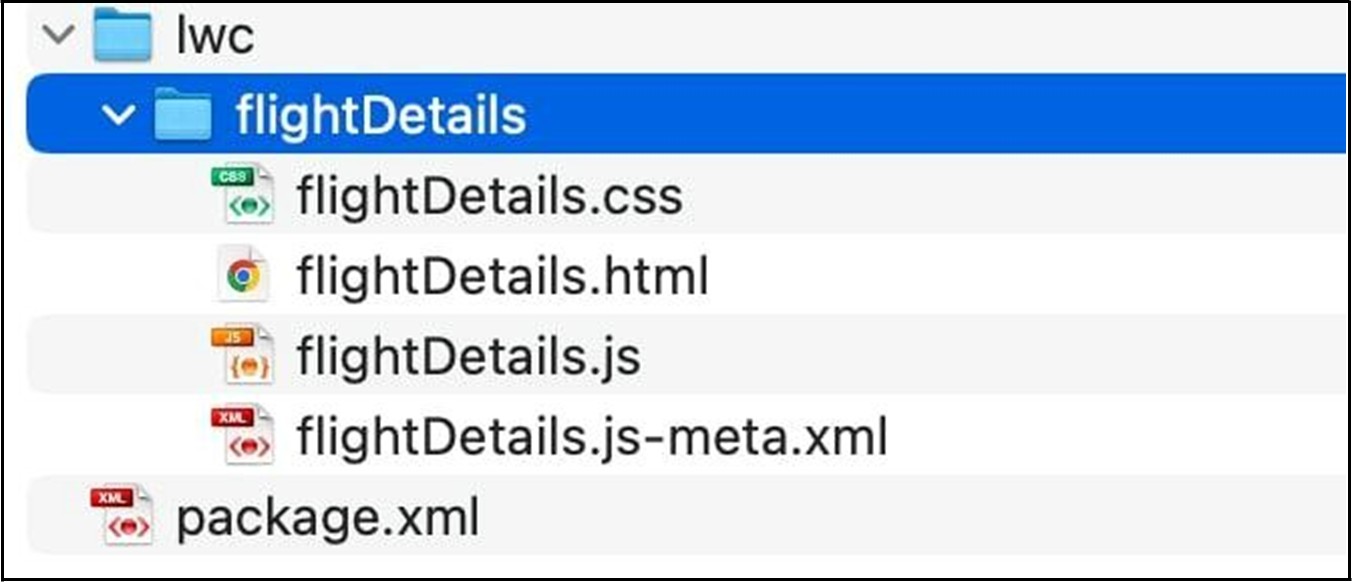
This section explains how the components are created and deployed for agent action output.This image shows the Lightning Web Component (LWC) folder structure. Sample code for LWC Component.
The LWC component includes HTML markup designed to represent the data that the agent returns for
@apexClassType/c__AvailableFlight. This HTML markup ensures that the data is displayed in an intuitive and customized format.
This sample code shows the contents of the flightDetails.js-meta.xml file.
<?xml version="1.0" encoding="UTF-8"?>

<LightningComponentBundle xmlns="http://soap.sforce.com/2006/04/metadata">

    <apiVersion>64.0</apiVersion>

    <isExposed>true</isExposed>

    <masterLabel>Flight LWC</masterLabel>

    <targets>

        <target>lightning__AgentforceOutput</target>

    </targets>

    <targetConfigs>

        <targetConfig targets="lightning__AgentforceOutput">

            <sourceType name="c__flightResponse"/>

        </targetConfig>

    </targetConfigs>

</LightningComponentBundle>
Note – When you create an LWC component to override the UI for action input, use lightning__AgentforceInput as the target. For output, use lightning__AgentforceOutput. For information about LWC target types, see lightning__AgentforceInput Target and lightning__AgentforceOutputTarget.
Override Default UI for Output With Custom Lightning Types
Create a custom Lightning type named flightResponse to enhance the visibility of the information in the output UI. With CLTs, you can add your own Lightning Web Components (LWC) to present data in a more structured and intuitive format.
Configure the renderer.json file to override the default UI of a custom Lightning type in the agent action. Here’s a sample code showing a lightningTypes folder for a custom Lightning type named flightResponse.
Note – This example uses lightningDesktopGenAi to configure the custom Lightning type. To configure the type for the enhancedWebChat channel, create the renderer.json file in the corresponding channel folder.
The custom Lightning type flightResponse includes a schema.json file and a renderer.json file.
The renderer.json file controls how the data is displayed to the user in the agent action output. This sample code shows the contents of the schema.json file.
{

    "title": "My Flight Response",

    "description": "My Flight Response",

    "lightning:type": "@apexClassType/c__AvailableFlight"

}
This sample code shows the contents of the renderer.json file.
{

    "renderer": {

        "componentOverrides": {

            "$": {

                "definition": "c/flightDetails"

            }

        }

    }

}
Integrate Custom Lightning Type into Agent Action Output
To add a custom Lightning type to the agent action, complete these steps.
- Open the agent action.
- Edit the Output Rendering parameter of the agent action output for
aFlight.
- Select the custom lightning type
flightResponse.
- Save the agent action.
The Unsupported Data Type message appears in the Map to Variable parameter. You see this message when you refer to types such as @apexClassType and custom Lightning types in an agent action’s Output Rendering parameter. This message doesn’t affect your saved work and can be safely ignored.
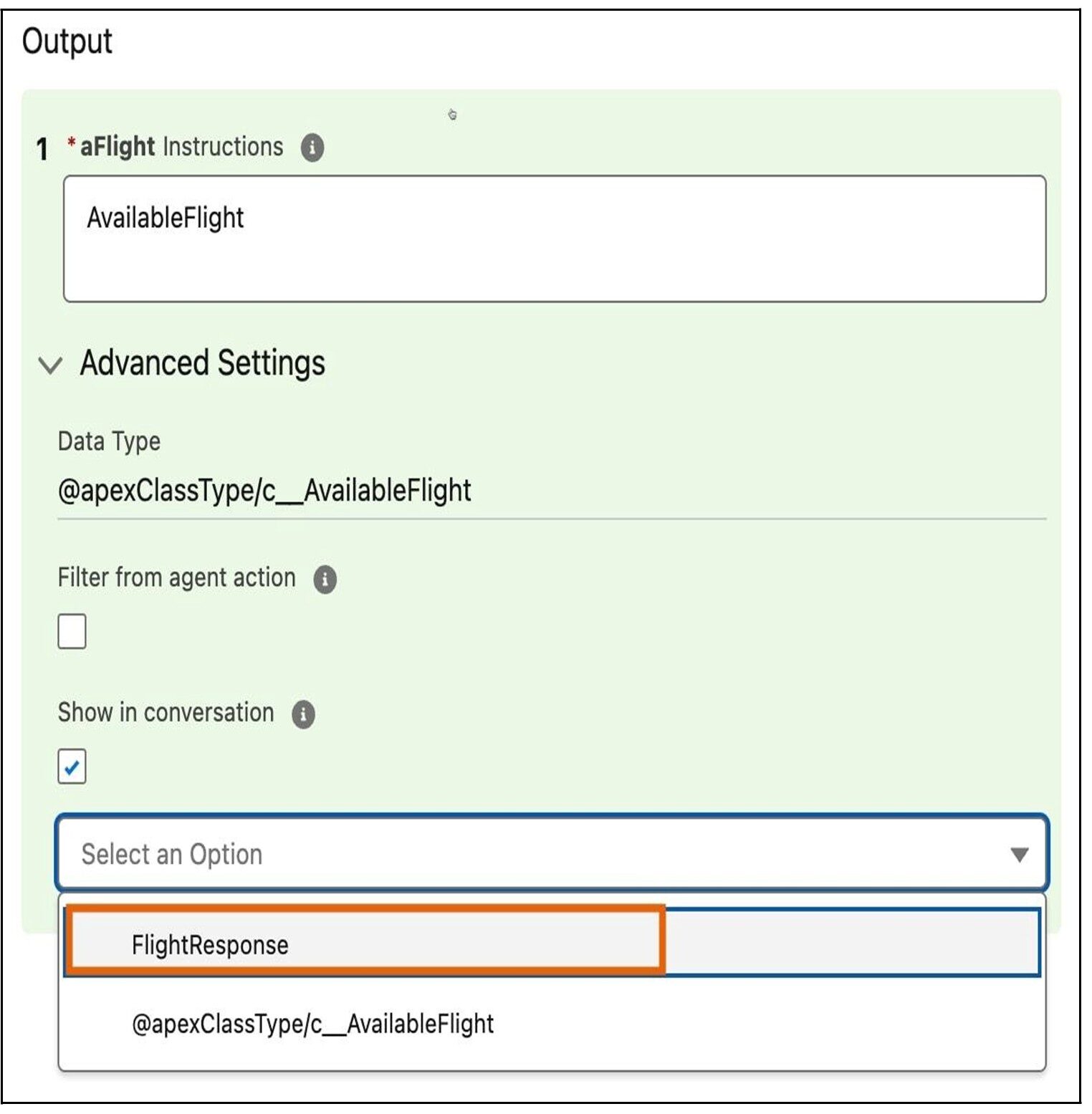
This image shows the custom Lightning type that you created.
Customized agent response with Custom Lightning Type
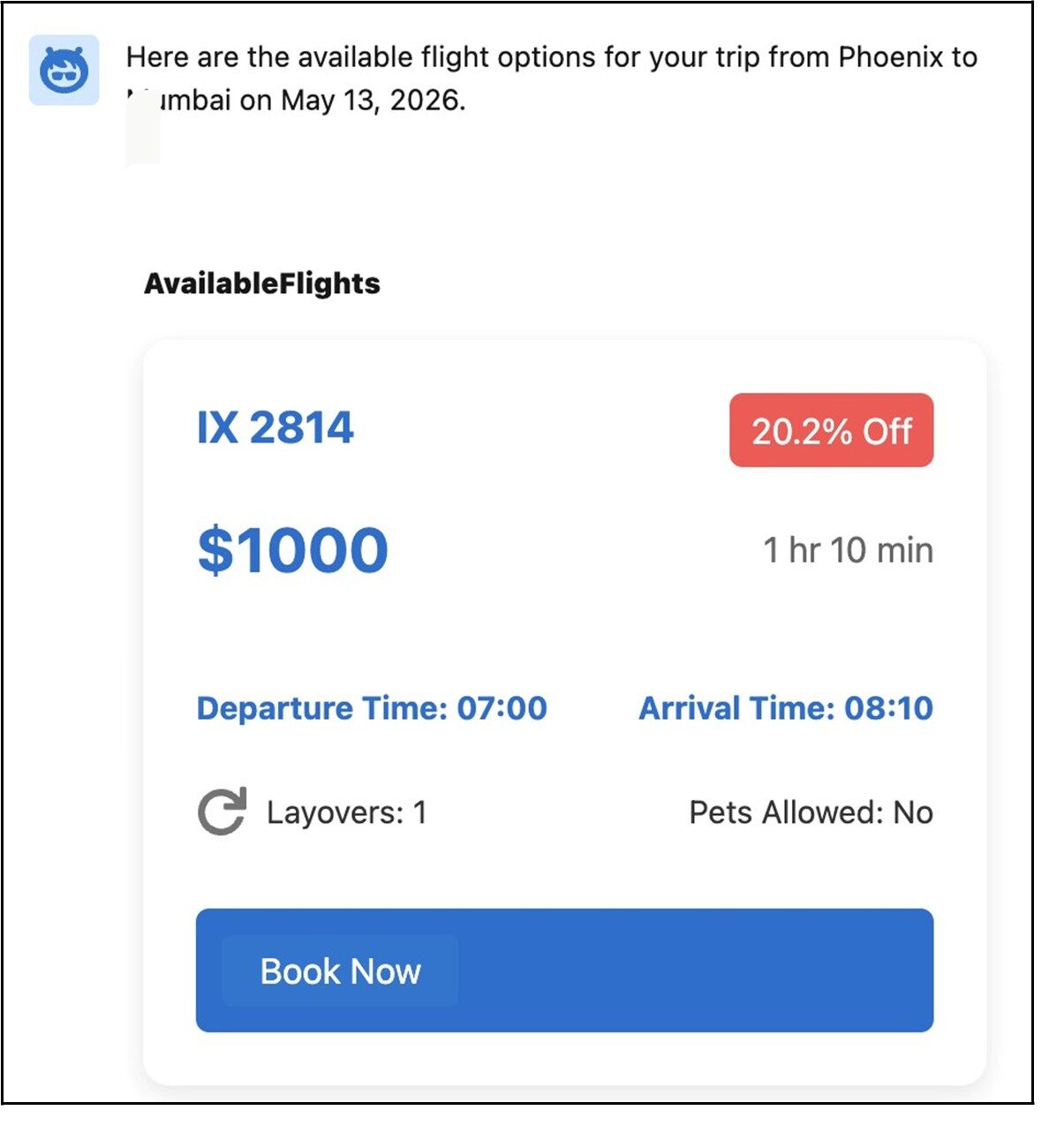
Before executing the agent action that you modified, reload the agent page. The agent prompts you to provide input and then generate the output. The output provides a new UI experience.
This image shows how the custom agent action’s output appears in an agent conversation.
Conclusion
In conclusion, while Agentforce provides a robust foundation for autonomous AI interactions, moving beyond standard text-based responses is essential for delivering a modern, user-friendly experience. By implementing Custom Lightning Types (CLTs) and Lightning Web Components (LWCs), developers can transform agent outputs into visually rich, branded, and interactive interfaces.
Resources: