How to Build Headless AI Agents with Salesforce Agent API

July 08, 2025
3184 Views
How to Build Headless AI Agents with Salesforce Agent API
Summarize this blog post with:

Salesforce Agentforce brings the power of generative AI to businesses by enabling the creation of intelligent, autonomous, and customizable AI agents. These agents are goal-driven and capable of reasoning over business data to execute tasks, helping users work more efficiently within the Salesforce ecosystem and beyond.

At the core of this solution is the Salesforce Agent API , a powerful REST interface that allows these AI agents to operate not only within Salesforce but across external websites, platforms, and custom applications. Businesses can easily integrate Agentforce agents into websites, workflows, and third-party systems without being limited by user interface constraints.

This flexibility allows organizations to automate routine processes, streamline customer interactions, and build connected ecosystems where agents collaborate to solve complex problems. The Salesforce Agent API seamlessly integrates with Salesforce Data Cloud and other Salesforce APIs such as Rest API, Metadata API and Connect API, delivering consistent, real-time AI-powered decision-making across multiple systems.

Developers can also leverage tools like Postman for rapid implementation, while businesses gain scalable automation that adapts to evolving operational needs.
What is the Salesforce Agent API?

The Salesforce Agent API is a REST-based interface that allows external systems and applications to directly interact with Salesforce’s Agentforce AI agents – intelligent, autonomous, goal-driven AI agents that operate on Salesforce data.

Unlike UI-based chatbots or human-agent tools, Agent API supports “headless” AI agents -meaning they can run completely server-side, without a user interface or real-time human input

Key Characteristics of an Salesforce Agent API

Generative AI-powered: Uses large language models and Salesforce Data Cloud to reason over your enterprise data.

Autonomous agents: These agents can independently analyze information, take actions, and drive outcomes aligned to specific business goals.

Headless interaction: Agents can run workflows completely in the background (ex: lead scoring, claims processing, order fulfillment, case routing).

Multi-Agent Orchestration: Developers can design systems where multiple specialized agents collaborate (e.g., one validates identity, another generates a document, another verifies financials).

Salesforce Context-Aware: Agents are natively aware of Salesforce metadata, including objects, fields, flows, business rules, and access permissions. They operate securely within Salesforce’s data security, trust, and compliance frameworks, making them safer and better aligned with enterprise governance compared to generic AI tools.

API-First Design: Everything is accessible programmatically through the REST API, eliminating the need to build custom UI or manually embed LLM models. Salesforce manages model hosting, fine-tuning, data integration, compliance, and security.

Cross-Platform Compatibility: The Agent API can be called from web applications, mobile apps, backend microservices, integration platforms, and middleware orchestration layers, without relying on the Salesforce UI. This flexibility makes it ideal for creating embedded AI services, agent-as-a-service models, backend automations, and industry-specific vertical solutions.

Tabular View of Salesforce Agent API features

Feature Description
Core API Type REST API
Purpose Access Agentforce agents programmatically (headless execution)
Primary Use Cases Backend automation, multi-agent orchestration, headless workflows
Authentication OAuth 2.0 via Connected App
Execution Modes Synchronous (sync) and Streaming (async, Server-Sent Events)
Data Context Salesforce Data Cloud, CRM, metadata, objects, fields
Security Follows Salesforce trust, permission, governance, data residency
Multi-Agent Support Yes – orchestration across multiple specialized agents
Integration Targets Web apps, backend services, middleware, third-party platforms
UI Dependency None (fully headless; UI optional)
Language Model Einstein GPT + LLMs tuned for enterprise data
Tools Provided Postman collection, Flow integration, Apex invocable methods

Agent Real-World Use Cases

As the number of headless agents increases within a system, adopting a multi-agent approach becomes essential. In these systems, multiple independent agents collaborate, each focused on a specific function, to address more sophisticated tasks. To keep everything aligned and working cohesively, an orchestrator agent steps in – managing communication between the agents and ensuring a smooth, consistent experience for users.

Consider patient onboarding as an example. This process could be handled by several dedicated agents across various systems – like one responsible for identity verification, another for insurance validation, and a third for setting up appointments. Together, they help deliver a streamlined and effective onboarding experience.

Industry Use Case Agents Involved
Financial Services Loan Processing Identity verification agent, Credit score agent, Document generation agent
Insurance Claim Automation Policy validation agent, Fraud detection agent, Payout calculation agent
Healthcare Patient Onboarding Identity verification agent, Insurance verification agent, Appointment scheduling agent
Retail / Commerce Order Fulfillment Inventory check agent, Pricing agent, Shipping coordination agent
Support / Service Auto Case Resolution Knowledge article agent, Sentiment analysis agent, Case update agent
HR / Internal Ops Employee Onboarding Background check agent, IT access provisioning agent, Compliance agent

Connecting with Agents via APIs

Salesforce offers two key APIs to work with Agentforce: The Messaging for In-App and Web (MIAW) API and the newer Agent API. Each serves distinct purposes depending on the business need.

The MIAW API, available for several years, was primarily built for “human-in-the-loop” scenarios where user interfaces play a central role — such as customer service chats. It supports conversations across multiple channels like Experience Cloud, custom websites, mobile apps, and more, offering various interaction modes including text, forms, and file sharing. While MIAW provides flexibility for complex interactions and allows seamless handoffs to human agents, its setup is relatively more involved.

In contrast, the Salesforce Agent API is purpose-built for headless, fully autonomous agent interactions. It’s much simpler to configure and provides a streamlined set of operations tailored for programmatic communication with agents, making it ideal for backend or automation-driven use cases.

Also Read

Don’t forget to checkout: Before-Save vs After-Save Flows: What You Need to Know.

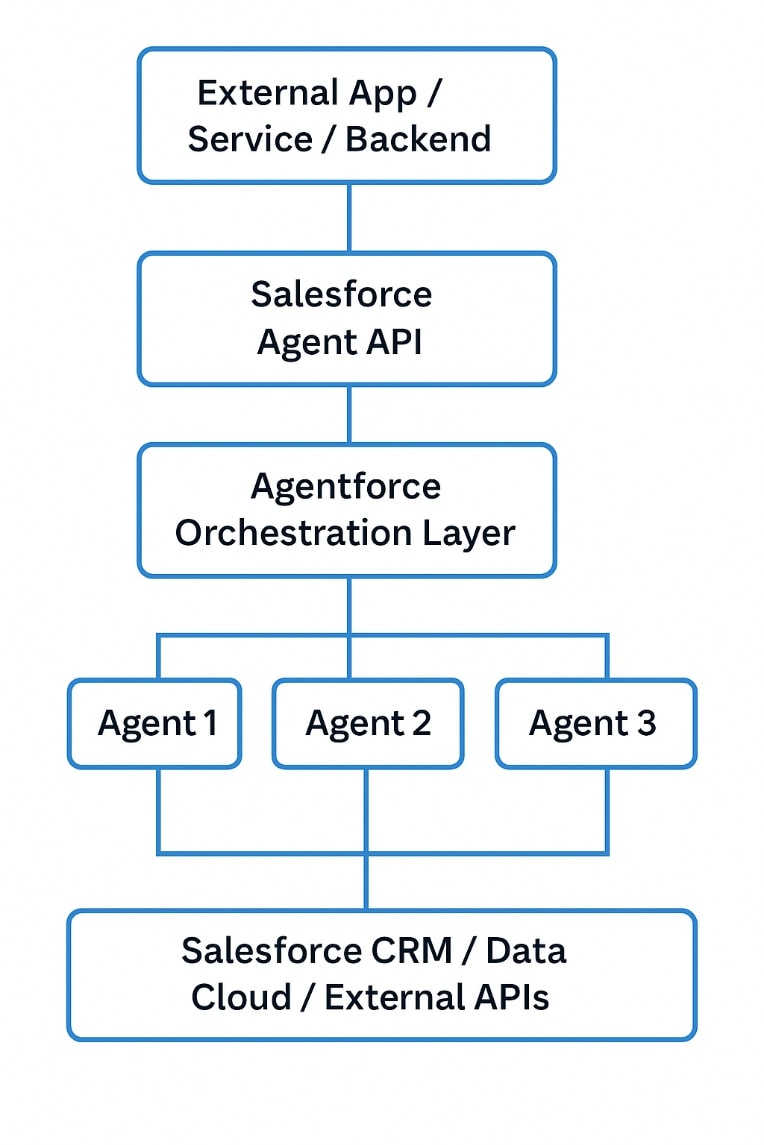
Salesforce Agent API architecture

Agent API architecture

Agent API Architecture – Explanation

External App / Service / Backend

  • Any external system can initiate interaction.
  • Examples: Web portals, mobile apps, backend systems, ERP, middleware, etc.
  • Communicates directly with Salesforce via API calls.

Salesforce Agent API

  • REST-based API interface exposed by Salesforce.
  • Acts as the gateway to access AI agents programmatically.
  • Handles authentication (OAuth), session management, and request processing.
  • Provides synchronous (immediate response) and asynchronous (streaming) interaction options.

Agentforce Orchestration Layer

  • Central layer inside Salesforce Agentforce platform.
  • Manages:
    • Multi-agent workflows.
    • Sequencing and coordination between different specialized agents.
    • Passing data between agents during complex workflows.
  • Orchestrates agents to achieve defined business outcomes.

Agents (Agent 1, Agent 2, Agent 3, etc.)

  • Specialized autonomous agents, each responsible for a specific task.
  • Examples:
    • Agent 1: Identity Verification
    • Agent 2: Credit Scoring
    • Agent 3: Document Generation
  • Agents can call Salesforce objects, invoke business logic, or interact with external APIs as needed.

Salesforce CRM / Data Cloud / External APIs

  • Agents operate on Salesforce data (Sales Cloud, Service Cloud, Data Cloud).
  • Can interact with:
    • Salesforce CRM data (Accounts, Contacts, Opportunities, etc.)
    • Data Cloud for real-time customer profiles.
    • External systems via APIs if additional information is needed.
  • This ensures agents have full enterprise context for accurate decisions.

How to work with the Salesforce Agent API?

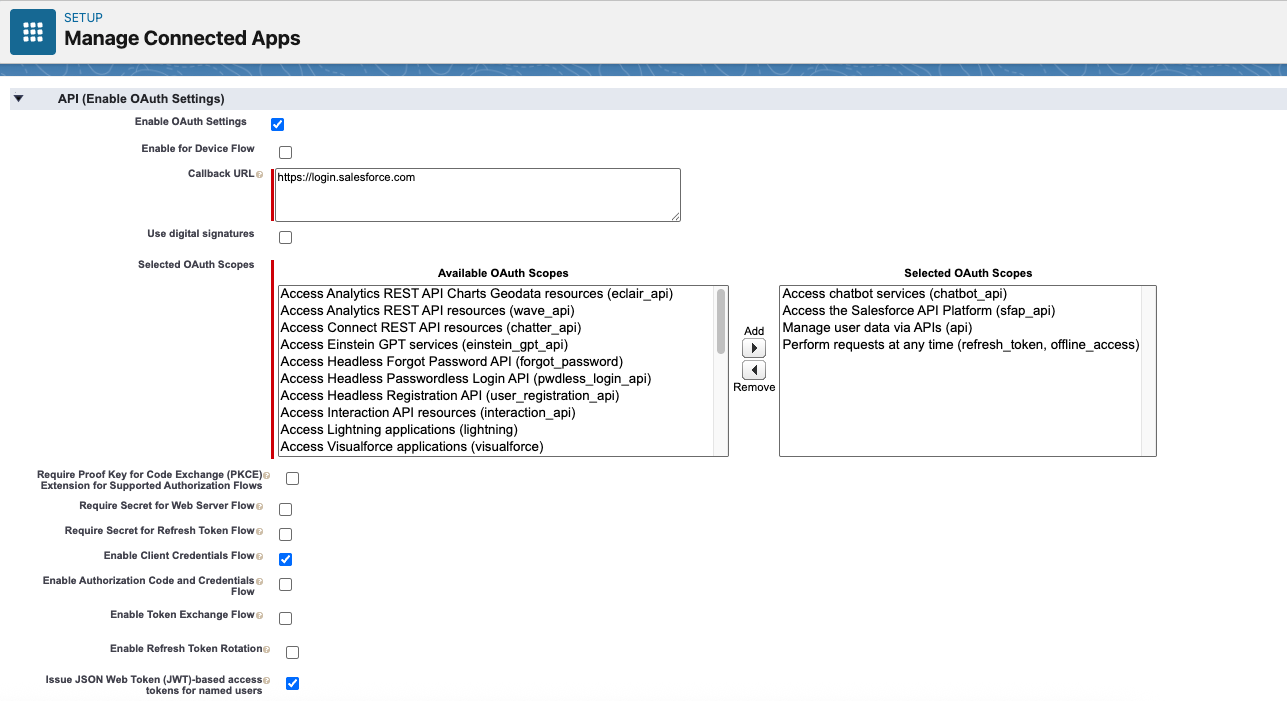
Agent API setup mainly requires two steps (details: https://developer.salesforce.com/docs/einstein/genai/guide/agent-api-get-started.html):

1. Provision a Connected App with the necessary OAuth scopes.
Provision a Connected App

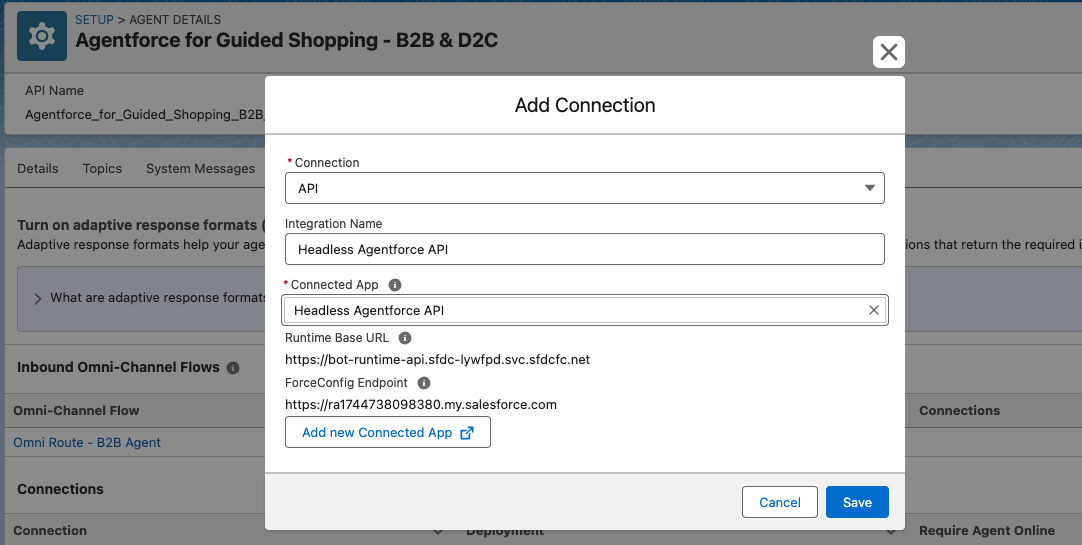
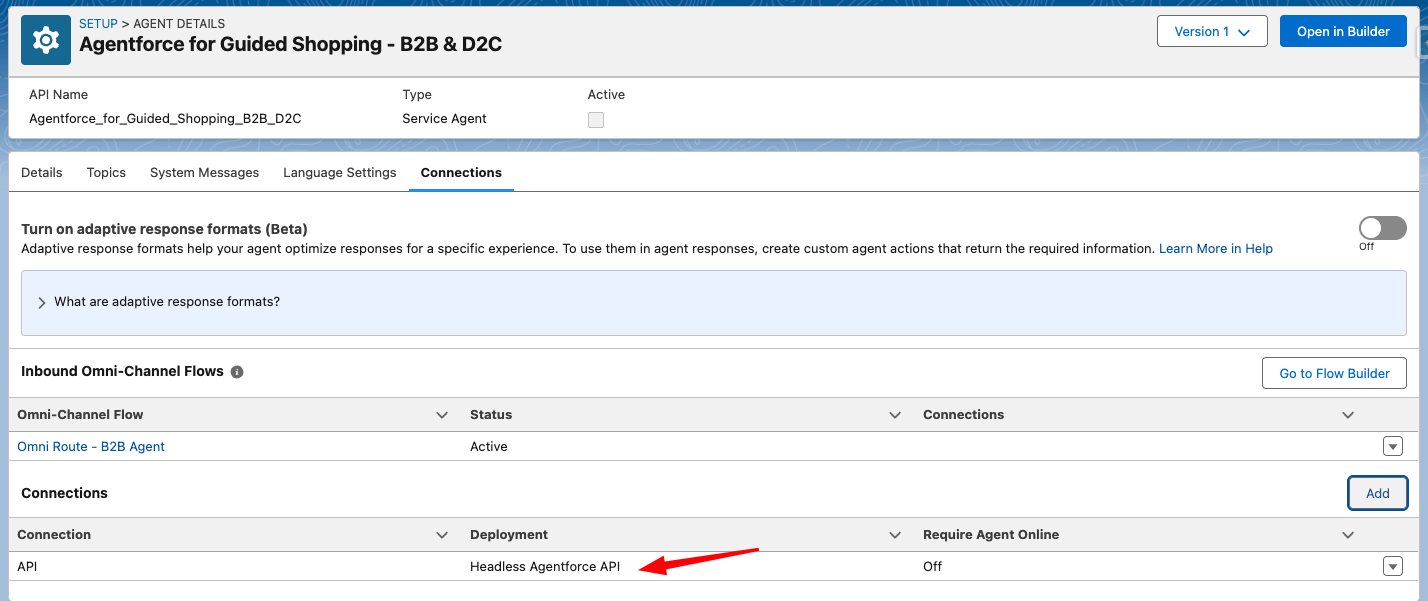
2. Register the Connected App as a connection within the Agent Service configuration.
After configuration, the Agent API endpoints are accessible.

the Connected App as a connection

the Connected App as a connection 2

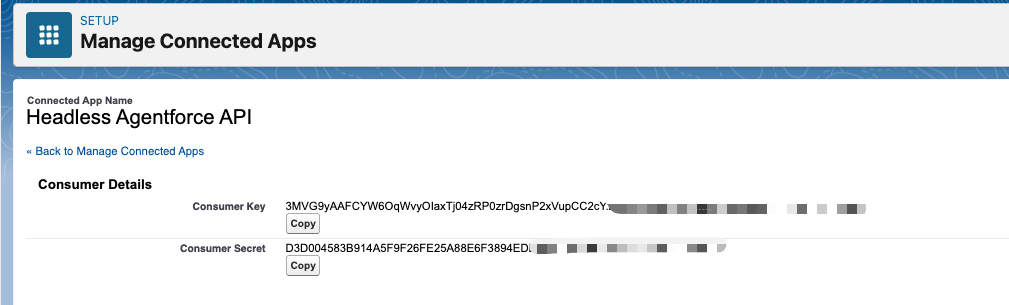
Obtain Credentials:

In Setup > App Manager, locate your connected app, select View, then Manage Consumer Details to copy the Consumer Key and Secret needed for token generation.

Obtain Credentials

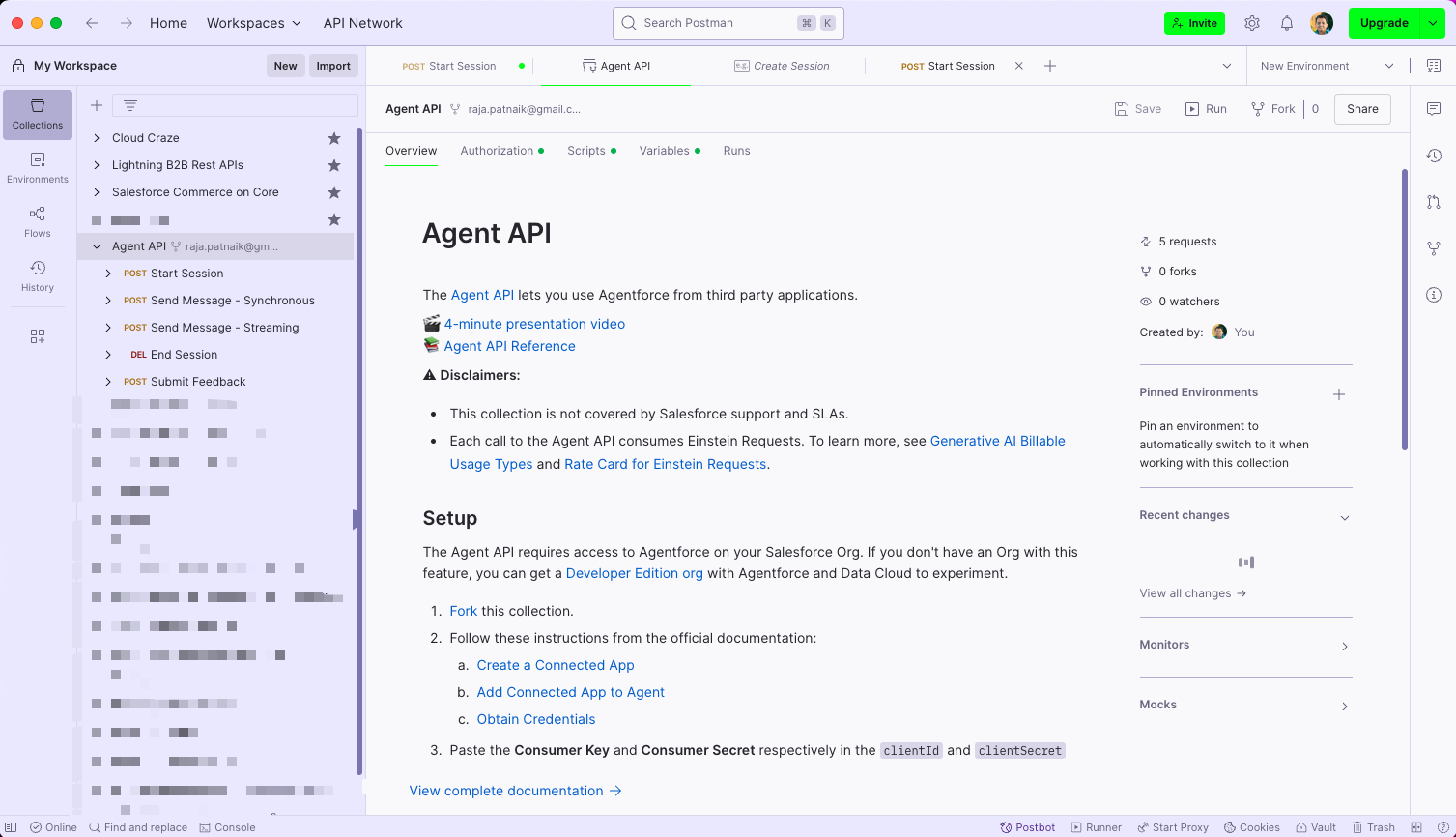
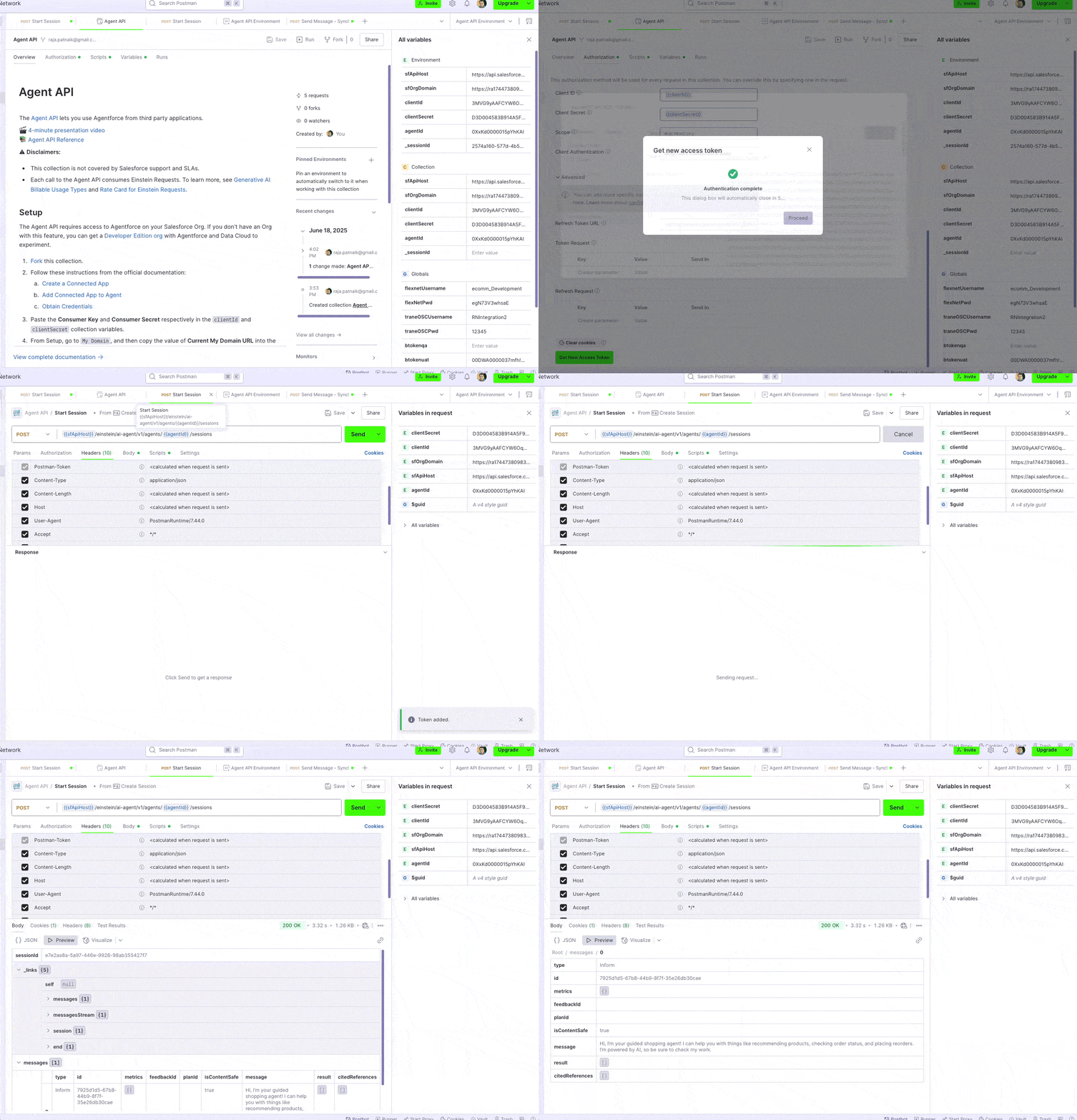
Generate a Token

Utilize the Postman collection to generate a token, which is required for all Agent API requests. To obtain the token, provide your consumer key, consumer secret, and domain name

Generate a Token

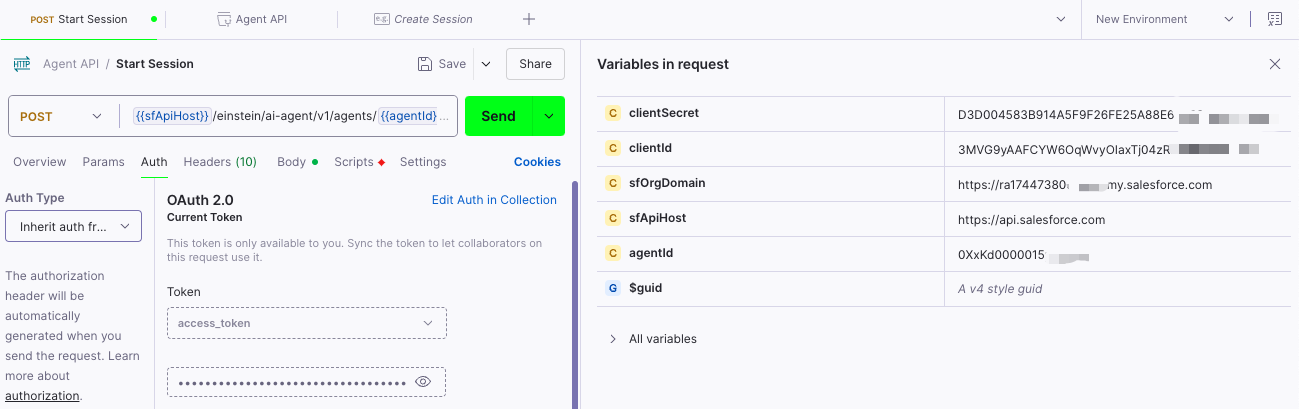
Here are the variables in the request

Here are the variables in the request

MY_DOMAIN_URL:

Go to Setup, search for My Domain, and simply copy the value you see under Current My Domain URL.

CONSUMER_KEY and CONSUMER_SECRET:

You’ll find these in Connected App Manager. Open your connected app, and copy both the Consumer Key and Consumer Secret.

AGENT_ID:

This is the ID of the agent you want to work with. You can get it from the URL when you’re viewing the agent in Setup — just grab the 18-character ID at the end of the URL.

A quick heads-up:

Starting in Summer ’25, you won’t be able to create connected apps from App Manager anymore. Instead, you’ll need to go to Settings under External Client Apps in Setup to create one. But keep in mind — Agent API doesn’t support External Client Apps (ECAs) right now; it only works with regular Connected Apps.

Once you’ve set up the variables, use them to call the Agent API and generate an access token. This token will be used for all subsequent calls to initiate a conversation with the agent.

Agent API does not support External Client Apps

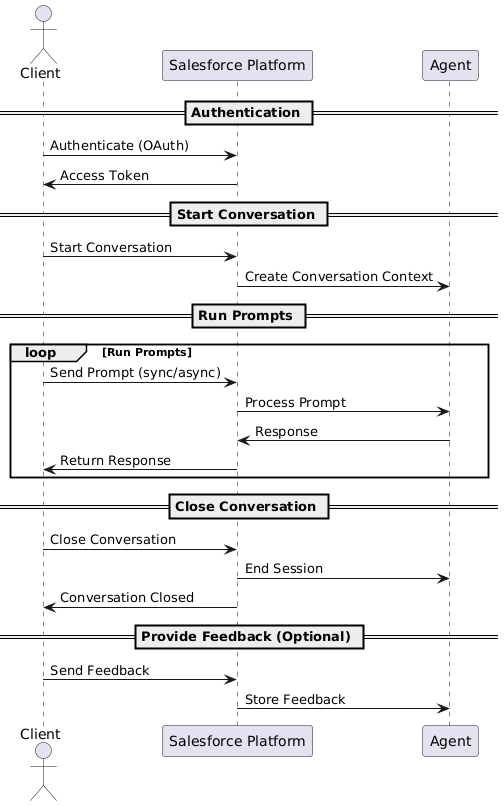
Agentforce Conversation Flow

Agentforce Conversation Flow

Agent API & Testing API Considerations

Category Consideration Details
Agent Type Support Supported Agent Types Not supported for agents of type “Agentforce (Default)”
Usage & Billing Agent API Consumes Flex Credits (see Flex Credits Billable Usage Types)
Testing API Use of generative AI capabilities in both production and sandbox environments consumes Einstein Requests credits and possibly Data Cloud credits (see Generative AI Billable Usage Types)
API Limits API Timeout 120-second timeout; on timeout, returns HTTP 500
Testing API Limits In-Progress Run Limit Maximum 10 concurrent IN-PROGRESS runs
Test Case Limit Maximum 1,000 test cases in an AiEvaluationDefinition
Test Results Variability Test results may change across runs due to continuous service improvements

Additional Approaches for Creating Headless Agents

Beyond the Agent API, Salesforce is making it even easier to build headless agents by introducing support for Flow and Apex.

Trigger a prompt from Flow

With the new AI Agent Actions in Flow, you can easily invoke your AI agent. Simply provide a prompt and an optional session ID, and you’ll receive the agent’s response along with the session ID to use in your Flow. For more details, refer to the documentation linked in the reference section.

Trigger a prompt from Apex

Prefer Apex? You can easily invoke the agent directly from your code using Salesforce’s auto-generated generateAiAgentResponse invocable method. For more details, refer to the documentation linked in the reference section.

Resources

How useful was this post?

Click on a star to rate it!

Average rating 5 / 5. Vote count: 2

No votes so far! Be the first to rate this post.

Written by

Raja Patnaik

With over a decade of experience in Salesforce, I specialize in crafting smart solutions for industries like real estate, healthcare, banking, and payments. As director of Technology Architecture at RafterOne, I help businesses grow and streamline operations by building powerful B2B Commerce solutions on Salesforce. I’m passionate about turning ideas into reality—from gathering business needs to designing, developing, and launching solutions that create real value. I’ve had the opportunity to lead projects integrating tax, shipping, and payment systems into e-commerce platforms, improving workflows and customer experiences. A highlight of my work has been automating CPQ and billing processes using the Lightning B2B Store. I'm also honored to serve on the Salesforce B2B Commerce Partner Advisory Board, contributing to the evolution of future products. I love learning and staying ahead of the curve, focusing on solving complex problems and driving meaningful results for businesses.

Get the latest tips, news, updates, advice, inspiration, and more….

Contributor of the month
contributor
Mykyta Lovygin

SFCC Developer | SFCC Technical Architect | Salesforce Consultant | Salesforce Developer | Salesforce Architect |

...
Categories
...
Boost Your Brand's Visibility

Want to promote your products/services in front of more customers?

...

Leave a Reply

Your email address will not be published. Required fields are marked *