A Comprehensive Guide to Speeding Up Salesforce Code Reviews with AI

March 19, 2026
283 Views
A Comprehensive Guide to Speeding Up Salesforce Code Reviews with AI
Summarize this blog post with:

Waiting for a pull request review has become a daily part of life for most dev teams. In Salesforce projects, it becomes even more painful due to the complexity and high degree of customization of the environment.

This is where code reviews using AI help streamline the process, reducing delays and improving overall efficiency.

What normally should be a quick check sometimes becomes a long line of pull requests waiting for a senior developer to pull the trigger. Multiple sandboxes, managed packages, integrations, and custom automations all add extra layers of complexity.

At some point our own team had an experience where the number of open PRs was greater than that of closed ones. Everyone were busy developing features and fixing bugs, but the reviews were slowly becoming the hidden bottleneck.

Even the team was following good Lightning Web Components (LWC) conventions and structured Apex code with appropriate documentation, but time was not on the side of senior engineers to review everything fast enough.

It was at this point where AI-assisted code reviews started to be considered. Not to replace human reviewers, but to help them handle their workload so the review process would flow without any issues.

Why Code Reviews Become Slow in Salesforce Projects?

Code reviews are good for quality, but harder than you think in a Salesforce environment.

Several factors make the review process slower:

1. Platform complexity

Salesforce development often includes different components such as:

Reviewers often need to move between these different layers, which slows down the process.

2. Critical business logic

A small change in a trigger or flow can impact important business processes like:

  • revenue recognition
  • integrations with external systems
  • data synchronization

Because of this, reviewers must carefully check every modification.

3. Long review cycles

Files such as metadata configurations and test classes can contain large XML structures. Reviewing these files line by line requires time and attention.

4. Reviewer fatigue

Senior developers frequently repeat the same feedback related to:

  • naming conventions
  • code formatting
  • best practices like bulkification

These repetitive checks consume valuable time.

In many teams that use GitHub or Azure DevOps the entire review process is manual. Even if you write checklists and documentation, most of the work is still about looking for common pitfalls.

This is where AI begins to play an important role.

How AI Is Changing the Code Review Process?

AI is already helping with many parts of software development such as writing code, creating documentation and even recommending improvements.

Now the same technology is helping improve code reviews.

AI-powered tools look at pull requests and give you feedback in seconds. No more having to wait for a reviewer to pick up on every little detail. You get suggestions immediately after you push your changes.

Some of the common things AI tools can identify include:

  • potential security issues
  • inefficient logic or queries
  • missing null checks
  • complex or duplicated code
  • patterns that might lead to governor limit problems

Because of this early feedback, developers can fix many issues before a human reviewer even looks at the pull request.

AI reviews also help bring consistency to the process. Human reviews may vary depending on workload or availability, but AI tools apply the same standards every time.

Another advantage is that many tools provide explanations with their comments. This means that developers are able to fix bugs quicker, and to code better in the process.

Obviously AI can’t be perfect. It sometimes will tell you code is wrong when it’s technically correct or misinterpret logic that isn’t there for business reasons. However, when combined with human review, it works like an additional reviewer that performs the first pass automatically.

Popular Tools That Support AI-Based Code Reviews

A variety of tools now help development teams improve their review process.

Some platforms are focused around code quality and static analysis. For example, SonarQube is looking for bugs, security vulnerabilities and maintenability leaks in your code.

And in the GitHub ecosystem, you have tools like GitHub Copilot which can provide suggestions and summaries to help developers understand pull requests.

Some of the many more modern AI-based review tools in use today include:

  • Codacy
  • DeepSource
  • CodeRabbit
  • CodeScene
  • Qodo

Pull Requests are scanned automatically by these platforms for security, quality, performance or code complexity issues.

Because a lot of them have free tiers or free trials, teams are able to try packages and pick the ones that make sense.

Using Qodo and CodeScene in Salesforce Development

The insights shared here are based on practical experience using these tools during Salesforce projects and are not part of any sponsorship or promotion.

Among the tools tested, Qodo and CodeScene proved to be particularly useful.

Qodo works with your GitHub workflow and automatically scans pull requests with Apex, Lightning Web Components or SOQL queries, detecting problems with readability, risky patterns, and other potential improvements.

With proper configuration, it can also detect Salesforce-specific problems such as missing null checks. In many cases, it acts like an AI co-reviewer that gives early suggestions before the final human review.

CodeScene suits Azure DevOps teams The tool analyzes trend patterns of development and which areas suffer from growing technical debt instead of a single pull request.

By tracking code changes over time, it helps teams understand which modules are becoming harder to maintain.

Getting Started With Qodo in GitHub

For teams that are interested in trying out AI code reviews, Qodo has a free plan to enable easy sign-up.

The setup process usually involves a few simple steps,

  • Create an account on the Qodo platform
  • Open the Qodo Git plugin page
  • Click the Configure option
  • Select the GitHub organization or account
  • Choose the repositories where reviews should run

After installation, GitHub shows a confirmation message and the integration becomes active.From that moment onward, Qodo automatically analyzes pull requests in the selected repositories and adds review comments when necessary.

What an AI-Assisted Review Workflow Looks Like?

When you use AI tools in the development cycle the process becomes much easier.

This is a normal process, it looks something like this:

  • A developer commits to a feature branch
  • A pull request is created in GitHub
  • The AI review tool automatically scans the changes
  • The tool checks areas such as:
    • Apex and LWC best practices
    • Query performance
    • Code readability and complexity
    • Potential governor limit risks
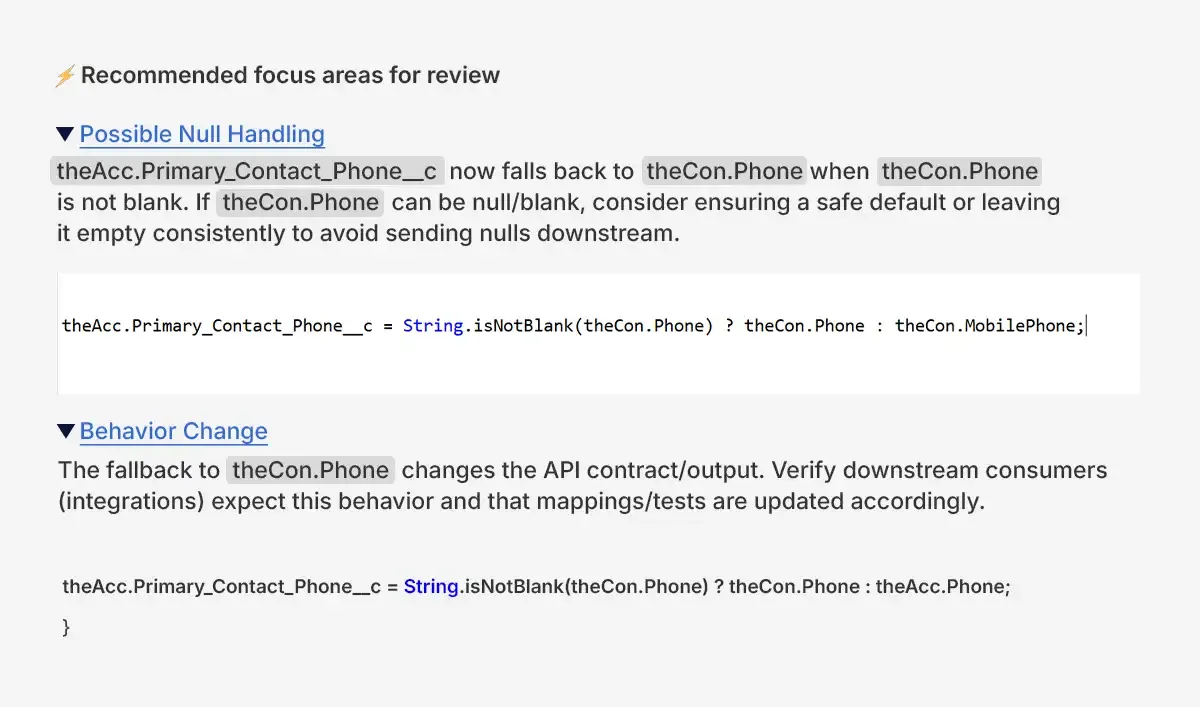
  • Comments and suggestions are posted directly inside the pull request
picture 1

Sometimes the tool also highlights things like duplicated code, complex methods, or missing null checks. If a new developer tries to make changes to the code, they can instantly fix these minor issues.

once a senior engineer reviews the PR, most of these minor issues have already been fixed.

Understanding the Benefits and Limitations of AI Reviews

There are many benefits to AI assisted reviews for development teams.

They get faster feedback, and can fix problems earlier in the development process. They get consistent feedback, because the rules used to review pull requests are the same for every pull request. So another advantage is that senior developers have less time for fixing the same basic problems and more time for the architecture and business logic.

But it’s not perfect. Even correct code could be called an issue, it’s going to need adjustment to conform to a team’s coding conventions, and more than anything it doesn’t see the contextual business framing. This means there will almost always be a need for a human reviewer.

That’s why the best solution is a dual approach. The robot does the structure checks and all repetitive work while the human is concentrating on more detailed design and logical decisions.

Final Thoughts

AI code reviews help developers, they don’t replace them.

CodeScene and Qodo in Salesforce projects can help to cut down on review latency and add consistency across teams.

One practical starting point for these tools is to run AI reviews in parallel with manual reviews. Over time, teams frequently find they’ll make fewer duplicate comments, approve pull-requests more quickly, and spend more time actually creating useful features.

Code reviews will always remain an important part of Salesforce development. The difference now is that AI allows teams to perform them faster and with less friction, helping developers spend more time delivering solutions that create real business value.

How useful was this post?

Click on a star to rate it!

Average rating 5 / 5. Vote count: 1

No votes so far! Be the first to rate this post.

Written by

Dev Anand

A dynamic engineer, innovative thinker, initiative taker and multi technology professional with exceptional logical, analytical and management skills possess a decade experience in Software Development and Salesforce CRM Solutioning. Enrich experience in converting business needs to Salesforce Experience. Worked on multiple RFPs and POCs. 50+ Integrations between Salesforce and other Platforms. Experience in LWC, Aura, Apex, JS, HTML, PHP, WordPress, Magento and many others.

Get the latest tips, news, updates, advice, inspiration, and more….

Contributor of the month
contributor
Mykyta Lovygin

SFCC Developer | SFCC Technical Architect | Salesforce Consultant | Salesforce Developer | Salesforce Architect |

...
Categories
...
Boost Your Brand's Visibility

Want to promote your products/services in front of more customers?

...

Leave a Reply

Your email address will not be published. Required fields are marked *