Introduction to Salesforce Agent Script: Build Predictable AI Agents

December 19, 2025
1389 Views
Introduction to Salesforce Agent Script: Build Predictable AI Agents
Summarize this blog post with:

As artificial intelligence becomes central to business automation and customer engagement, one challenge stands out: how do you keep AI agents predictable and aligned with your processes? Relying solely on large language models (LLMs) can lead to inconsistent behavior, making it hard to enforce business rules.

Agent Script solves this problem. It’s a declarative scripting language in Salesforce Agentforce that gives you precise control over how your agents think, respond, and act. Instead of leaving everything to an LLM, Agent Script lets you define clear logic, structured workflows, and topic transitions – ensuring your agents behave consistently and deliver reliable outcomes.

With Agent Script, you can:

  • Set rules and conditions using simple if/else logic.
  • Guide conversations by defining when and how topics change.
  • Trigger actions in sequence for predictable workflows.
  • Reference variables and outputs easily using intuitive syntax.

This combination of natural language readability and structured logic makes Agent Script a must-have skill for anyone building intelligent, business-aligned workflows in Salesforce. In the sections ahead, we’ll explore what Agent Script is, how it works, and why it’s transforming the way teams design AI-powered experiences.
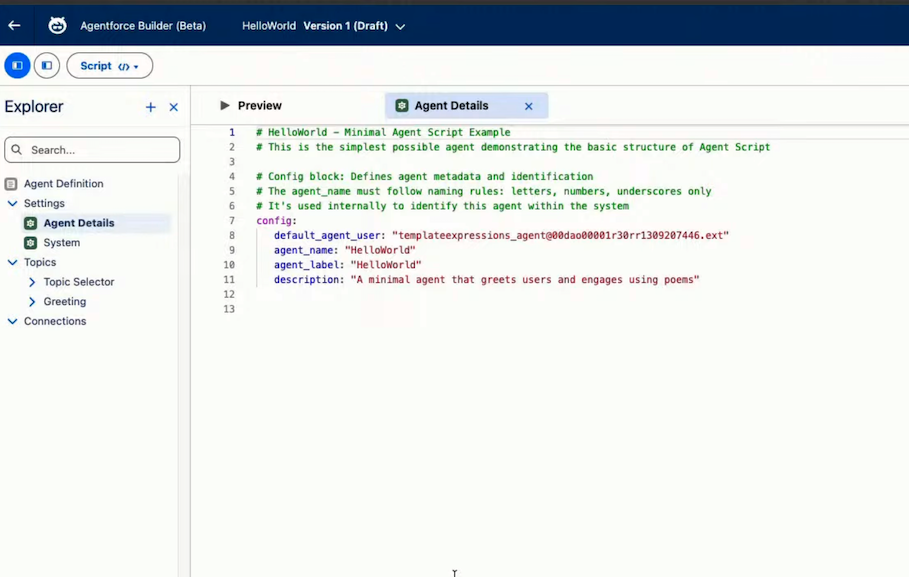
image1

What is Salesforce Agent Script?

Agent Script is the language you use to build smart, reliable agents in Agentforce Builder. It blends the ease of natural language with the structure of logic-based expressions. With Agent Script, you can set up clear rules like if/else conditions, define how an agent should move between topics, update or compare variables, and decide which actions to run.

It introduces a “hybrid reasoning” approach that blends the creative flexibility of Large Language Models (LLMs) with the precision of structured business logic. This makes your agent predictable and context-aware instead of relying only on an LLM to interpret everything. For example, you can decide exactly when the agent should switch topics or run a series of actions in a specific order. This level of control helps you create smoother, more consistent workflows that align with real business processes.

image2

Core Features of the Agent Script Language

Agent Script is a specialized language built by Salesforce for defining how agents behave in Agentforce. It combines both declarative and procedural elements so you can express what an agent should do and how it should do it, step by step. When you save your script, it’s compiled into metadata that the reasoning engine uses to run the agent. The language is designed to be readable, even for non-developers, and relies on structured blocks and indentation to show relationships.

  1. Syntax Basics

    Agent Script uses a clean, indentation-based structure that makes it easy to read and follow. Instead of complex brackets or heavy code formatting, the language relies on clear line breaks and hierarchy to show how logic is organized. This keeps scripts approachable for both technical and non-technical users while still supporting powerful workflows.

  2. How Expressions Work

    Expressions are the building blocks of Agent Script. You use them to compare values, check conditions, assign variables, and guide the agent’s decisions. Whether you’re defining a simple true/false branch or handling more detailed logic, expressions give you direct control over how the agent responds in different situations.

  3. Using Topics, Actions, and Variables

    Agent Script makes it easy to reference important elements in your agent using the @ symbol. You can point to variables, topics, and actions without writing long code. This keeps scripts concise and ensures your agent always works with the right data and workflow elements.

  4. Structuring Multi-Step Logic

    The language supports clear step-by-step instructions, allowing you to define how tasks should run in sequence. You can chain actions, guide transitions between topics, and outline entire workflows in a way that is both predictable and flexible. This structure helps you design agents that perform consistently across different scenarios.

  5. Built-In Readability Features

    Agent Script includes small but helpful features – like using pipes (|) for multiline text and arrows (->) to express flow or mapping. These visual cues make scripts easier to scan, debug, and maintain as your agent grows more advanced.

Accessing Agent Resources with the @ Symbol

Agent Script uses the @ symbol to quickly reference key elements in your agent -such as actions, topics, variables, and outputs – without writing long or complex expressions. This keeps your script clean and readable while making it easy to connect logic to the right resources. You simply point to what you need by using the appropriate prefix:

  • @actions. → points to an action you’ve defined
  • @topic. → references a topic
  • @variables. → accesses a stored variable
  • @outputs. → retrieves the output of an action

This pattern creates a consistent and intuitive way to work with your agent’s building blocks, helping you move faster and avoid errors.

Property-Based Structure in Agent Script

Agent Script is organized around a property-based format where each line follows a key: value pattern. The key always appears before the colon, and the value comes after it. description: “Get account info”

Indentation and Formatting in Agent Script

Agent Script uses indentation to define structure, so formatting must stay consistent. You can use either two spaces or a tab, but you must choose one style and apply it throughout the script to avoid errors. Indentation shows which values belong to a property, and the arrow symbol (->) is used to introduce logic steps. For multiline messages, the pipe (|) lets you write text across several lines or switch into a prompt-style instruction within your logic

Using Expressions in Agent Script

Agent Script lets you add simple logic to your workflows using familiar expressions. You can control decisions with if and else, do basic math with + and -, and compare values using ==, !=, >, and <.
It also supports checking for empty or missing data with is None and is not None. These tools help your agent respond correctly based on the information it receives.

Comments to Help Humans

Agent Script lets you add comments using the # symbol. Anything written after # on the same line is ignored during execution. This is an easy way to document your logic, explain decisions, and help others understand the script when they read or update it later.

Agent Script Blocks

Agent Script organizes logic into blocks, each serving a specific purpose in defining how your agent behaves. At a high level, blocks group related settings, data, and procedures to make scripts clear and modular. Core Block Types

  • system — Contains general instructions and key messages the agent uses in standard situations (for example, welcome text or error responses).
  • config — Holds basic agent settings such as the agent’s label, developer name, and default user.
  • variables — Lists all global variables available in the script. Use these throughout your logic with the @variables. syntax.
  • language — Specifies the languages the agent supports.
  • connection — Defines how your agent communicates with external systems or integrations.
Topic Blocks
  • topic — Central to your agent’s behavior, a topic block defines the instructions, logic, and actions for handling a specific class of user requests. It includes:
    • A name (in snake_case) and a descriptive purpose. snake_case uses underscores to separate lowercase words (e.g., user_name).
    • reasoning instructions that guide the agent’s decision-making.
    • A list of actions the agent can perform when this topic is active.
  • start_agent — A special topic that runs first for every conversation and typically routes control to other topics as needed.

Each block type makes scripts easier to structure and understand, helping you define both data and behavior in a clear, maintainable way.

Agent Script Flow of Control

Agent Script follows a simple, predictable execution order:
  • start_agent runs first to set up variables and decide which topic should handle the request.
  • The selected topic executes top-to-bottom, processing instructions, logic, and actions.
  • If a transition is triggered, the script immediately moves to the new topic and continues there.
  • After a topic finishes, the agent waits for the next user message and then returns to start_agent for the next cycle.

This flow keeps conversations consistent and easy to manage.

Agent Script Example

Appointment Scheduling Topic (Agent Script vs. Natural Language Instructions)

Before Agent Script, we just used plain text to tell agents what to do. It was easy to set up, but it didn’t give developers enough fine-grained control over the actual steps the agent took.

New Approach – Agent Script

topic schedule_appointment:description: “Helps users book, reschedule, or cancel service appointments”

reasoning_instructions:

>>

Confirm the type of appointment (service, consultation, or follow-up).

Validate user availability and preferred time slots.Call {@action.Check_Availability} with {@variable.requested_date} and {@variable.requested_time}.

If slots are available, proceed with {@action.Book_Appointment}.

If no slots are available, suggest alternative dates and times.Gather missing details
such as location, service type, and contact information.

reasoning_actions:

@action.Check_Availability
with date=@variable.requested_date
with time=@variable.requested_time
set @variable.available_slots = @result.slots

@action.Book_Appointment
with slot=@variable.selected_slot
set @variable.confirmation_id = @result.confirmation_id

@utils.transition to @topic.reschedule_appointment as reschedule
description: “Handle rescheduling requests if user changes their mind.”

Existing Way – Natural Language
  • Assist the user in booking or rescheduling an appointment.
  • First, confirm the type of appointment and preferred date/time.
  • Check availability for the requested slot.
  • If available, book the appointment and provide a confirmation ID.
  • If not available, suggest alternative options.
  • Collect any missing details like location or service type.

Conclusion

As AI becomes an integral part of business operations, predictability and control are essential for delivering consistent customer experiences. Salesforce Agent Script addresses this need by combining the flexibility of natural language with the precision of structured logic. Its hybrid reasoning approach ensures agents can handle complex workflows while remaining conversational and adaptive. By leveraging clear syntax, topic-based organization, and intuitive references, teams can design intelligent agents that align with business rules and deliver reliable outcomes.

How useful was this post?

Click on a star to rate it!

Average rating 5 / 5. Vote count: 1

No votes so far! Be the first to rate this post.

Written by

Raja Patnaik

With over a decade of experience in Salesforce, I specialize in crafting smart solutions for industries like real estate, healthcare, banking, and payments. As director of Technology Architecture at RafterOne, I help businesses grow and streamline operations by building powerful B2B Commerce solutions on Salesforce. I’m passionate about turning ideas into reality—from gathering business needs to designing, developing, and launching solutions that create real value. I’ve had the opportunity to lead projects integrating tax, shipping, and payment systems into e-commerce platforms, improving workflows and customer experiences. A highlight of my work has been automating CPQ and billing processes using the Lightning B2B Store. I'm also honored to serve on the Salesforce B2B Commerce Partner Advisory Board, contributing to the evolution of future products. I love learning and staying ahead of the curve, focusing on solving complex problems and driving meaningful results for businesses.

Get the latest tips, news, updates, advice, inspiration, and more….

Contributor of the month
contributor
Mykyta Lovygin

SFCC Developer | SFCC Technical Architect | Salesforce Consultant | Salesforce Developer | Salesforce Architect |

...
Categories
...
Boost Your Brand's Visibility

Want to promote your products/services in front of more customers?

...

Leave a Reply

Your email address will not be published. Required fields are marked *