How to Use Combobox in LWC: Step-by-Step Guide

June 04, 2025
2124 Views
How to Use Combobox in LWC: Step-by-Step Guide
Summarize this blog post with:

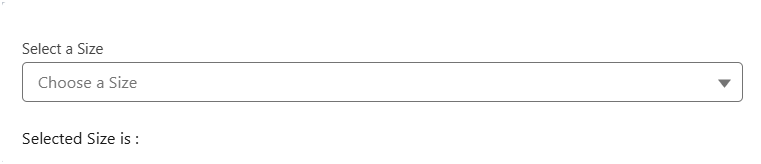
The Lightning Combobox is one of the most versatile and commonly used components in Lightning Web Components (LWC). It provides users with a dropdown interface to select from predefined options, making forms more user-friendly and data entry more consistent.

In this post, we’ll walk through how to use the lightning-combobox in LWC with a simple example.

What is a Lightning Combobox?

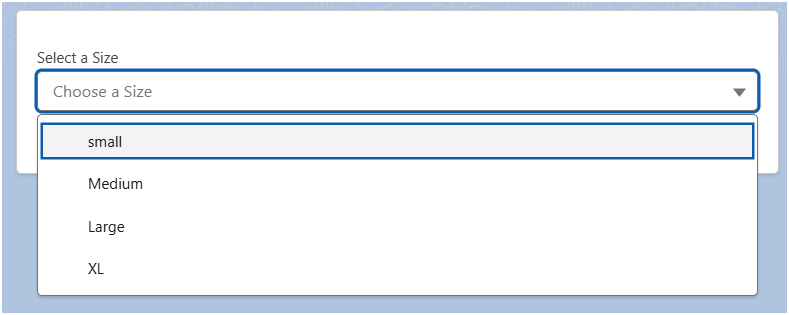
A Lightning Combobox is a form input component that displays a dropdown list of selectable options. It combines the functionality of a text input with a dropdown menu, allowing users to either select from predefined options or, in some cases, enter custom values.

Basic Combobox Implementation

Let’s start with a simple example to understand the fundamental structure of a combobox in LWC.

HTML Template (BasicCombobox.html)

<template>
    <lightning-card>
        <div class="slds-p-horizontal_medium">
            <lightning-combobox
                name="Size"
                label="Select a Size"
                value={selectedsizeValue}
                placeholder="Choose a Size"
                options={AvailableSizeOptions}
                onchange={handleChange}>
            </lightning-combobox>
            
            <div class="slds-p-top_medium">
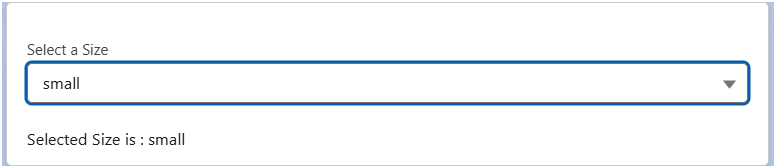
                <p>Selected Size is : {selectedsizeValue}</p>
            </div>
        </div>
    </lightning-card>
</template>

basicCombobox.js

import { LightningElement } from 'lwc';

export default class BasicCombobox extends LightningElement {
    selectedsizeValue = '';
    
    AvailableSizeOptions = [
        { label: 'small', value: 'small' },
        { label: 'Medium', value: 'Medium' },
        { label: 'Large', value: 'Large' },
        { label: 'XL', value: 'XL' }
    ];

    handleChange(event) {
        this.selectedsizeValue = event.detail.value;
        console.log('Selected value:', this.selectedsizeValue);
    }
}

Meta-XML file

<?xml version="1.0" encoding="UTF-8"?>
<LightningComponentBundle xmlns="http://soap.sforce.com/2006/04/metadata">
    <apiVersion>60.0</apiVersion>
    <isExposed>true</isExposed>
    <targets>
        <target>lightning__AppPage</target>
        <target>lightning__RecordPage</target>
        <target>lightning__HomePage</target>
    </targets>
</LightningComponentBundle>
Meta XML file
Meta XML file 2
Meta XML file 3

How to create combobox using apex.

Here’s an example that demonstrates loading options dynamically from an Apex controller:

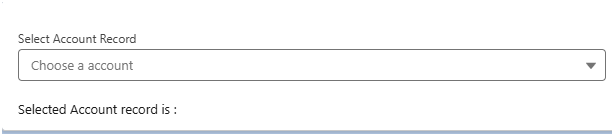
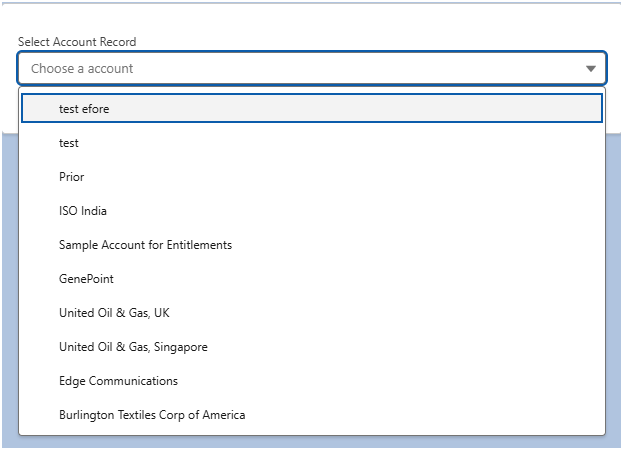
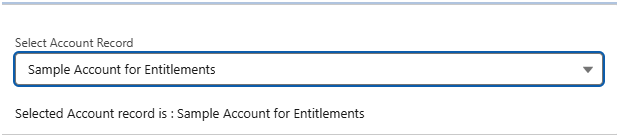
Example: I want to show list of account records as combobox.

Apex Class :

public with sharing class getAccountRecord {
    @AuraEnabled(cacheable=true)
    public static List<Account> getAccountrecordforcombobox() {
        return [
            SELECT Id, Name
            FROM Account
            LIMIT 10
        ];
    }
}

accountRecordAsCombobox.html

<template>
    <lightning-card>
        <div class="slds-p-horizontal_medium">
            <lightning-combobox
                name="Account Record"
                label="Select Account Record"
                value={ temporaryValue}
                placeholder="Choose a account"
                options={accountOptions}
                onchange={handleChange}>
            </lightning-combobox>
            
            <div class="slds-p-top_medium">
                <p>Selected Account record is : {selectedValue}</p>
            </div>
        </div>
    </lightning-card>
</template>

accountRecordAsCombobox.JS

import { LightningElement, track, wire } from 'lwc';
import getAccountRecordOptions from '@salesforce/apex/getAccountRecord.getAccountrecordforcombobox';

export default class AccountRecordAsCombobox extends LightningElement {
    @track accountOptions = [];
    @wire(getAccountRecordOptions)
    error;
    selectedValue;
    temporaryValue;

    @wire(getAccountRecordOptions)
    wiredAccounts({ error, data }) {
        if (data) {
            this.accountOptions = data.map(account => ({
                label: account.Name,
                value: account.Id
            }));
            this.error = undefined;
        } else if (error) {
            this.error = error;
            this.accountOptions = [];
        }
    }

    handleChange(event) {
        this.temporaryValue = event.detail.value;

        // Find the selected account option
        const selected = this.accountOptions.find(
            option => option.value === this.temporaryValue
        );

        console.log('selected', selected);
        this.selectedValue = selected ? selected.label : '';

        console.log('Selected Value:', this.selectedValue);
        console.log('Selected Label:', this.selectedLabel);
    }
}

AccountRecordAsComboboxMeta-xml

<?xml version="1.0" encoding="UTF-8"?>
<LightningComponentBundle xmlns="http://soap.sforce.com/2006/04/metadata">
    <apiVersion>63.0</apiVersion>
    <isExposed>true</isExposed>
    <targets>
        <target>lightning__AppPage</target>
        <target>lightning__RecordPage</target>
        <target>lightning__HomePage</target>
    </targets>
</LightningComponentBundle>

In the above example I have queried limited number of account records then added all those result in collection variable in apex then passed in to JS and stored in array. Then used array to show the option as combobox.

AccountRecord 1
AccountRecord 2
AccountRecord 3

Validation and Error Handling

One of the most important aspects of creating user-friendly forms is ensuring data integrity through proper validation. The Lightning Combobox component comes with built-in client-side validation features that make it easy to enforce required selections and provide meaningful feedback to users.

We can make combobox as required. When you add this attribute, the component automatically prevents form submission if no option is selected and displays a clear error message to the user.

<lightning-combobox
    name="Account Record"
    label="Select Account Record"
    value={selectedValue}
    placeholder="Choose a account"
    options={accountOptions}
    required
    onchange={handleChange}>
</lightning-combobox>

And To check the validity states of an input, use the validity attribute, which is based on the ValidityState object. You can access the validity states in your Javascript. This validity attribute returns an object with Boolean attributes.

Also Read

Don’t forget to checkout: Salesforce Agentforce Prompt Engineering: Masterclass Guide.

Conclusion

Using a lightning-combobox in LWC is straightforward yet powerful. From static options to Apex-driven dynamic lists, it can be adapted to fit almost any form-related requirement in Salesforce apps.

Related Links :
  1. lightning-combobox – example
  2. Style Components Using Lightning Design System Styling Hooks

How useful was this post?

Click on a star to rate it!

Average rating 5 / 5. Vote count: 1

No votes so far! Be the first to rate this post.

Written by

Mithun Naik

Hi there! 👋 I'm Mithun. I'm a software engineer with over 4.5 years of experience, currently working at Shell India. I have experience working as a Salesforce Developer. With good hands-on knowledge on Apex Programming, Lightning Flows, Aura Component, LWC, and Salesforce Configuration. Graduated B.E in computer science & engineering in 2019 and started a career in Salesforce Industry. Additionally, I enjoy writing articles about Salesforce in my free time. I also love to travel and play video games in my free time.

Get the latest tips, news, updates, advice, inspiration, and more….

Contributor of the month
contributor
Antonina Kharchenko

Technical Writer, Salesforce Admin at SFApps.info

...
Categories
...
Boost Your Brand's Visibility

Want to promote your products/services in front of more customers?

...

Leave a Reply

Your email address will not be published. Required fields are marked *